Expect $10,000–$150,000: 2026 App Costs for Founders (+AI Calculator)
Expect $10,000–$150,000: 2026 App Costs for Founders (+AI Calculator) ! Founder reviewing an app development milestone Expect $10,000 to $50,000 for a lean cross-platform MVP, $50,000 to $150,000 for a full-featured production app, and $150,000 or more for complex or compliance-heavy platforms.


Expect $10,000 to $50,000 for a lean cross-platform MVP, $50,000 to $150,000 for a full-featured production app, and $150,000 or more for complex or compliance-heavy platforms. Those ranges are only ever a starting point. The real number comes from a scoped discovery process, not a rule of thumb.
TL;DR:
- Building a simple MVP typically costs between $10,000 and $60,000, depending on scope, features, and platform strategy, with cross-platform options often saving 30-45%.
- Development costs are mainly driven by project phases, with development accounting for over 45%, and can escalate with complex features like AI, payments, and regulatory compliance.
- Accurate budgeting depends on thorough scoping of user journeys and integrations, as generic estimates often underestimate costs and lead to surprises.
- Vendor choice and hiring models significantly affect costs, with freelancers cheapest but riskier, and agencies or senior staff offering more accountability and quality.
- Post-launch expenses such as maintenance, hosting, and user acquisition should be factored into the overall budget, with annual maintenance running 15-25% of initial build costs.
Table of Contents
- How Much Does It Cost to Make an App? The Real Ranges
- Where the Money Actually Goes: A Phase-by-Phase Budget
- Native, Cross-Platform, or Web: What Your Stack Costs You
- What Drives Costs Up: Features, AI, and Compliance
- Freelancer, Agency, or Staff Augmentation: Who Should Build It
- Budgeting for Year One: Maintenance, Hosting, and the Costs After Launch
- How to Turn a Ballpark Into a Written Quote You Can Trust
- Bitrupt’s Tools and Track Record Behind These Numbers
- The Bottom Line on Budgeting Your App
- What Marketing and User Acquisition Add to Your Budget
- App Store Submission: The Costs Nobody Budgets For
- Why the “Average App Cost” Question Misses the Point
- Get a Scoped Quote Instead of Another Estimate
- Sources
How Much Does It Cost to Make an App? The Real Ranges
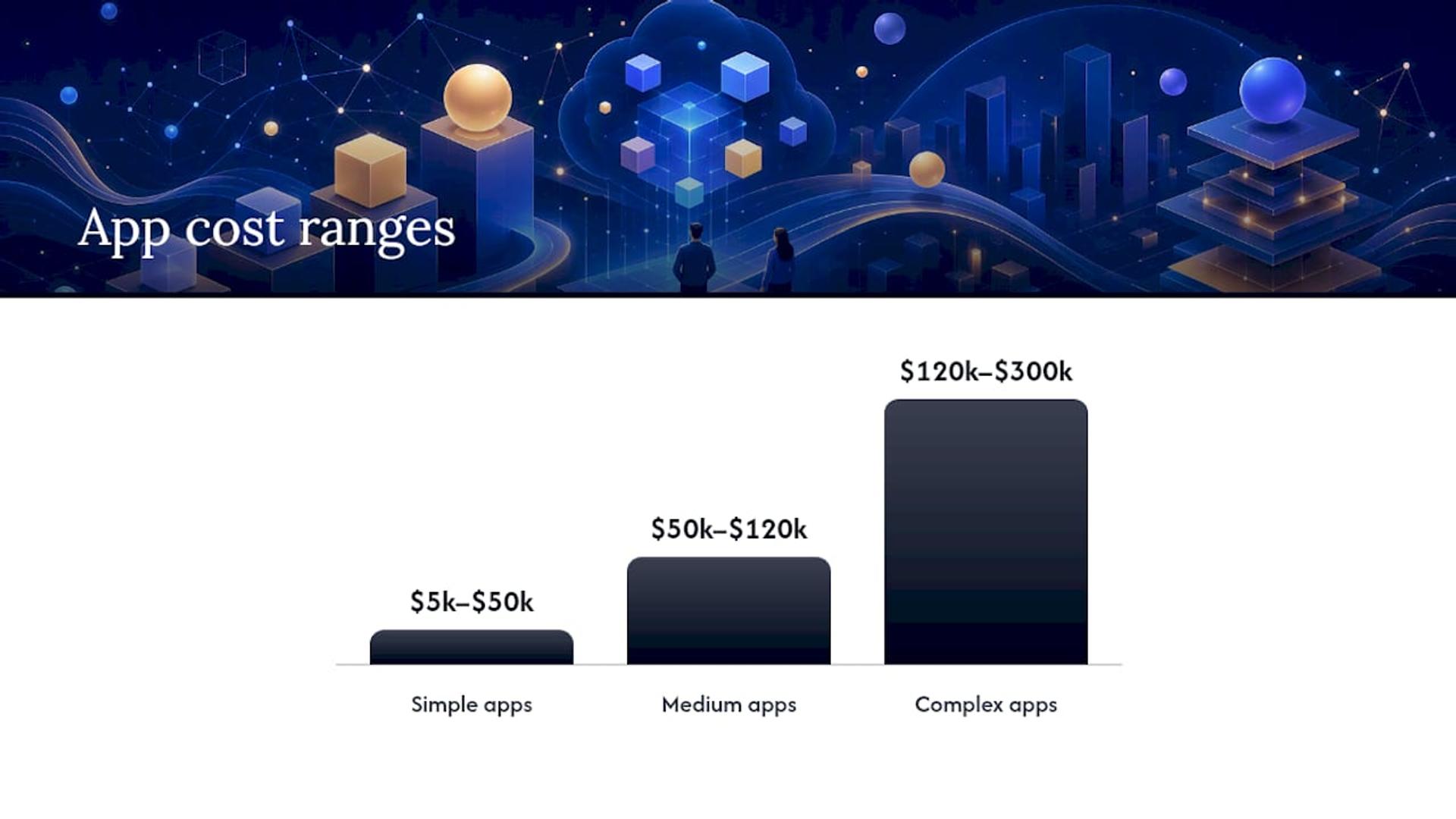
Every founder asks the same question before they ask anything else about features or timelines: how much does it cost to make an app? The honest answer is a range wide enough to make anyone uncomfortable, because “app” covers everything from a single-screen habit tracker to a HIPAA-compliant telehealth platform with video and billing built in. Industry benchmarks pin simple apps at $5,000 to $50,000, medium-complexity apps at $50,000 to $120,000, and complex builds at $120,000 to $300,000. Think of these tiers less like a menu and more like a house-building estimate. Nobody quotes “a house” without knowing square footage, finishes, and other key details.
A more recent practitioner dataset sharpens that picture. Median SMB app projects land around $80,000 to $150,000, with a common MVP band closer to $25,000 to $60,000 once a team scopes real user flows instead of a wish list. That gap between the lower “simple app” figure and the MVP band matters. A true bare-bones app (think a static content viewer with no backend) can dip near $5,000. The moment you add accounts, a database, and any kind of sync between devices, you’re solidly in MVP territory.
Here’s how those bands typically map to real products:
| Tier | Typical range | Example app type |
|---|---|---|
| Simple / MVP | $10,000–$60,000 | Single-purpose utility, content app, basic booking tool |
| Medium | $50,000–$120,000 | Social feed, on-demand service app, e-commerce with payments |
| Complex | $120,000–$300,000 | Marketplace with two-sided logistics, fintech app with KYC |
| Enterprise | $300,000+ | Multi-region platform, healthcare system with compliance layers |
A few things push a project up or down within these bands:
- Team location. A US-based agency and an Eastern European studio can quote wildly different totals for identical scope.
- Platform strategy. Building for iOS and Android natively as two separate codebases costs meaningfully more than one cross-platform build.
- Feature density. Real-time chat, AI recommendations, and payment processing each add discrete chunks of cost, not a percentage bump.
- Compliance needs. Healthcare and financial apps carry documentation and security work that simple productivity apps never touch.
Pro Tip: Don’t anchor to the average of a range. Anchor to the closest example app type, then adjust up or down based on your actual feature list. Averages hide more than they reveal.
The variance isn’t sloppiness on anyone’s part. It’s the natural result of “app” being a category as broad as “vehicle.” A skateboard and a delivery truck are both vehicles. Only one of them needs a commercial driver’s license and a maintenance contract.
Where the Money Actually Goes: A Phase-by-Phase Budget
Knowing your total budget tells you what you can spend. Knowing the phase breakdown tells you whether your vendor is spending it right. A typical build splits roughly like this across five phases, though the exact split shifts depending on how much discovery work you’ve already done before hiring anyone.
- Discovery and scoping (5% to 10%): User research, competitive analysis, technical feasibility, and the written scope of work that everything else gets priced against.
- Design (15% to 20%): Wireframes, clickable prototypes, and full UI/UX design across every screen and state, including error states and empty states most founders forget to budget for.
- Development (45% to 55%): Frontend, backend, API integrations, and database architecture. This is where most of the dollars and most of the timeline live.
- QA and testing (10% to 15%): Manual testing, automated test suites, device compatibility testing, and security review.
- Launch (5% to 10%): App store submission, deployment infrastructure, analytics setup, and the first round of post-launch monitoring.
A quick gut check: on a $100,000 build, that means roughly $7,500 on discovery, $17,500 on design, $50,000 on development, $12,500 on QA, and $7,500 on launch. If a quote skips discovery entirely or buries QA into a rounding error, that’s worth asking about before you sign anything.
Inside those phase totals, specific line items eat budget in ways generic quotes don’t always show. Wireframing and prototyping inside the design phase might run $3,000 to $10,000 alone for a medium-complexity app. Third-party API integrations, cloud infrastructure setup, and push notification services all live inside development but get quoted separately by many vendors. A practical guide to mobile test automation shows why QA often costs more than founders expect: automated testing infrastructure has upfront setup cost that pays off over the life of the app, not just at launch.
The smartest move on payment structure is tying releases to milestones, not calendar dates. Pay a deposit to start discovery, release the design payment once wireframes and prototypes are approved, and split development into two or three milestone payments tied to working demos you can actually click through. This protects you if a vendor underperforms and gives your development partner clear, provable checkpoints instead of vague “trust us” progress updates. A realistic budgeting guide for custom software walks through how to structure these milestones so cash flow and accountability move together.
Native, Cross-Platform, or Web: What Your Stack Costs You
The platform decision is often the single biggest lever on your total budget, bigger than most feature choices. Building separately for iOS and Android as two native codebases essentially doubles your development phase, since you’re writing and testing two distinct products that happen to look similar. Cross-platform frameworks like React Native and Flutter let one codebase ship to both platforms, and that shared code typically saves 30% to 45% compared to building two native apps.
A useful shortcut when comparing quotes: multiply a single-platform native estimate by roughly 1.3 to 1.45 to approximate what a “native pair” (separate iOS and Android builds) would cost, rather than assuming double. That modeling assumption comes from cost calculators built on real project data, and it’s a far better gut check than doubling a number and hoping.
- Cross-platform (React Native, Flutter): Best default for most MVPs and medium-complexity apps. One codebase, faster iteration, lower ongoing maintenance since you’re patching one thing, not two.
- Native (Swift for iOS, Kotlin for Android): Justified when you need deep hardware integration, top-tier performance for graphics-heavy or AR features, or you’re building at a scale where every millisecond of app responsiveness affects revenue.
- Web or progressive web app: The cheapest entry point when you don’t need app store distribution or offline functionality, but it sacrifices push notifications and some device integrations native apps take for granted.
Pro Tip: If you’re not sure whether you need native performance, you probably don’t yet. Launch cross-platform, gather usage data, then decide if a native rebuild is worth it once you know which features actually get used.
The maintenance math favors cross-platform even after launch. One shared codebase means one bug fix instead of two, one feature build instead of two, and one team that understands the whole product instead of two specialized teams that need to stay in sync. That compounding savings shows up every single sprint after launch, not just on day one.
What Drives Costs Up: Features, AI, and Compliance
Base app cost gets you a functional product. Specific features are what push a $30,000 MVP into $80,000 territory, and it’s worth knowing exactly which ones carry the biggest price tags before you fall in love with a feature list.
Payment processing is one of the most common budget surprises. Integrating a payment provider properly, handling edge cases like failed transactions and refunds, and meeting basic PCI compliance typically adds $10,000 to $20,000 to a project, even though the payment provider itself might advertise a simple API. A developer’s guide to Plaid API integration illustrates how much groundwork sits behind what looks like a plug-and-play banking connection: authentication flows, error handling, and data mapping all take real engineering time.
AI features carry a much wider range, and for good reason. A basic recommendation engine or a simple chatbot might sit at the lower end. A custom-trained model handling complex personalization or analyzing regulated health data climbs fast. That spread typically runs $30,000 to $100,000, depending on whether you’re integrating an existing AI service or training something bespoke on your own data.
A few other add-ons worth budgeting for before you’re surprised by them:
- Real-time features (chat, live location tracking, live video) add infrastructure complexity beyond the UI work, often requiring dedicated backend services like WebSocket servers.
- Third-party APIs and mapping services (Google Maps, Twilio, Stripe) come with per-transaction or per-call costs that scale with usage, not just one-time integration fees.
- Rich media handling (video upload, editing, streaming) needs storage and compression infrastructure that basic text-and-image apps never touch.
- Regulated data compliance (HIPAA for healthcare, PCI DSS for payments) typically carries a surcharge of roughly 30% on top of comparable non-regulated builds, covering documentation, security audits, and specialized development practices.
That compliance premium isn’t padding. Regulated projects require audit trails, encrypted data handling, and documentation that a standard consumer app simply doesn’t need, and skipping it isn’t a cost-saving option, it’s a legal liability.
Freelancer, Agency, or Staff Augmentation: Who Should Build It
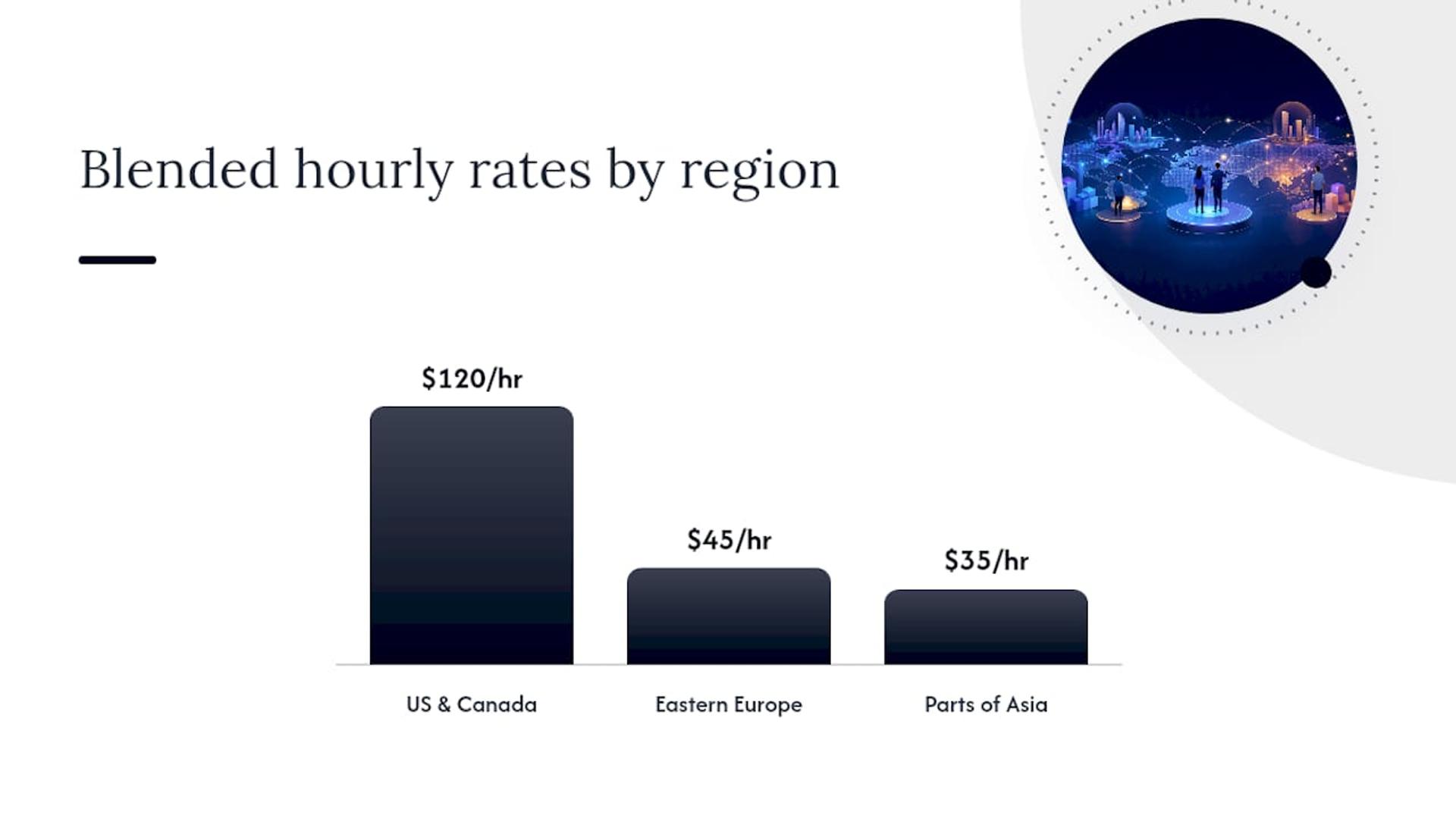
Your hiring model affects your budget almost as much as your feature list does, and it’s the decision founders spend the least time thinking through. Regional rate differences alone create roughly a fourfold spread: blended hourly rates run around $120 per hour in the US and Canada, roughly $45 per hour in Eastern Europe, and around $35 per hour in parts of Asia. Senior specialists cost 1.5 to 2 times the blended rate in any region, since a senior engineer’s speed and judgment usually offset the higher hourly number.
| Model | Typical cost profile | Best fit |
|---|---|---|
| Freelancer | Lowest hourly cost, highest management overhead | Small, well-defined features with a technical founder to manage them |
| Agency | Mid to high cost, includes project management and QA | Full builds where you want one accountable team |
| Staff augmentation / dev pods | Salary-equivalent cost with senior talent, flexible scaling | Ongoing product work needing senior judgment without full-time hiring risk |
| In-house team | Highest fixed cost, $100,000 to $120,000 per developer annually | Long-term products where institutional knowledge matters most |
Freelancers look cheapest on an hourly basis, and for a narrow, well-defined feature, they often are. The risk shows up in coordination. Without a project manager or a lead architect tying pieces together, a founder ends up doing that integration work themselves, which has its own real cost even when it doesn’t show up on an invoice.
Agencies solve the coordination problem by bundling project management, design, and QA into one accountable relationship. You pay for that structure, but you’re also not the one chasing down three separate contractors when a bug appears in production.
Staff augmentation and senior development pods sit in a useful middle ground, particularly for businesses that already have some technical leadership in-house but need senior engineering capacity fast. Instead of a six-month hiring process for a senior mobile engineer, you plug in a vetted senior developer or a small pod within days, and you scale that capacity up or down as the roadmap shifts. For teams building anything with real technical complexity, especially in regulated spaces like healthcare or fintech, senior-only talent isn’t a luxury; junior mistakes in those domains get expensive fast, in rework and in compliance risk.
Budgeting for Year One: Maintenance, Hosting, and the Costs After Launch
Launch day is not the finish line, and treating it as one is how founders blow through their runway in month four. Plan for annual maintenance costs of 15% to 25% of your original build cost, covering bug fixes, OS compatibility updates (a new iOS or Android release can break things you didn’t touch), security patches, and minor feature refinements.
On a $100,000 build, that’s $15,000 to $25,000 a year, every year, for as long as the app is live. Skip this line item in your financial plan and you’ll be scrambling for funds right when your app needs its first post-launch update.
Hosting costs start modestly and scale with usage:
- Launch-stage hosting: Roughly $200 to $500 per month for a new app with a modest user base, covering server infrastructure and basic database hosting.
- Growth-stage hosting: Climbs into four figures monthly as user counts and data volume increase, particularly for apps with heavy media storage or real-time features.
- Third-party API and licensing fees: Ongoing costs for services like push notifications, analytics platforms, and any paid APIs, often billed per active user or per API call and easy to underestimate at launch.
A maintenance and support resource worth reviewing lays out what recurring technical upkeep should realistically include, and the same logic applies whether you’re maintaining a website or a mobile app: proactive monitoring costs less than emergency fixes. Budget maintenance the same way you budget rent. It’s not optional just because it’s recurring.
How to Turn a Ballpark Into a Written Quote You Can Trust
A cost range is useful for planning. A written quote is what you actually commit budget against, and the gap between the two closes only through proper scoping. Here’s how to get there without wasting months.
- Write a scope of work that names real user journeys. Not “users can log in,” but the full path: sign-up, email verification, password reset, social login options. Vague scopes produce vague quotes that balloon later.
- List every integration by name. Payment processor, mapping service, analytics tool, any third-party data source. Each one is a line item a vendor needs to price, and unnamed integrations are the most common source of change orders.
- Specify non-functional requirements up front. Expected user load, uptime requirements, data residency rules if you’re handling regulated information. These affect architecture decisions that are expensive to change later.
- Request quotes in both pricing models and compare like for like. Fixed-price quotes protect your budget but require a locked scope. Time-and-materials quotes offer flexibility but need active oversight to avoid runaway hours.
- Ask pointed vendor questions. Who specifically will work on this project, and what’s their seniority level? What happens if scope changes mid-build? What’s included in post-launch support, and for how long?
Pro Tip: Treat “we’ll figure out the details as we go” as a red flag, not a sign of flexibility. A vendor who can’t scope your project properly before starting can’t estimate it accurately either, and that uncertainty always lands on your invoice, not theirs.
Building an MVP first and iterating based on real usage is consistently the single biggest cost-control lever available to founders, more effective than negotiating rates or shopping regions. A breakdown of why shortcuts backfire makes the case plainly: skipping proper discovery to save two weeks upfront routinely costs months of rework later, the software equivalent of skipping a home inspection because you’re excited to close.
Vendor research matters here too. A list of reputable mobile development firms gives you a sense of what established players in this space actually look like, useful context when you’re evaluating whether a quote is realistic or a lowball designed to win the bid and pad it later with change orders.
Bitrupt’s Tools and Track Record Behind These Numbers
The ranges throughout this guide aren’t theoretical. They reflect how Bitrupt scopes and prices real engagements for healthcare, fintech, marketplace, and AI-driven products, and the studio’s own tooling exists specifically to help founders get past the “it depends” answer faster.
Bitrupt’s AI Development Cost Calculator is built for exactly the AI budgeting uncertainty covered earlier in this guide. Rather than a flat estimate, it factors in model complexity, data volume, and whether your project touches regulated data, the same variables that separate a $30,000 AI feature from a $100,000 one. Founders get a refined estimate before committing to a full discovery engagement, which turns a vague AI ambition into a number worth planning around.
A few things worth knowing about how Bitrupt approaches projects at this budget range:
- Senior-only engineering staff. Every engineer on a project has senior-level experience, which matters most on the exact features this guide flags as high-risk: payments, AI, and compliance-heavy builds.
- Response times within 24 hours. Scoping conversations move quickly, which matters when you’re comparing quotes on a deadline.
- Flexible engagement models. Full project builds, staff augmentation, and senior development pods are all available, matching the hiring-model discussion above to whichever fit suits your actual team structure.
- End-to-end delivery. Design, development, QA, and launch support live under one accountable team rather than being split across vendors you have to coordinate yourself.
That combination, senior talent plus a purpose-built cost calculator plus flexible engagement structure, is what turns this article’s ranges into a specific number for your specific project.
The Bottom Line on Budgeting Your App
Pick your band based on intent, not ambition. A validated idea with a tight feature list belongs in the $10,000 to $60,000 MVP range. A funded product with real complexity, payments, or multi-sided logistics belongs in $50,000 to $150,000 or higher. Compliance-heavy or enterprise builds start at $150,000 and climb from there.
Three moves turn that range into a real budget:
- Scope it properly. Write down real user journeys and named integrations before you ask anyone for a number.
- Run the numbers through a calculator built on real project data, especially if AI is involved, to sanity-check any quote you receive.
- Get two to three written quotes, comparing scope line by line, not just the bottom-line total.
It’s not a footnote. It’s the cost of keeping what you built actually working.
What Marketing and User Acquisition Add to Your Budget
Building the app is half the financial equation. Getting people to actually download and use it is the other half, and it’s the line item most first-time founders forget entirely when they set their initial budget.
User acquisition costs vary enormously by category, but a reasonable planning assumption is setting aside an amount comparable to your development budget for the first year of marketing, particularly in competitive categories like consumer social or e-commerce. That includes paid app store advertising, social media campaigns, influencer partnerships, and content marketing to build organic discovery over time.
A few cost realities worth planning around before launch:
- Paid acquisition gets more expensive every year as app stores get more crowded, which means early cost estimates from a few years ago are already outdated.
- Organic strategies (App Store Optimization, content, referral programs) cost less per user but take months to build momentum, so they work best started before launch, not after.
- Retention spending is cheaper than acquisition spending. Budgeting for push notification strategy and onboarding flow refinement often produces better returns than pouring more money into new user ads.
A look at why businesses build mobile apps in the first place is worth reading before you finalize any marketing budget, since the outcomes you’re actually chasing (repeat engagement, direct customer relationships, reduced platform dependency) should shape how you split spend between acquisition and retention. Skipping this planning step is how founders end up with a great app and an empty user base.
App Store Submission: The Costs Nobody Budgets For
Apple charges a $99 annual developer program fee, and Google charges a one-time $25 registration fee for the Play Store. Those numbers look trivial next to a six-figure development budget, and that’s exactly why they get overlooked until submission week arrives.
The real cost isn’t the fee. It’s the time and rework tied to approval. Apple’s review process is notably stricter than Google’s, checking not just for bugs but for design guideline compliance, privacy disclosure accuracy, and functional completeness. Apps get rejected regularly for issues that have nothing to do with code quality: incomplete privacy policy links, placeholder content left in from testing, or login screens that don’t let reviewers actually test the app.
Build rework time into your launch phase budget for at least one rejection cycle. Each cycle can add several days to a couple of weeks to your timeline depending on the severity of the issue and how quickly your development team can respond.
A few submission-specific line items worth planning for:
- App Store optimization work (keywords, screenshots, preview videos) done properly before submission, not as an afterthought.
- Privacy compliance documentation, especially with Apple’s App Tracking Transparency requirements and any data collection disclosures.
- A buffer in your launch timeline for at least one rejection and resubmission cycle, since assuming first-time approval is optimistic even for experienced teams.
None of this changes your core development budget dramatically. It does change your timeline, and a launch date that slips by two weeks because of an avoidable rejection is a cost every founder should plan to avoid.
Why the “Average App Cost” Question Misses the Point
Founders keep asking for a single number, and every guide, including the benchmarks cited throughout this one, keeps giving ranges instead. That’s not evasiveness. It’s honesty about how differently two apps that sound similar in a pitch deck can actually be built.
The bigger shift worth noting for 2026 specifically is how AI and no-code tools have changed the low end of the market without changing the high end at all. A founder can get a functional prototype for $5,000 to $30,000 using AI-assisted or no-code platforms, which is genuinely useful for validating an idea fast. What that number doesn’t include is the cost of rebuilding for scale once that prototype finds traction, and too many founders treat the low-code price as their permanent budget rather than a validation-stage placeholder.
The conventional advice to “get three quotes and pick the middle one” also undersells how much a well-run discovery phase changes the outcome. A vendor who spends real time scoping your user journeys before quoting will often land on a number that looks higher upfront and ends up cheaper overall, because it accounts for the integrations and edge cases a rushed quote glosses over. Cheap discovery produces expensive surprises during development.
If there’s one priority for a founder reading this before talking to any vendor, it’s this: spend real money on scoping before you spend real money on building. A properly scoped MVP, priced against named user journeys and integrations, is worth more than any average anyone can quote you.
— Usama
Get a Scoped Quote Instead of Another Estimate
Every range in this guide gets more useful the moment it’s applied to your actual project, and that’s where Bitrupt fits. Unlike agencies that staff junior developers on regulated or complex builds and hope for the best, Bitrupt puts senior engineers on every engagement, including the payment, AI, and compliance-heavy features that this guide flags as the biggest budget risks.
If your project touches AI, run your numbers through the AI Development Cost Calculator first. It’s built to handle the exact variables, model complexity, data sensitivity, regulated-data surcharges, that generic estimators miss. From there, Bitrupt offers full project builds, staff augmentation, and senior development pods, so whether you need an entire team or one senior specialist to fill a gap, the engagement model matches your actual need rather than forcing you into a one-size structure.
For healthcare, fintech, or other regulated projects specifically, Bitrupt’s healthcare software development practice and broader industry expertise reflect the compliance depth those builds require. Start with a discovery conversation. It’s the fastest way to turn the ranges in this guide into a number that’s actually yours.