Avoid Replication Bills: 10 Cloud Migration Tools for IT Teams in 2026
Avoid Replication Bills: 10 Cloud Migration Tools for IT Teams in 2026 ! Engineer checking a cloud migration test There isn't a single best cloud migration tool: choose by migration class, whether that's tenant moves, hyperscaler lift-and-shift, or multi-cloud orchestration, and run a dependency map before committing to anything.


There isn’t a single best cloud migration tool: choose by migration class, whether that’s tenant moves, hyperscaler lift-and-shift, or multi-cloud orchestration, and run a dependency map before committing to anything. Below, we cover 10 recommended cloud migration tools, a procurement-ready evaluation checklist, and detailed profiles. The first move, before any vendor call, is an automated dependency mapping and readiness assessment.
TL;DR:
- Run automated dependency discovery before vendor selection, then validate network flows, permissions, and job schedules with application owners because tools can miss undocumented integrations.
- AWS Application Migration Service includes 2,160 free replication hours per source server, but target compute and storage charges continue during replication and testing.
- Use hyperscaler native tools for single cloud moves, tenant migration tools for mailbox or content consolidations, and orchestration platforms only for genuine multi cloud programs.
- Test a noncritical workload that matches production structurally, validate permissions and data integrity before cutover, and keep a documented rollback plan ready.
- Formal readiness assessments correlate with roughly 2.4 times higher migration success rates, so require a written assessment and dependency map in any consultant’s scope.
BitruptPlan Your Cloud Migration With ConfidenceBitrupt builds custom, scalable software solutions and provides ongoing engineering support for organizations managing complex technology needs.Explore Bitrupt’s engineering services
Table of Contents
- The top 10 cloud migration tools at a glance
- How to evaluate cloud migration tools: features, pricing, and fit
- Concise profiles: the 10 recommended tools
- Common migration challenges and how to mitigate them
- When to hire professional cloud migration support
- Aligning tool choice with long-term cloud strategy
- Managed migration and engineering support from Bitrupt
- FAQ
- Sources
The top 10 cloud migration tools at a glance
Picking a tool without knowing your migration class wastes budget fast. Here’s a quick-scan shortlist built around what each tool actually does well.
- AWS Application Migration Service (MGN): best for lifting VMs into AWS, with a free replication window worth watching closely.
- Azure Migrate: best for assessment and migration inside the Microsoft ecosystem, strong on real-time analytics.
- Google Cloud Migration Center: best for TCO modeling and AI-assisted readiness assessments before a Google Cloud move.
- AWS DataSync: best for one-time or recurring data transfers into AWS storage services.
- CloudEndure Migration: best for block-level replication with minimal downtime during cutover.
- MigrationWiz (BitTitan): best for mailbox, tenant, and SaaS-to-SaaS migrations.
- ShareGate: best for Microsoft 365 and SharePoint content migrations that must preserve permissions.
- Cloudiway: best for complex multi-platform tenant consolidations spanning several source systems.
- Carbonite Migrate: best for workload migrations where near-zero downtime cutover matters most.
- Flexera (RISC Networks): best for dependency mapping and discovery ahead of a larger migration program.
Several of these carry pricing shapes worth flagging early. AWS’s migration service bundles a free replication allowance, but you still pay for the target compute and storage it spins up during testing, a point we unpack in the next section. Tenant-focused tools like MigrationWiz and ShareGate typically price per user or per mailbox, which can swing budgets sharply depending on organization size.
How to evaluate cloud migration tools: features, pricing, and fit
Comparing tools side by side only works once you know what to check. Run every candidate against this feature checklist before you request a quote:
- Discovery and dependency mapping: does it map network flows, identity permissions, and batch-job schedules automatically?
- Replication and cutover modes: block-level, file-level, or database replication, and does it support staged cutover?
- Supported workloads: physical servers, VMs, containers, databases, or SaaS tenants.
- Automation and orchestration: can it sequence multi-step migrations without manual intervention at each stage?
- Monitoring and logging: real-time progress tracking and audit trails for compliance review.
- Rollback and testing: can you run a non-disruptive test cutover and revert cleanly if it fails?
- Security and compliance: encryption in transit and at rest, plus support for your regulatory framework.
- Post-migration operations: does it hand off cleanly to ongoing monitoring, or stop at cutover?
Pricing deserves its own line of scrutiny. Many tools charge per gigabyte, per user, or per source server, but the bigger trap sits in the target environment. AWS Application Migration Service includes 2,160 hours, or 90 days, of free replication per source server, yet the EC2 and EBS costs for the provisioned target instances during that replication and testing window still apply. Budget for that target-side spend separately from the licensing cost, or the “free” window can still produce a surprising invoice.
Category fit matters as much as feature checklists. Hyperscaler-native tools make sense for a single-cloud lift where cost control and tight integration matter most. Third-party SaaS tools earn their keep in tenant and email consolidations, especially where permissions and metadata need to survive the move intact. Orchestration platforms justify their complexity only when you’re running a genuine multi-cloud modernization program, not a one-time lift.
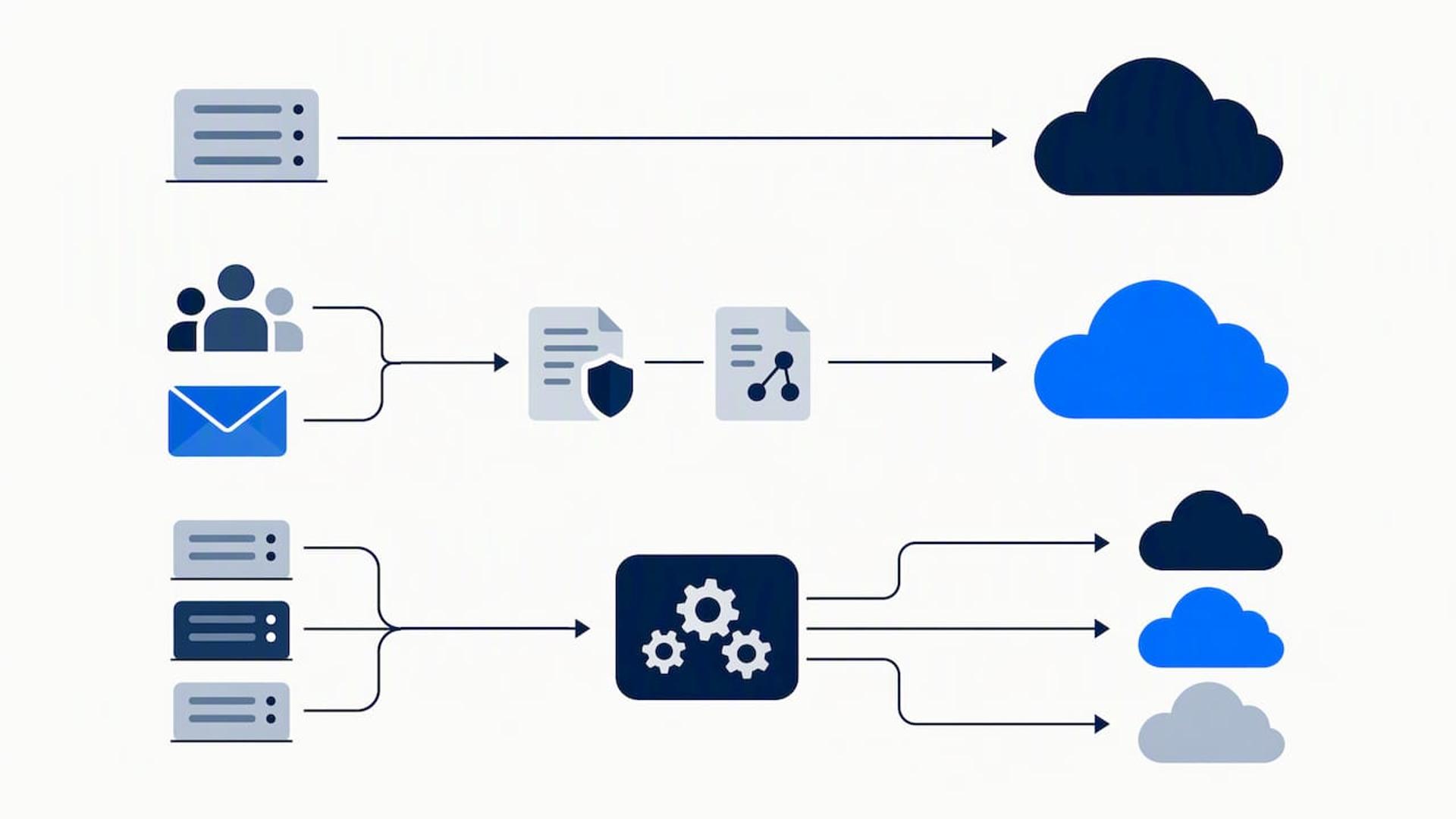
Before signing anything, check internal capability against the tool’s learning curve, confirm compliance coverage for your industry, and insist on a pilot run with a non-critical workload. Build in time for a test migration, not just a production date, and set SLA expectations for support response during cutover weekends.
Pro Tip: Run your pilot migration against your least critical workload first, but make it structurally identical to your production environment, otherwise the pilot tells you nothing about the real cutover.
Concise profiles: the 10 recommended tools
Each profile below follows the same structure: what it is, who it fits, and the one feature that sets it apart.
- AWS Application Migration Service (MGN). A hyperscaler-native replication service for lifting physical, virtual, or cloud-based servers into AWS. Best for teams already committed to AWS as the target. Standout: the free replication window, though target compute costs still accrue during that period.
- Azure Migrate. Microsoft’s native assessment and migration hub, combining discovery, right-sizing, and migration execution in one console. Best for organizations standardizing on Azure. G2 reviewer data shows it scoring well on ease of use and real-time analytics compared to AWS DataSync.
- Google Cloud Migration Center. A discovery and planning hub that runs AI-powered Quick Assessments and exports multi-year TCO projections. Best for building the business case before a Google Cloud move. The assessment activation is free beyond whatever resources you provision during testing.
- AWS DataSync. A managed data transfer service for moving files and objects into AWS storage at scale, including scheduled recurring syncs. Best for data lake or backup migrations rather than full application lifts.
- CloudEndure Migration. Block-level replication software built for minimal-downtime cutovers, often used as a precursor to broader AWS migrations. Best for teams that need continuous replication with a short, predictable cutover window.
- MigrationWiz (BitTitan). A SaaS tenant migration tool built for mailboxes, documents, and Microsoft 365 or Google Workspace moves. Best for IT teams consolidating multiple tenants after mergers or acquisitions.
- ShareGate. A content migration tool focused on Microsoft 365 and SharePoint, built to preserve permissions and metadata rather than performing a raw file copy. Best for organizations where governance continuity after cutover matters as much as the data itself.
- Cloudiway. A multi-platform migration tool supporting complex tenant consolidations across mixed source systems. Best for larger enterprises juggling several legacy platforms at once. G2 review patterns place third-party SaaS tools like this ahead of native options specifically for tenant and collaboration work.
- Carbonite Migrate. A replication and workload migration platform built around near-zero downtime cutover, commonly used for disaster recovery scenarios that double as migration testbeds. Best for workloads where even a short outage window is unacceptable.
- Flexera (RISC Networks). A discovery and dependency mapping platform used ahead of larger migration programs to build an accurate application inventory. Best for enterprises that need the dependency map itself, not just the migration execution tool.
Availability for all 10 extends across standard business regions, though specific compliance certifications and data residency options vary by provider and should be confirmed directly against your industry requirements.
Common migration challenges and how to mitigate them
Most migration failures trace back to a handful of repeat causes. Here’s how to head off each one.
- Dependency mapping gaps: run automated discovery first, then validate the results with the actual application owners, since automated tools miss undocumented integrations that only the team running the app would know about.
- Hidden replication and testing costs: budget for the provisioned compute and storage your target environment uses during trial windows, since free replication hours don’t cover those charges.
- Downtime risk: stage the cutover in phases, run a validation pass on a non-production copy first, and keep a documented rollback plan ready before the production switch.
- Permissions and data integrity gaps: audit access controls and run data integrity checks before cutover, not after, since fixing broken permissions on live production data is far more disruptive than catching it beforehand.
When to hire professional cloud migration support
Some migrations outgrow what an internal team can safely handle alone. Bringing in outside help makes sense when the workload scale or complexity exceeds in-house bandwidth, when compliance requirements demand specialized audit experience, when AI or GPU-heavy workloads need specific provisioning expertise, and when internal skills simply don’t cover the target platform.
Industry analyses tie formal readiness assessments to roughly 2.4 times higher migration success rates, which makes a documented assessment the first deliverable to insist on, not an afterthought.
Whatever vendor or consultant you engage, require these items in the statement of work:
- A written readiness assessment covering current infrastructure and target fit.
- A dependency map documenting network flows, identity permissions, and job schedules.
- A migration runbook with step-by-step cutover sequencing.
- A documented rollback plan and defined success metrics.
- A knowledge transfer plan so your internal team can operate the environment after handoff.
Aligning tool choice with long-term cloud strategy
The tool you pick for this migration shapes your flexibility for years afterward. Favor portability when vendor lock-in is a real risk to your business model, but lean on native tools when you’re staying single-cloud and cost control is the priority. Governance, observability, and ongoing cost operations matter more than the migration itself once the move is done. Treat a pilot project and a staged cutover as the default, not the exception.
— Usama
Managed migration and engineering support from Bitrupt
Buying a tool solves part of the problem. Getting the dependency map right, sequencing the cutover, and keeping target-cloud costs under control afterward takes engineering judgment a license alone won’t give you. We run cloud migration and modernization engagements with experienced engineers, providing readiness assessments, dependency maps, migration runbooks, and dedicated execution support rather than just a tool subscription and a support ticket queue.
For organizations weighing a fixed-fee managed IT route alongside custom engineering, NEXTmsp’s AI transformation services offer a complementary option built around proactive managed support and a written technology roadmap.
Our engagements typically include:
- Readiness assessment and dependency mapping before any cutover date is set.
- A cutover and rollback runbook built around your actual workload mix.
- Post-migration support, including AWS cost optimization work to keep target-cloud spend under control.
- Ongoing enterprise software maintenance once the migration is live.
If your next step is scoping a migration project properly, reach out through our cloud migration services page to learn more about our response times and support.
FAQ
What are the top 10 cloud migration tools?
The strongest shortlist for 2026 includes AWS Application Migration Service, Azure Migrate, Google Cloud Migration Center, AWS DataSync, CloudEndure Migration, MigrationWiz, ShareGate, Cloudiway, Carbonite Migrate, and Flexera. Each fits a different migration class, so the right pick depends on whether you’re moving tenants, lifting VMs, or orchestrating a multi-cloud program.
What are the AWS migration tools?
AWS’s core migration toolset includes Application Migration Service (MGN) for server replication and DataSync for file and object transfers into AWS storage. AWS Application Migration Service also includes 2,160 hours of free replication per source server, though target compute and storage costs during that window still apply.
What are the three data migration tools available?
Data migration tools generally fall into three categories: replication tools that copy data continuously (CloudEndure, Carbonite Migrate), transfer tools built for file and object movement (AWS DataSync), and tenant or application migration tools built for SaaS platforms (MigrationWiz, ShareGate). Which category you need depends on whether you’re moving infrastructure, raw data, or application tenants.
What are the 7 R’s of cloud migration?
A common migration framework describes various strategies including rehost, replatform, repurchase, refactor, retire, retain, and relocate. Each represents a different level of change to the application during the move, from a straight lift-and-shift rehost to a full refactor rebuilt for cloud-native architecture.
How do I know if I need professional migration support?
Professional support makes sense when your migration spans compliance-heavy workloads, AI or GPU-dependent systems, or a scale beyond what your internal team has handled before. A documented readiness assessment and dependency map are the first deliverables to request, since formal assessments correlate with meaningfully higher migration success rates.
Sources
- AWS Application Migration Service pricing
- Google Cloud Migration Center overview
- Cloud migration tools compared: what G2 reviews reveal
- IBM Consulting — Cloud migration