5 Copy Ready Python Functions, Including a Mutable Default Fix
5 Copy Ready Python Functions, Including a Mutable Default Fix ! Engineer writing Python functions in code editor A Python function is a named, reusable block of code defined with `def` that you call to perform a task and optionally return a value.


A Python function is a named, reusable block of code defined with def that you call to perform a task and optionally return a value. Here’s the one-liner that proves it: def greet(): return "Hi" and then greet() runs it. Functions exist so you write logic once, reuse it everywhere, and keep your programs modular and easy to read.
TL;DR:
- Functions require parentheses even when no arguments are used, because omitting them refers to the function object, not called execution.
- Using the
defkeyword, a function’s docstring provides official documentation and should be concise, describing what the function does. - Positional arguments match parameters by order, while keyword arguments are explicitly named, improving clarity when calling functions with many parameters.
- Functions without a
returnstatement default to returningNone, which can cause unexpected behavior if a return value is assumed. - Mutable default arguments, like lists or dictionaries, evaluate only once and can lead to unintended data sharing; use
Noneto avoid this issue.
BitruptBuild Software That ScalesBitrupt’s senior engineers develop secure, high-performance software for healthcare, fintech, marketplaces, AI, and ed-tech.Visit Bitrupt
Table of Contents
- Defining and calling functions: def syntax and docstrings
- Parameters vs arguments: positional and keyword styles
- What return statements actually give back
- Default arguments, positional-only, and keyword-only parameters
- Variable-length arguments: *args and **kwargs explained
- Scope, closures, and when to reach for nonlocal
- Lambda functions: small, anonymous, and situational
- Recursive functions: base cases, call stacks, and limits
- Built-in functions and combining them with your own code
- Best practices and the mistakes almost every beginner makes
- Practical examples to run and verify yourself
- Why function design matters once code reaches production
- FAQ
- Sources
Defining and calling functions: def syntax and docstrings
Think of a function definition like writing a recipe card. You write the steps once, under a clear name, and anyone (including future you) can follow it without re-learning how to cook. In Python, that recipe card starts with the def keyword, a function name, parentheses, and a colon. Everything indented beneath it is the function body.
Notice the parentheses after greet. They’re required even when a function takes no input, because that’s how Python knows you’re calling the function rather than just referring to it by name. Leave them off, and you get a reference to the function object, not an executed result.
The string right under the def line is a docstring. It’s not a comment, it’s the first statement in the function body, and it becomes the function’s official documentation. You can retrieve it later with help(greet) or greet.__doc__, which matters once your codebase grows past a handful of files and nobody remembers what greet() actually does six months from now.
A few habits worth building from day one:
- Name functions with lowercase words separated by underscores, following PEP 8 conventions so your code reads consistently with the rest of the Python ecosystem.
- Keep the docstring short but specific: what the function does, not how it’s implemented internally.
- Call the function by name followed by parentheses, with arguments inside if it needs any.
- Test a function immediately after writing it by calling it with a simple, predictable input.
The official Python tutorial documents this syntax in detail, including how the function body executes top to bottom and returns control to the caller once it finishes. Once you’re comfortable with that flow, parameters are the next piece of the puzzle.
Parameters vs arguments: positional and keyword styles
Here’s a distinction that trips up a lot of beginners because the words get used interchangeably in casual conversation, but they mean different things. A parameter is the placeholder name you write in the function definition. An argument is the actual value you pass in when you call the function.
In that example, name and species are parameters. "Rex" and "dog" are arguments. The function definition sets the expectations; the function call fulfills them.
Python gives you two ways to pass arguments, and knowing when to use each one makes your calls clearer:
- Positional arguments are matched to parameters by order: the first value goes to the first parameter, the second to the second, and so on.
- Keyword arguments are matched by name, using
parameter=valuesyntax, which means order no longer matters. - You can mix both in a single call, but positional arguments must come before keyword arguments.
- Keyword arguments make calls with many parameters far more readable, especially when some values are booleans or numbers that don’t explain themselves.
Mixing styles is where the ordering rule bites people. Try describe_pet(name="Rex", "dog") and Python throws a syntax error, because once you use a keyword argument, every argument after it must also be a keyword argument. The rule exists so Python never has to guess which name you meant partway through a call.
This flexibility is part of why Python function syntax feels approachable once it clicks: you can write a function once and call it in whichever style fits the situation, favoring positional arguments for short, obvious calls and keyword arguments when clarity matters more than brevity.
What return statements actually give back
A function that calculates something is only useful if it hands the result back to whoever called it. That’s the job of return. The expression after return becomes the function’s output, available wherever you called it.
Here’s the part that surprises beginners: a function without an explicit return statement, or one that uses a bare return with nothing after it, hands back None by default. That’s documented behavior, not a quirk, confirmed by Real Python’s guide to defining functions.
log_message prints as a side effect but never returns anything meaningful, so output ends up None. That distinction, side-effect functions versus value-returning functions, matters when you’re debugging why a variable downstream is unexpectedly empty. return can also appear early inside a conditional, letting a function exit the moment it has an answer instead of running through unnecessary code afterward.
Default arguments, positional-only, and keyword-only parameters
Default arguments let a parameter fall back to a preset value when the caller doesn’t supply one, which saves you from writing near-duplicate functions for slightly different use cases.
One rule you can’t skip: parameters with default values must come after parameters without them in the function signature. Python needs to resolve the ones without defaults first.
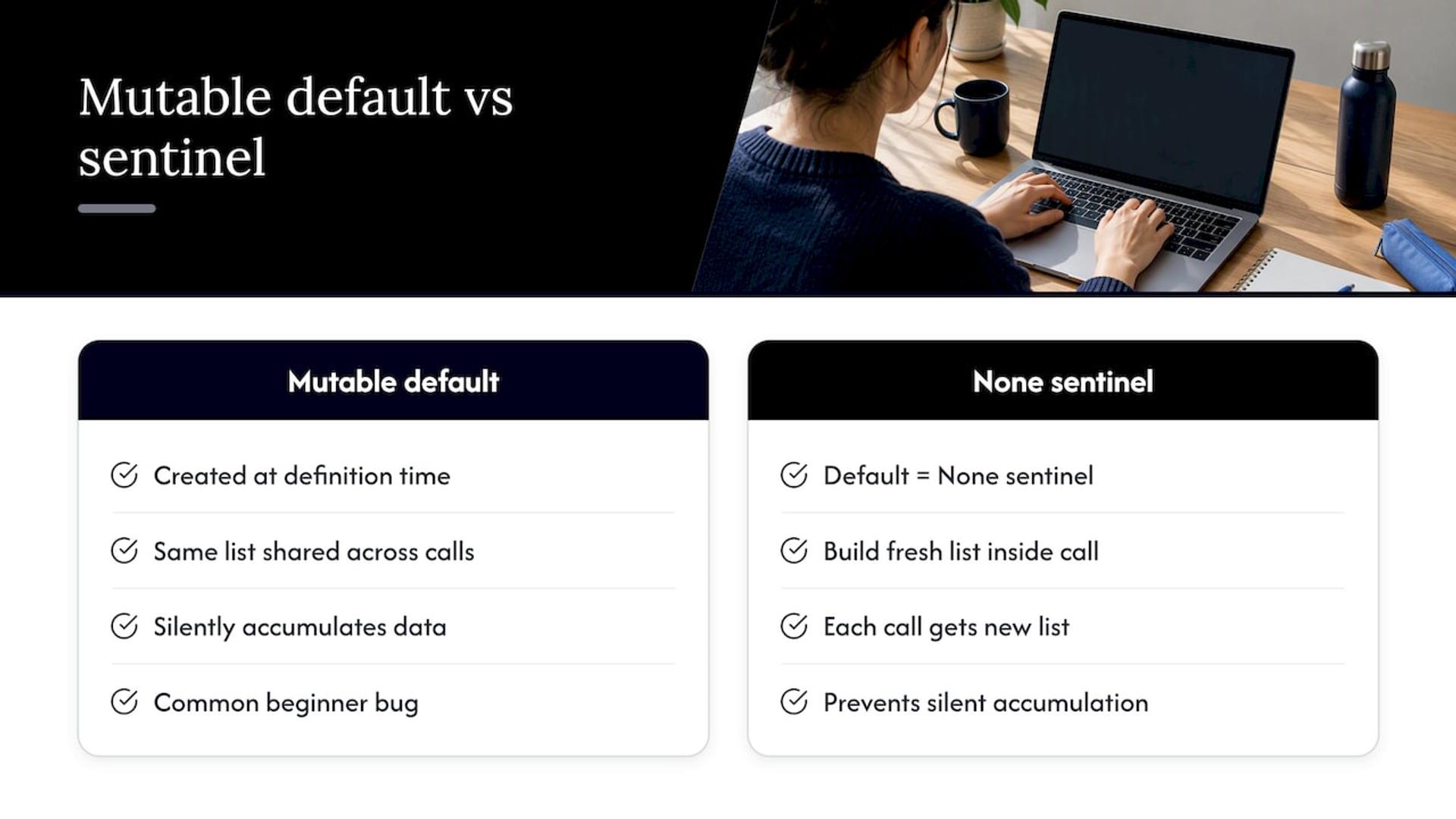
There’s a trap here that catches nearly every beginner at least once. If your default value is mutable, like a list or dictionary, Python evaluates that default exactly once, at definition time, not every time the function runs. That shared object then persists across every call that relies on the default, silently accumulating data nobody expected. The documented fix, confirmed in this Python function examples guide, is to use None as a sentinel and build a fresh container inside the function body.
Python also lets you enforce how a parameter must be passed, using / for positional-only and * for keyword-only parameters, a pattern documented in the official tutorial on control flow.
Here, level must be positional and mute must be named. Keyword-only parameters are worth reaching for whenever a function’s arguments are easy to confuse, since forcing a name on the call site removes any ambiguity about what each value means.
Pro Tip: Default to None for any mutable parameter default, then build the real value inside the function. It’s the single most common bug fix in beginner Python code.
Variable-length arguments: *args and **kwargs explained
Sometimes you don’t know in advance how many arguments a function will receive. Python handles that with two special parameter forms: *args collects any extra positional arguments into a tuple, and **kwargs collects any extra keyword arguments into a dictionary.
A few rules keep these working predictably, as outlined by TutorialsTeacher’s reference on Python functions:
*argsmust appear before**kwargsin a function signature whenever both are used together.- Regular positional parameters come first, then
*args, then keyword-only parameters, then**kwargs. - You can unpack an existing list or tuple into positional arguments using
*my_listwhen calling a function. - You can unpack a dictionary into keyword arguments using
**my_dictthe same way.
This pattern shows up constantly in wrapper functions and decorators, where you need to accept whatever arguments get thrown at a function and forward them unchanged to another one underneath. It’s less about memorizing syntax and more about recognizing the shape: “I don’t know what’s coming, so collect it all and pass it along.”
Scope, closures, and when to reach for nonlocal
A variable created inside a function is local to that function. It exists only while the function runs and disappears the moment it returns. A variable defined outside any function, at the top level of your module, lives in global scope and is visible everywhere, though reading from global scope inside a function doesn’t automatically mean you can modify it.
That surprises beginners every time. Assigning to a name inside a function creates a local variable by default, even if a global variable with the same name already exists. Favor passing values in as parameters and getting results back via return instead of relying on global state. It keeps functions predictable, testable in isolation, and far easier to debug when something goes wrong.
- Local variables exist only for the duration of a function call and are invisible outside it.
- Global variables are readable from inside a function but not writable without extra syntax.
- Prefer parameters and return values over global state for anything beyond a quick script.
- Use
nonlocalonly when you specifically need a nested function to modify a variable in its enclosing function.
Closures come up when a function defined inside another function “remembers” variables from the enclosing scope, even after the outer function has finished running:
nonlocal tells Python that count belongs to the enclosing function, not to counter itself, so each call updates the same captured variable rather than creating a fresh local one.
Lambda functions: small, anonymous, and situational
A lambda is a function with no name, written in a single line using the lambda keyword, restricted to exactly one expression. There’s no return keyword because the expression’s value is returned automatically.
Lambdas are most useful as short-lived callbacks passed into higher-order functions like map, filter, and sorted, a pattern described in DataCamp’s functions tutorial.
Because Python treats functions as first-class objects, you can assign them to variables, store them in lists, pass them as arguments, or return them from other functions, the same way you’d handle a string or an integer. That’s what makes patterns like decorators and function factories possible, as noted in Stanford’s reference on Python functions.
That said, a lambda crammed with nested conditionals becomes unreadable fast. If the logic needs more than one line to explain clearly, write a named function instead. Readability wins over cleverness every time someone else has to maintain your code, including future you at 11 p.m. trying to remember what you meant.
Recursive functions: base cases, call stacks, and limits
A recursive function calls itself, which sounds circular until you see the two pieces that make it work: a base case that stops the recursion, and a recursive case that breaks the problem into a smaller version of itself.
Each call to factorial waits on the call stack for the one below it to finish, so factorial(5) triggers factorial(4), which triggers factorial(3), all the way down to the base case, then the results multiply back up the chain.
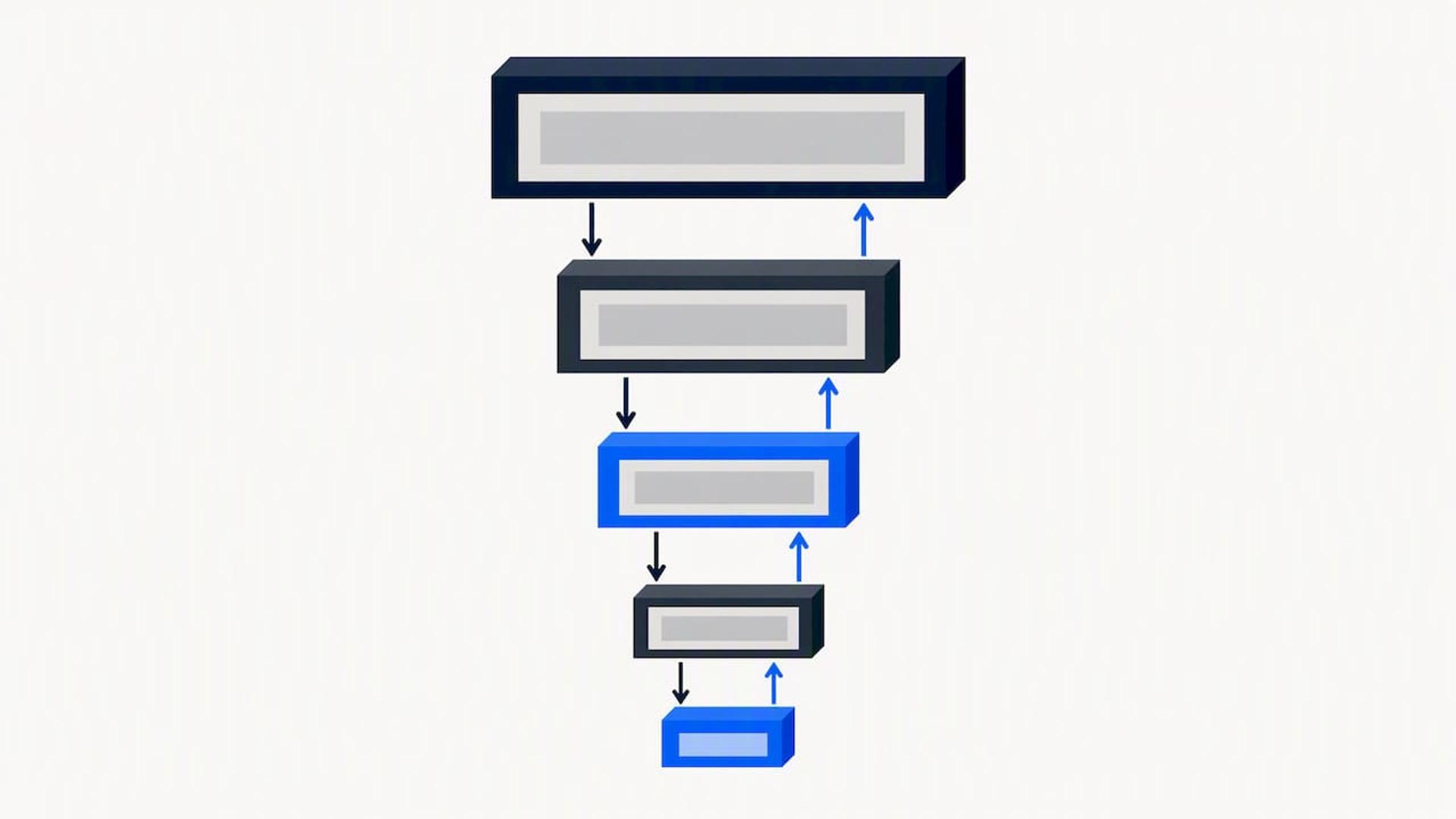
Recursion reads elegantly for problems like tree traversal or combinatorics, but CPython doesn’t optimize tail-recursive calls the way some other languages do, so deep recursion can hit a recursion limit and crash with a RecursionError. For anything that might recurse thousands of levels deep, an iterative loop or an explicit stack structure is the safer, more performance-friendly choice. Before trusting a recursive function in production code, test it against small inputs first and confirm the base case actually triggers, since a missing or unreachable base case is the single most common way recursion turns into an infinite loop.
Built-in functions and combining them with your own code
Python ships with dozens of built-in functions available without any import, documented in full in the official built-ins reference. The ones you’ll reach for constantly include len(), range(), enumerate(), zip(), sorted(), map(), filter(), and print().
The real productivity gain comes from combining built-ins with your own user-defined functions:
For simple transformations, a list comprehension often reads more clearly than map() or filter() with a lambda. [n for n in numbers if is_even(n)] does the same job as the example above, and most Python style guides treat comprehensions as the more idiomatic choice for straightforward filtering. Reach for map() and filter() when you’re already passing around a named function and want to apply it directly, and reach for comprehensions when the logic is short enough to write inline.
Best practices and the mistakes almost every beginner makes
Writing a function that works is easy. Writing one that still makes sense to you, or a teammate, six months later takes a bit more discipline. These are the habits that separate functions people actually trust from functions people are afraid to touch.
- Give every function a single responsibility: if you’re describing what it does and you need the word “and,” it’s probably doing two jobs and should be split into two functions.
- Follow PEP 8 naming conventions, lowercase with underscores, and write a docstring that explains the purpose, not just a restatement of the function name.
- Never use a mutable object like a list or dictionary as a default argument value; use
Noneas a sentinel and build the container inside the function body instead. - Write a small test for every function you create, even a few plain
assertstatements, before moving on to the next piece of code. - Keep functions short enough to read in one scroll of your editor; if it’s sprawling past 30 or 40 lines, look for a natural place to split it.
On testing specifically, you don’t need a heavy setup to catch real bugs early. A few assert statements or a lightweight pytest test file will catch most mistakes before they reach anyone else’s screen:
The mistakes that show up most often in beginner code are predictable once you’ve seen them a few times: forgetting the parentheses when calling a function (which returns the function object instead of running it), naming a variable list or str and accidentally shadowing a built-in type, passing arguments in the wrong order when relying on position instead of keywords, and assuming a function modifies a list in place when it actually returns a new one. Reading error messages carefully, Python almost always tells you exactly what went wrong and on which line, will save you more debugging time than any trick in this list.
Pro Tip: Run python -m pydoc yourfunction or call help() on any function you’re unsure about. It’s the fastest way to confirm what a function actually expects before you call it.
Practical examples to run and verify yourself
The fastest way to internalize all of this is to type these out and run them, not just read them.
- Greeting function:
def greet(name): return f"Hello, {name}!"thengreet("Sam")should outputHello, Sam!. - Temperature converter:
def celsius_to_fahrenheit(c): return (c * 9/5) + 32thencelsius_to_fahrenheit(20)should output68.0. - *Aggregator with args:
def total_sales(*amounts): return sum(amounts)thentotal_sales(100, 250, 75)should output425. - Keyword-only API:
def create_user(*, username, is_admin=False): return {"username": username, "is_admin": is_admin}thencreate_user(username="jo")should output{'username': 'jo', 'is_admin': False}. - Memoized Fibonacci (mutable-default-safe): use a dictionary passed with the
Nonesentinel pattern to cache results across recursive calls without leaking shared state between unrelated function calls.
Try modifying each one: change the converter to Fahrenheit-to-Celsius, add a third keyword argument to the user creator, or add a base case guard to the Fibonacci function that raises an error on negative input. Verifying your own predicted output against the actual output is the single best habit for building real fluency with Python methods and function behavior.
Why function design matters once code reaches production
Clean function design isn’t an academic exercise. In codebases that live for years and pass through multiple engineers, small functions with clear names and predictable inputs are what keep a system debuggable instead of brittle. We see this constantly in our own engineering work: a function that does one thing, returns a predictable value, and avoids hidden mutable state is a function nobody is afraid to refactor later.
As a global engineering studio building custom software for healthcare, fintech, marketplace, AI, and ed-tech organizations, we build tailored, high-performance platforms where this kind of discipline isn’t optional. Our team consists of experienced engineers, which helps keep response times fast because the fundamentals are well understood by everyone involved. For teams scoping their next AI build, our AI Development Cost Calculator is a useful planning resource before a project even starts.
— Usama
FAQ
What are the functions of Python?
Python functions serve one core purpose: packaging a block of code under a name so it can be reused, called with different inputs, and optionally return a value. They support positional, keyword, default, and variable-length arguments, which makes the same function flexible across many call sites.
What are the 33 keywords in Python?
Python reserves a fixed set of keywords, including def, return, lambda, global, nonlocal, if, for, and class, that you cannot use as variable or function names because they carry special syntactic meaning. The exact count varies slightly by Python version as new keywords like match and case were added in recent releases.
What’s harder, C++ or Python?
C++ generally demands more upfront knowledge, since it requires manual memory management and stricter compile-time type checking, while Python’s syntax is closer to plain English and runs without a separate compile step. Most learners find Python faster to get productive in, though C++ rewards that extra effort with finer control over performance.
What are the 7 types of functions?
Python doesn’t define an official “7 types” taxonomy, but code is commonly grouped by behavior: built-in functions, user-defined functions, lambda functions, recursive functions, higher-order functions, methods (functions attached to objects), and generator functions that use yield. Definitions vary across tutorials, so treat this as a common categorization rather than an official standard.
Do Python functions always need a return statement?
No. A function without an explicit return, or with a bare return, automatically gives back None, which is documented behavior rather than an error. This matters most when you’re debugging a variable that unexpectedly holds None instead of the value you expected.
Sources
- Defining Your Own Python Function – Real Python
- The Python Tutorial — Control Flow Tools (defining functions and related topics)
- Functions in Python - DataCamp tutorial
- Python function examples — pythonbyexample