Copyable Runbook Engineers Follow for Zero Downtime Deployment
Copyable Runbook Engineers Follow for Zero Downtime Deployment ! Hands wiring network cable in server rack Zero downtime deployment means shipping a new version of your application without a single user seeing an error or a blank page.


Zero downtime deployment means shipping a new version of your application without a single user seeing an error or a blank page. You get there by combining a traffic-splitting strategy (blue-green, canary, or rolling), health checks with graceful shutdown, backward-compatible database migrations, and feature flags. None of this is free. Every layer you add buys safety at the cost of extra infrastructure, longer pipelines, and more moving parts to monitor.
TL;DR:
- Blue-green deployments are safest and easiest to roll back but require maintaining two full environments and identical infrastructure.
- Rolling updates are more efficient on Kubernetes but need careful configuration of surge and availability settings to avoid capacity drops.
- Canary releases validate new versions with small traffic slices, using metrics like error rate and latency to trigger automated rollbacks if needed.
- Feature flags enable decoupling deployment from release, allowing code to be pushed dark and activated gradually for segments of users.
- Proper health checks, graceful shutdowns, and two-phase database migrations are critical to maintaining zero downtime during deployment.
Table of Contents
- What Is Zero Downtime Deployment, and Which Strategy Fits Your Stack?
- Blue-Green Deployments: The Exact Sequence
- Rolling Updates: Getting the Kubernetes Knobs Right
- Canary Releases: Phased Percentages and Abort Rules
- Feature Flags: The Layer That Separates Deploy From Release
- Health Checks and Graceful Shutdown: The Instance-Level Discipline
- Database Migrations Without Downtime
- Testing, Observability, and Automated Rollback
- The Copyable Runbook: Preflight, Rollout, Rollback
- What Senior Engineers Get Wrong About Zero Downtime Deployment
- Getting Your Deployment Pipeline Built Right the First Time
- Sources
What Is Zero Downtime Deployment, and Which Strategy Fits Your Stack?
The core idea is simple: in-flight requests finish normally while new requests route to the updated version once it’s actually ready to serve traffic. The strategy you pick determines how that handoff happens.
The three primary approaches trade safety, cost, and complexity against each other differently:
- Blue-green runs two full environments and flips traffic between them. Safest rollback, highest infrastructure cost.
- Rolling updates replace instances gradually within one environment. Efficient and Kubernetes-native, but rollback takes longer since old and new versions coexist mid-rollout.
- Canary sends a small traffic slice to the new version, then expands it. Best for validating behavior against real traffic before committing fully.
If you’re new to this, start with blue-green. It’s the easiest to reason about and the fastest to undo. Move to rolling updates once you’re deploying frequently on Kubernetes and want efficiency over redundancy. Reach for canary when you have enough traffic volume to get statistically meaningful signal from a 1% slice. Feature flags sit underneath all three, letting you decouple the act of deploying code from the act of releasing a feature to users.
Blue-Green Deployments: The Exact Sequence
Blue-green works by running two identical environments and switching traffic to the new one only after it’s validated, which is what makes rollback nearly instant.
- Provision the green environment with identical infrastructure, config, and secrets as blue.
- Deploy the new version to green while blue keeps serving live traffic.
- Run automated smoke tests and integration tests against green directly.
- Switch the load balancer or router to green, then watch error rates and latency for several minutes.
- If metrics hold steady, decommission blue. If not, switch the router back to blue immediately.
Shared resources like databases and caches need their own compatibility plan, since both environments may hit them simultaneously during the cutover window.
Pro Tip: Keep blue warm for at least one full business cycle after cutover. A surprising number of regressions only surface once real user patterns, not smoke tests, hit the new environment.
Rolling Updates: Getting the Kubernetes Knobs Right
Rolling updates replace old pods gradually, and the behavior hinges on two settings: maxSurge and maxUnavailable. For a small fleet, maxSurge: 1 and maxUnavailable: 0 is a safe default. It spins up one extra pod before removing an old one, so capacity never drops below your baseline. Kubernetes uses readiness probes to decide when a new pod is actually fit to receive traffic, not just when it starts.
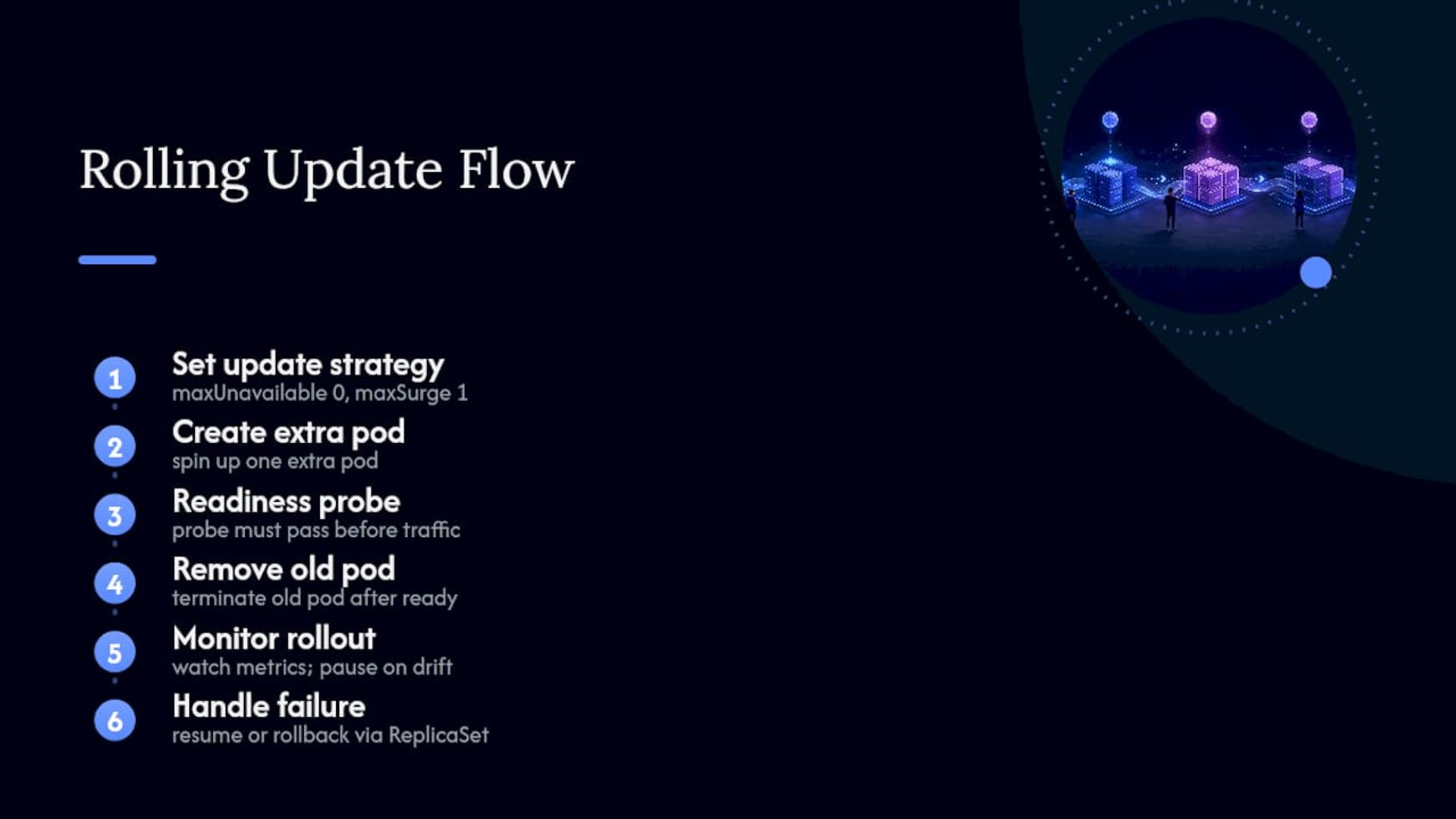
Set progressDeadlineSeconds so a stuck rollout gets flagged instead of hanging silently. If metrics drift mid-rollout, pause the deployment, investigate, and either resume or roll back to the prior ReplicaSet revision. Kubernetes keeps that revision history specifically so rollback is a one-command operation, not a redeploy.
Canary Releases: Phased Percentages and Abort Rules
A canary rollout works because you’re validating on real traffic before you’re exposed to all of it, catching regressions that synthetic tests miss. A typical progression looks like 1% → 5% → 25% → 50% → 100%, with a bake window at each stage, often 15 to 30 minutes, long enough for a meaningful sample.
Watch these signals at every stage:
- 5xx error rate compared against the baseline version
- p99 latency, not just averages, since tail latency hides the failures users actually feel
- One business KPI that matters for the feature (checkout completion, signup rate)
Wire automated rollback triggers to these thresholds so a breach halts promotion and reverts traffic without waiting for someone to notice a dashboard.
Feature Flags: The Layer That Separates Deploy From Release
Feature flags decouple deployment from release, which is the single biggest unlock for shipping frequently without shipping risk. You can push code to production dark, then turn it on for a segment of users whenever you’re ready, independent of the deploy pipeline.
- Release flags gate unfinished features until they’re complete.
- Experiment flags power A/B tests and gradual exposure.
- Ops flags act as kill switches for degrading a feature under load.
Runtime flags flip instantly through a config service. Build-time flags require a redeploy, so they’re slower but simpler to reason about. Either way, flags need a lifecycle: name them consistently, set an expiration date, and test both the on and off state before merging, or you end up with toggle debt nobody wants to clean up.
Pro Tip: Put an expiration date in the flag’s own metadata at creation time. A flag with no removal date left it in production will still be there in three years.
Health Checks and Graceful Shutdown: The Instance-Level Discipline
Readiness and graceful shutdown mechanics are what stop a load balancer from routing traffic to an instance that isn’t ready, or cutting off one that’s mid-request.
- Implement a readiness probe that only returns healthy once the app can actually serve traffic, and a separate liveness probe that just confirms the process hasn’t hung.
- Gate the load balancer on readiness, not on process start; a booted container isn’t the same as a ready one.
- On SIGTERM, stop accepting new connections, let in-flight requests finish, close database connections cleanly, then exit.
- Set the shutdown timeout slightly above your p99 request latency, and instrument for requests that get stuck past that window.
Database Migrations Without Downtime
Schema changes break the zero-downtime promise faster than anything else, because old and new code versions run side by side during a rollout and both need the schema to work. The fix is the expand-backfill-contract pattern, sometimes called two-phase migration:
- Expand: add the new column or table without touching the old one; deploy code that writes to both.
- Backfill: migrate existing data asynchronously, in batches, so you’re not locking a live table.
- Contract: once backfill is verified complete, switch reads to the new column, then remove the old one in a later deploy.
Never rename a column, drop a table, or change a column’s type in a single deploy. Design schema changes so old and new code can operate against the same schema simultaneously during the transition. Throttle the backfill job so it doesn’t compete with production traffic for database I/O, and keep an emergency rollback plan ready in case backfill verification fails partway through.
Testing, Observability, and Automated Rollback
Load test the new version during rollout itself, not just before it, using something like k6 or wrk, and confirm 5xx responses don’t tick upward as traffic shifts. Static pre-deploy testing catches obvious breaks; it won’t catch a memory leak that only shows up under sustained production load.

Instrument four signals continuously: error rate, p95 and p99 latency, queue depth, and one business KPI tied to the feature. Set explicit numeric thresholds for each, not vague “watch and see” guidance. AWS AppConfig, for example, ties feature-flag rollout strategies directly to CloudWatch alarms, so a breached alarm halts the rollout automatically instead of waiting on a human to catch it on a dashboard.
The Copyable Runbook: Preflight, Rollout, Rollback
Print this, tape it next to your deploy button, and follow it in order.
Preflight checks:
- Run automated smoke tests against a staging environment that mirrors production config.
- Confirm the
/healthendpoint responds correctly under load, not just at rest. - Verify you have at least two running instances behind the load balancer before starting.
- Dry-run any database migration against a production data snapshot.
- Confirm your feature-flag plan: what’s dark, what’s on for canary, what’s fully live.
Rollout steps:
- Start with the smallest viable traffic slice for your strategy (5% canary, one pod for rolling, a validated green environment for blue-green).
- Watch the consolidated dashboard: error rate, latency, queue depth.
- Promote gradually only after each stage clears its bake window with clean metrics.
- Hold a final bake window at 100% before calling the deploy complete.
Rollback plan:
- Switch the router back or flip the feature flag off, whichever reverts fastest.
- Run an incident review before the next deploy, even if the rollback was clean.
- Only schedule a database migration reversal if you’ve verified it’s safe to run against current data.
What Senior Engineers Get Wrong About Zero Downtime Deployment
The failures I see most often aren’t exotic. They’re the same three habits repeated across teams that should know better: big-bang database changes pushed in one deploy, missing readiness probes that let traffic hit a cold instance, and feature-flag sprawl where nobody remembers which toggles are still load-bearing.
The fix isn’t more tooling. It’s discipline: trunk-based development, small and frequent deploys instead of quarterly monoliths, and a standing calendar reminder to audit and remove dead flags. Teams that treat zero downtime deployment as a checklist rather than a one-time infrastructure purchase are the ones that actually sustain it past the first successful rollout. That’s the pattern Bitrupt’s engineering teams build toward on every enterprise platform engagement, because a deployment pipeline that only works during the demo isn’t one that works.
— Usama
Getting Your Deployment Pipeline Built Right the First Time
Most teams don’t fail at zero downtime deployment because they picked the wrong strategy. They fail because nobody had the bandwidth to wire readiness probes, two-phase migrations, and automated rollback triggers together correctly while also shipping features. That’s the gap Bitrupt closes.
Bitrupt’s Cloud & DevOps engineers run an audit of your current pipeline, build the runbook specific to your stack, and either implement it directly or embed with your team through staff augmentation. A typical engagement starts with a short audit, moves into a runbook and canary/rollback wiring sprint, then hands off with your team fully able to run it solo. If you’re scaling a regulated platform, the SaaS and B2B engineering team at Bitrupt has done this exact work for multi-tenant systems where downtime isn’t an option. Reach out through Bitrupt’s services page to scope an audit for your deployment pipeline.
Sources
- Implement zero-downtime deployments with blue/green, canary, and rolling strategies — HashiCorp
- Update a Deployment Without Downtime | Kubernetes
- Blue/green deployments — AWS whitepaper
- Feature flags — Octopus Deploy