7 Steps for Vibe Coding: Build Fast, Ship Safely for Developers
7 Steps for Vibe Coding: Build Fast, Ship Safely for Developers ! Developer guiding an AI coding session Vibe coding is the practice of describing what you want in plain language and letting an AI model write the actual code, rather than typing every line yourself.


Vibe coding is the practice of describing what you want in plain language and letting an AI model write the actual code, rather than typing every line yourself. It works best for prototypes, side projects, and quick idea validation, and it works worst when the output goes straight to production without review. The core tradeoff is speed for scrutiny: you move faster, but someone still has to check what the model built.
TL;DR:
- Vibe coding speeds up prototype development by allowing AI to generate entire code components based on natural language prompts, reducing setup time.
- It is crucial to review and test AI-generated code thoroughly, especially when handling security sensitive data or deploying for production use.
- While it lowers technical barriers, vibe coding requires precise intent description and careful validation, as it can produce logic errors and insecure patterns.
- Most startups and developers adopt vibe coding for early-stage products, but long-term maintainability and security demand rigorous human review before scaling.
- Transitioning prototype code into scalable, reliable systems typically involves senior engineers auditing, refactoring, and securing the code before deployment.
Table of Contents
- What Vibe Coding Means and Where the Term Came From
- How to Vibe Code: A Step-by-Step Workflow
- The Real Benefits of Vibe Coding
- Where Vibe Coding Falls Apart
- Vibe Coding vs. Traditional Development vs. AI-Assisted Coding
- Tools, Prompt Techniques, and an Operational Checklist
- How Bitrupt Uses Vibe Coding Without Betting the Business On It
- Turning a Vibe-Coded Prototype Into Something You Can Actually Ship
- Sources
What Vibe Coding Means and Where the Term Came From
The phrase belongs to AI researcher Andrej Karpathy, who described a workflow where he stops looking at the code and just tells an AI what he wants, accepting suggestions and running programs to see what happens. That framing stuck, and within months it had spread from a niche developer joke to a term IBM and Google Cloud both use in official explainers.
The formal definition, stripped of the meme energy, is straightforward: vibe coding is generating working software by prompting a large language model or an AI agent with natural-language instructions, then iterating on its output instead of writing syntax by hand. The “vibe” part refers to the intuitive, conversational loop, not a lack of rigor, though in practice the two often get confused.
There are two distinct flavors worth separating in your head:
- Pure vibe coding — you describe the goal, accept the AI’s output largely on faith, and run it to see if it works. This suits throwaway scripts, hackathon demos, and personal tools nobody else will ever touch.
- Guided vibe coding — you still prompt in natural language, but you read every diff, run tests, and push back when the logic looks wrong. Google Cloud’s own framing treats this as the practical middle ground for teams who want speed without giving up control.
The biggest misconception is that vibe coding means “no skill required.” It actually shifts the skill: instead of memorizing syntax, you need to describe intent precisely and recognize when generated code is subtly wrong. Vague prompts produce vague, buggy software, no matter how good the underlying model is. Wikipedia’s entry on the term even notes the slang has picked up a slightly critical edge, sometimes implying code accepted without real review, which is exactly the failure mode careful vibe coders try to avoid.
How to Vibe Code: A Step-by-Step Workflow
Every successful vibe coding session follows roughly the same arc, whether you’re using GitHub Copilot Agent, a chat-based assistant, or an autonomous coding agent. The steps stay consistent even as the tools change underneath you.
- Pick your tool and set the context. Decide whether you need a chat assistant for quick snippets or an agent that can read your whole repository, run commands, and make multi-file changes. Tell it what the project is, what stack it uses, and what already exists.
- Describe intent and constraints, not implementation. Say what the feature should do, who uses it, and any hard limits (performance, framework, data format). Skip the “how” unless you have a strong opinion about it.
- Generate scaffolding, then run it immediately. Let the model produce the first pass, but don’t read code as gospel. Run it. A script that “looks right” and a script that actually executes without errors are two very different things.
- Feed errors straight back into the prompt. Paste the stack trace or failing test output verbatim. Models handle concrete error messages far better than a vague “it’s not working.”
- Iterate until behavior matches intent, not until it merely compiles. Compiling is a low bar. Test against the actual scenario you described in step two.
- Refactor, run a security check, and decide the code’s fate. Some prototypes deserve a rewrite before anyone else touches them; Martin Fowler warns that vibe-coded prototypes often need real refactoring, not just polish, before they can scale.
- Commit early, wire up CI, and run dependency scanning before merging anything. Treat AI output as an unreviewed pull request from a fast but unfamiliar contributor.
Pro Tip: Ask the model to generate tests alongside the implementation, in the same prompt. Code that ships with its own test suite is far easier to trust, and far easier to hand off later, than code you have to test from scratch after the fact.
Microsoft Learn’s training module walks through this exact loop using GitHub Copilot Agent, and it’s worth running through once just to see the rhythm of prompt, generate, test, and refine in a controlled environment before trying it on a real project.
The Real Benefits of Vibe Coding
Speed is the headline benefit, but it’s not the only one. Vibe coding lowers the entry cost for building software in ways that matter differently depending on who you are.
- Faster prototypes. What used to take a weekend of setup and boilerplate can now take an afternoon, because the AI handles the repetitive scaffolding while you focus on whether the idea works at all.
- Access for non-developers. Someone with zero programming background can describe an app idea in plain English and get a working demo, which changes who gets to test a concept before raising money or pitching a team.
- Less time on boilerplate for working developers. Writing CRUD endpoints, form validation, and unit test skeletons is exactly the kind of repetitive work models handle well, freeing experienced engineers for harder architectural decisions.
- Tighter feedback loops with real users. Because iteration is cheap, you can show a working prototype to actual users faster and adjust based on what they say, instead of guessing for months before anything is testable.
The adoption numbers back this up. TechCrunch reported that a meaningful share of startups in a recent Y Combinator cohort have codebases that are almost entirely AI-generated, a sign that vibe coding has moved well past novelty status into how real companies actually ship early products.
Where Vibe Coding Falls Apart
Every shortcut has a cost, and vibe coding’s cost shows up in exactly the places you’d expect: correctness, security, and long-term maintainability.
- Logic errors that look plausible. AI-generated code often runs without crashing while still doing the wrong thing, which is more dangerous than an obvious crash because nobody notices until real data hits it.
- Insecure patterns baked in by default. Models trained on public code sometimes reproduce outdated security practices, and Ars Technica has documented cases where AI coding assistants behave unpredictably, underscoring why human review still matters.
- Hidden licensing exposure. Generated snippets can echo patterns from training data with licensing strings attached that nobody checked before merging.
- Fragmented architecture and rising technical debt. Martin Fowler’s analysis points out that prompt-by-prompt code tends to accumulate incoherent structure fast, since each prompt solves its own small problem without a unifying design.
- Data privacy exposure. Pasting sensitive customer data, credentials, or proprietary logic into a prompt can mean that data leaves your control the moment you hit enter, which matters enormously for healthcare and fintech projects bound by regulation.
The mitigation isn’t complicated, just consistent: run automated tests before every merge, require a human code review pass, and track where each piece of generated code came from so you can revisit it later. Microsoft Learn’s guidance treats AI output as a first draft that needs static analysis gates before it’s trustworthy, which is a fair way to think about all of it.
Vibe Coding vs. Traditional Development vs. AI-Assisted Coding
The differences come down to who does the thinking and who does the typing. In traditional development, the engineer designs the architecture, writes most of the implementation, and debugs line by line. In standard AI-assisted coding, a developer still drives the design but leans on autocomplete or targeted suggestions for individual functions. Vibe coding flips the ratio further: the human states intent and constraints, and the AI produces entire components, sometimes whole applications, before a person reviews anything.
- Role shift. You move from implementer to prompter and architect, spending more time describing what “correct” looks like than typing the mechanics of getting there.
- Spectrum of practice. Pure vibe coding suits disposable experiments; guided vibe coding, where you review and test every generated block, is the version teams can actually rely on; hybrid development blends both depending on the component’s risk level.
- Ownership and QA implications. Traditional code has a clear author who understands every decision. Vibe-coded systems often need an explicit review pass before anyone can say the same, which changes how QA and handoffs to engineering teams have to work.
- Handoff friction. A prototype built entirely through vibe coding usually needs translation into a maintainable form before a second team can safely extend it, exactly the gap tools focused on moving prototypes to production exist to close.
Tools, Prompt Techniques, and an Operational Checklist
Getting good results from vibe coding is less about which tool you pick and more about how disciplined you are with prompts and safety checks once you start generating real code.
- Start with a small, well-scoped project. A personal tool, a single-feature prototype, or a script that automates one annoying task. Avoid starting with anything that touches payments, health data, or user authentication until you’ve built intuition for what the AI gets wrong.
- Know your tool categories. Chat-based assistants are good for isolated snippets and explanations. Agent platforms like GitHub Copilot Agent can read a repository, run commands, and make coordinated multi-file changes. IDE-integrated assistants sit closest to your existing workflow and are often the gentlest entry point.
- Write prompts with context, examples, and constraints together. State the tech stack, show a sample input and expected output, and name any hard limits up front rather than correcting them after the fact.
- Ask for tests inside the same prompt as the implementation. This single habit does more for code provenance than almost anything else you can do.
- Never skip the operational basics. Version control from the first commit, automated test runs on every pull request, dependency scanning, and a security linter in your CI pipeline. Skipping these to “save time” tends to cost more time later, cleaning up what the shortcut broke.
Pro Tip: If a generated pull request touches authentication, payments, or personal data, treat that as a hard stop for a manual security review, no exceptions, no matter how clean the code looks on the surface. For a deeper look at where these guardrails tend to leak, this analysis of Copilot’s data handling is worth a read before you connect an agent to anything sensitive.
How Bitrupt Uses Vibe Coding Without Betting the Business On It
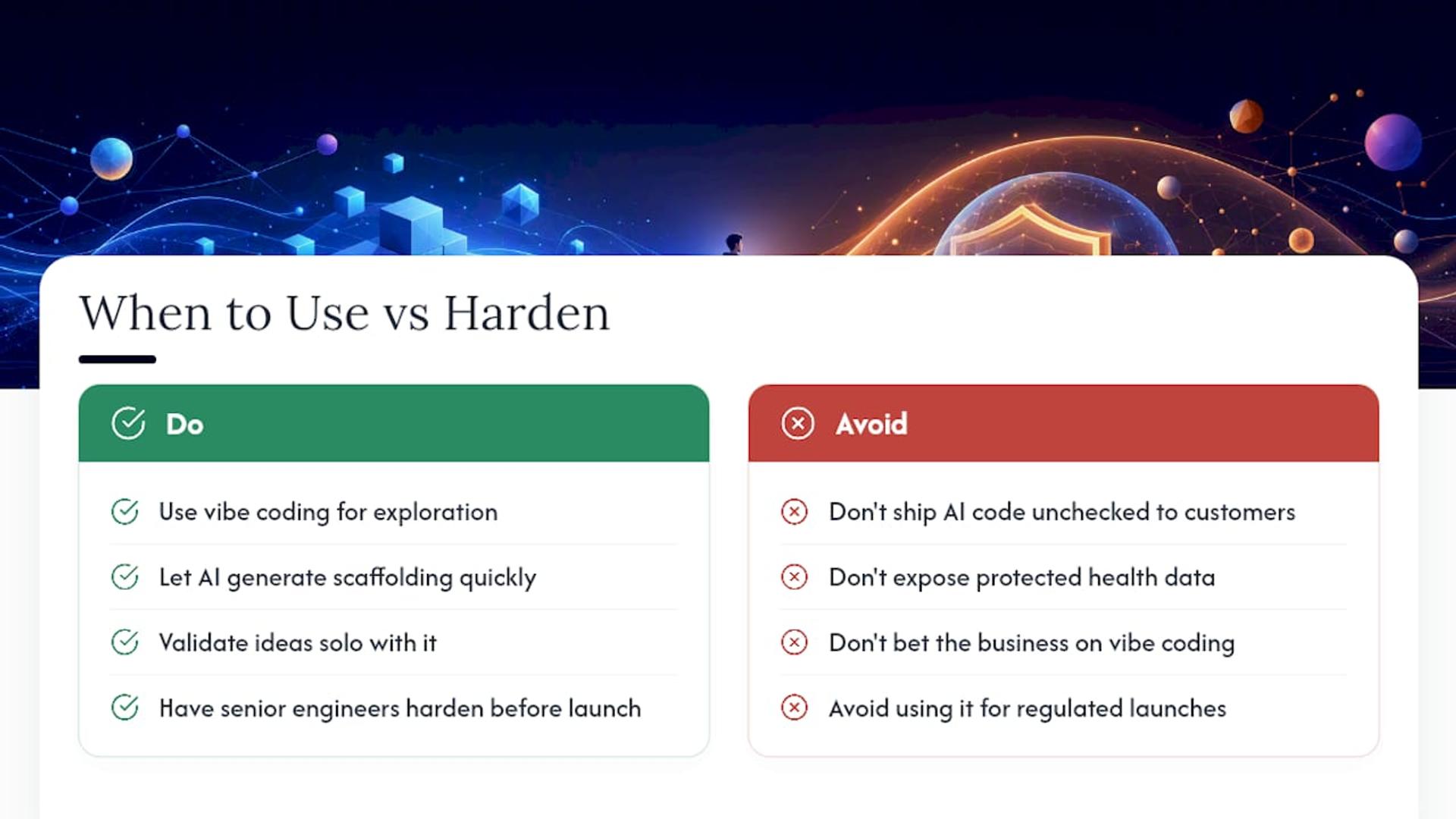
Vibe coding earns its place in our process the same way any fast tool does: for exploration, not for shipping unchecked. We let AI generate scaffolding and rough prototypes quickly, then our senior engineers rebuild the parts that need to survive contact with real users, real data, and real regulatory scrutiny. That pattern shows up across projects like Trivbiz, Vitality, and Fitness Flywheel, where speed mattered early and durability mattered by launch.
If you’re validating an idea solo, keep vibe coding. If you’re about to put AI-generated code in front of paying customers or protected health data, that’s the moment to bring in engineers who can harden it for production.
— Usama
Turning a Vibe-Coded Prototype Into Something You Can Actually Ship
A prototype that impresses in a demo and a system that survives real traffic are rarely the same codebase, and that gap is where most vibe coding projects stall. Bitrupt’s senior engineers specialize in exactly that transition: auditing AI-generated code for security gaps, rebuilding fragile architecture, and wiring up the testing and deployment infrastructure a real launch requires. Our AI and data engineering team has done this for healthcare platforms, fintech products, and marketplaces where “it mostly works” isn’t good enough.
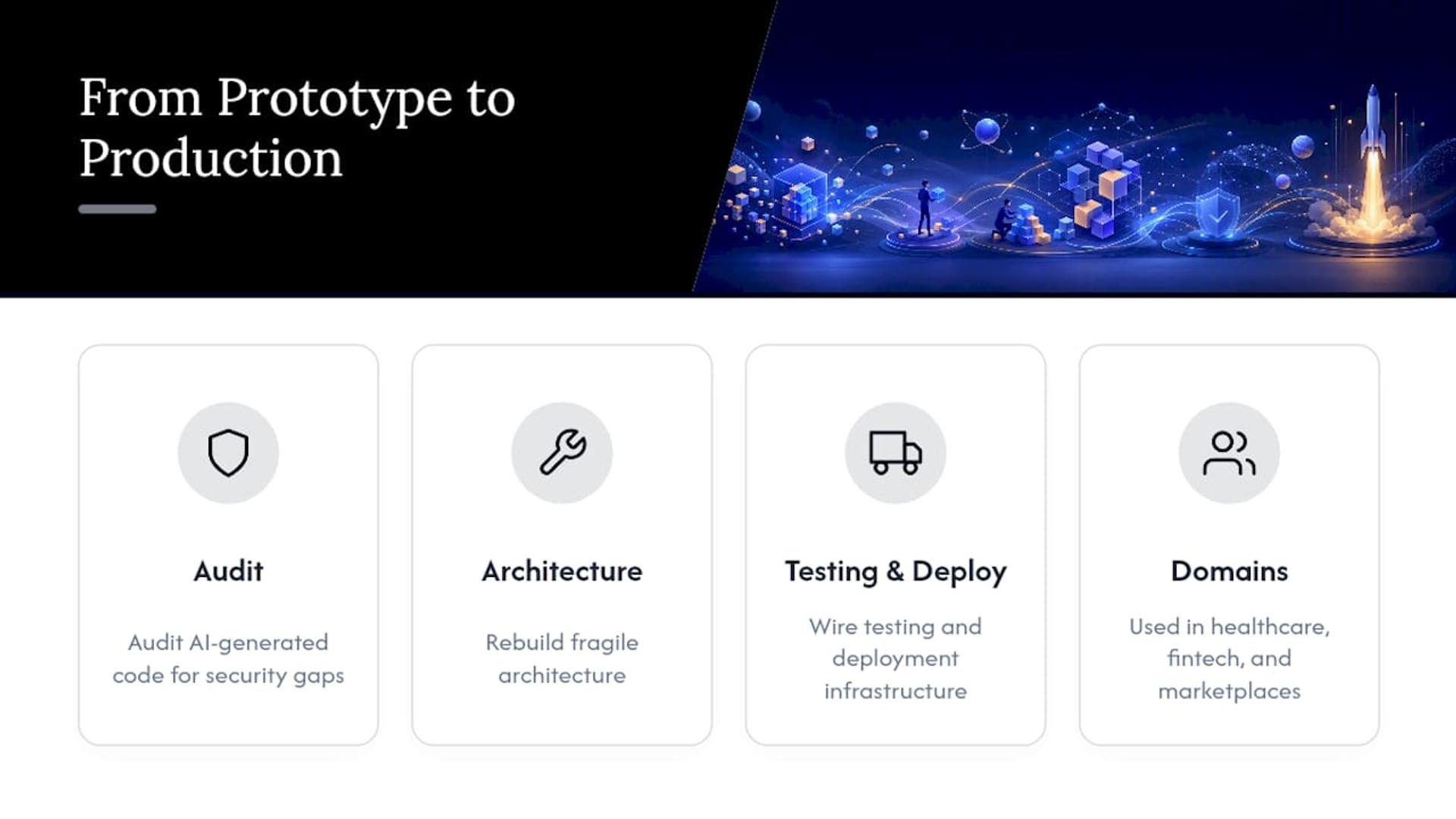
If your prototype is ready to grow up, Bitrupt’s vibe coding service is built specifically to fix, secure, and deploy AI-generated code, without starting the whole project over from a blank file.
Sources
- Introduction to vibe coding — Microsoft Learn
- What is Vibe Coding? - IBM
- A quarter of startups in YC’s current cohort have codebases that are almost entirely AI-generated — TechCrunch