Prototype in a Day, Production in 14–23 Weeks: Build a Custom CRM
Prototype in a Day, Production in 14–23 Weeks: Build a Custom CRM ! Engineer mapping CRM workflow stages Yes, you can create a custom CRM, and you have two realistic paths to get there: an AI or no-code builder for speed, or a custom-engineered system built for scale.


Yes, you can create a custom CRM, and you have two realistic paths to get there: an AI or no-code builder for speed, or a custom-engineered system built for scale. Costs range from a few hundred dollars for a quick no-code build to $40,000 or more for a production system, with timelines from a few days to roughly 20 weeks. Start with a one to two week discovery audit that maps your actual sales workflow before you write a line of code or pick a platform.
TL;DR:
- Custom CRMs are justified when existing software cannot support unique workflows or requires costly middleware and ongoing workarounds.
- The minimum viable product should focus on contact, deal, activity, task, and basic dashboard features, avoiding unnecessary fields and complexity.
- A thorough discovery process involving stakeholders and existing data mapping can prevent costly feature bloat and delays, ideally lasting one to two weeks.
- Building a reliable, scalable database with core entities linked through relationships and planning for integrations from day one is crucial to avoid future rebuilds.
- Development costs vary from minimal for no-code solutions to over $40,000 for full custom systems with integrations, emphasizing staged rollout and early testing to prevent failures.
BitruptBuild A CRM Around Your WorkflowBitrupt creates custom, scalable software for organizations that need tailored platforms, reliable integrations, and secure performance.Explore Bitrupt
Table of Contents
- Should You Build a Custom CRM or Buy Off-the-Shelf?
- What Features Does a Minimum Viable Custom CRM Need?
- How Do You Run Discovery Before Development Starts?
- How Should the CRM Database and Architecture Be Designed?
- Which UX Patterns Actually Increase CRM Adoption?
- What Tech Stack and Integrations Actually Work?
- How Long Does Custom CRM Development Actually Take?
- How Do You Keep a Custom CRM Secure and Scalable?
- What Does It Cost to Create a Custom CRM?
- What Mistakes Sink Custom CRM Projects?
- What Actually Separates a CRM People Use From One They Avoid
- How Bitrupt Helps You Build a CRM That Fits Your Business
- Sources
- FAQ
Should You Build a Custom CRM or Buy Off-the-Shelf?
The decision comes down to one question: does your sales process fit inside someone else’s software, or does it fight against it every day? A custom CRM is justified when your business has workflows that don’t map to standard fields, integration needs deep enough that middleware becomes its own maintenance project, or a total cost of ownership on your current tool that quietly exceeds what building would cost.
Run this checklist before committing either way:
- Do your reps spend time working around fields the software doesn’t support?
- Are you paying for three or four add-ons just to patch gaps in the core platform?
- Does your data live in spreadsheets because the CRM can’t hold it properly?
- Have admin hours and workaround tools started costing more than a license would if it actually fit?
Add up license fees, admin overhead, connector subscriptions, and hours lost to manual re-entry. That’s your true CRM cost, and it’s often double the sticker price.
What Features Does a Minimum Viable Custom CRM Need?
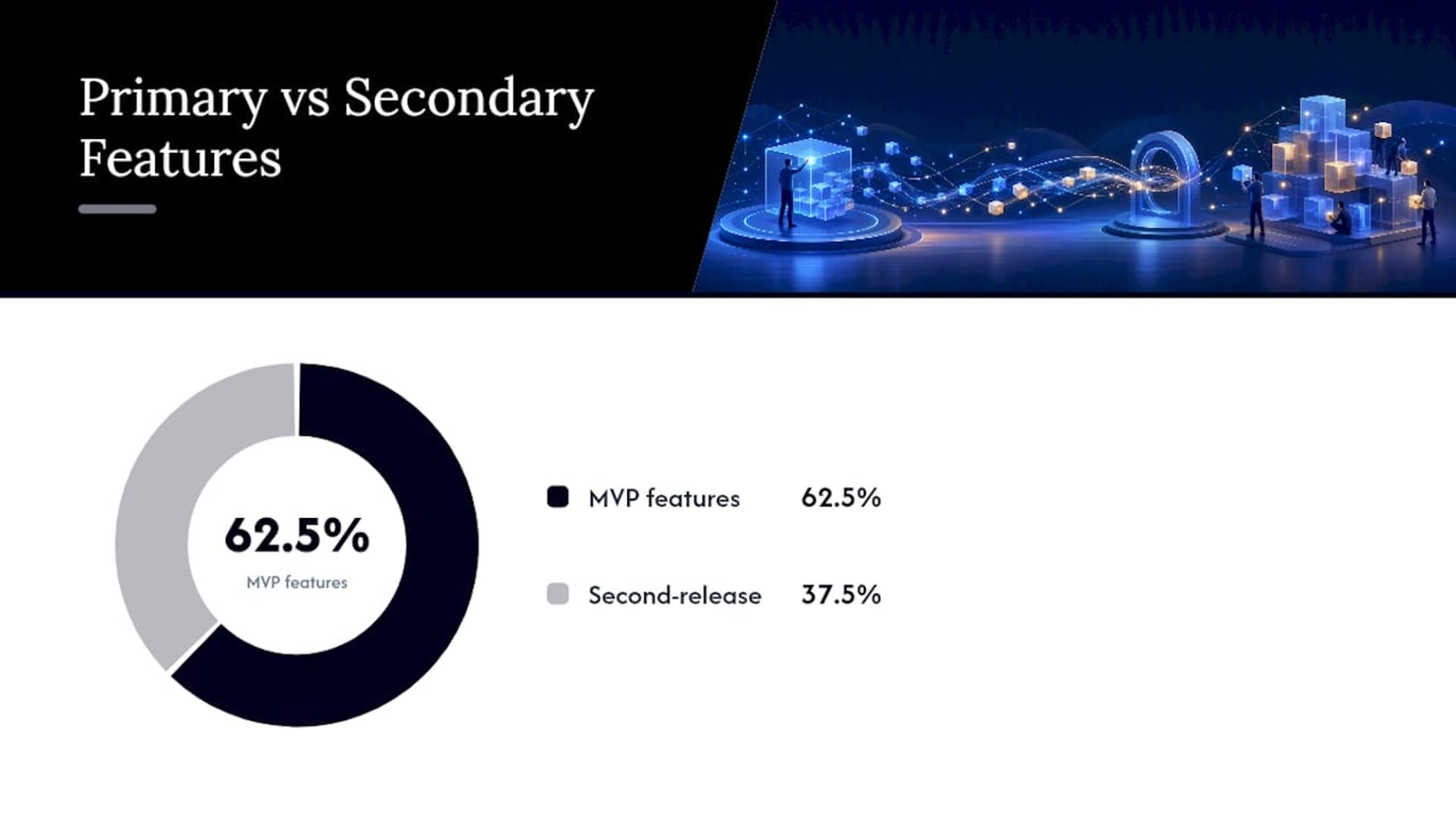
A first release should do five things well rather than twenty things poorly. Build a personalized CRM around this MVP feature set, then layer on complexity once your team actually uses the basics daily.
- Contact and company records with a lean field set. Aim for 15 to 25 fields your team will actually fill in rather than fifty fields nobody touches.
- Deals and pipelines with clear stages that mirror your real sales process, not a generic template.
- Activity logging that captures calls, emails, and meetings automatically where possible.
- Tasks and reminders tied to deals and contacts, with due dates that surface on a dashboard.
- Basic dashboards showing pipeline value, deal counts by stage, and overdue tasks.
Push email two-way sync, advanced automation sequences, and client-facing portals to a second release. They add real value, but they also add real complexity, and most teams aren’t ready to test them until the basics have run for a few weeks.
Pro Tip: Resist the urge to mirror every field from your old spreadsheet. Each unused field is a small tax on every future report and every rep who has to scroll past it.
How Do You Run Discovery Before Development Starts?
Discovery is where most CRM development budgets are saved or wasted. A focused discovery phase that actually maps how your team sells prevents feature bloat later, and feature bloat is the single biggest reason custom builds run over budget.
Structure discovery around these steps:
- Interview every stakeholder who touches the sales process, not just the sales manager.
- Map the actual workflow, stage by stage, including the exceptions and edge cases.
- Inventory existing data: what you have, where it lives, and how clean it is.
- List every system the CRM needs to talk to, from your email provider to your accounting software.
The outputs should be a written specification, wireframes for the core screens, a prioritized backlog, and acceptance criteria for what “done” means. Timebox this to one to two weeks, and insist that whoever runs it interviews both the people using the system and whoever owns the budget.
How Should the CRM Database and Architecture Be Designed?
The data model determines everything downstream, from how fast reports load to how painful integrations become. A well-designed CRM database centers on a handful of core entities: contacts, companies, deals, and activities, all linked through relationships rather than duplicated across tables.
Structure the foundation around these choices:
- Store activities and interactions as a separate events table with immutable timestamps, linked to contacts and deals, so you preserve an accurate audit trail and reliable “last contacted” fields.
- Choose a managed relational database like PostgreSQL on a cloud provider such as AWS or GCP rather than self-hosting, since managed backups and scaling save real engineering hours later.
- Add a dedicated search index once contact volume grows past a few thousand records, so filtering and lookup stay fast.
- Build APIs and webhooks with OAuth or SSO authentication from day one, even if you only have one integration at launch.
Getting this right early avoids a costly rebuild once you add your fifth integration.
Which UX Patterns Actually Increase CRM Adoption?
The CRM your reps actually use beats the CRM with the most features every time. UX/UI design for a custom CRM should reduce clicks, not add screens.
Focus design effort on these areas:
- The contact detail page needs a visible activity timeline and an automated “last contacted” indicator, so reps don’t guess who’s overdue for a follow-up.
- The pipeline board should let reps drag deals between stages and let managers save filtered views by territory or deal size.
- Lead capture forms need inline validation and the fewest required fields possible; every extra field lowers completion rates.
- Role-based views matter: a rep needs their pipeline, a manager needs the team’s pipeline, and neither needs the other’s clutter.
A tool like Monstrous Media Group’s approach to lead capture and follow-up shows how tightening the intake form alone can change conversion rates before a single automation rule fires.
Pro Tip: Test your pipeline board with the slowest typist on your sales team. If they can update a deal in under ten seconds, your UX is doing its job.
What Tech Stack and Integrations Actually Work?
For a production build meant to last years, a stack of a React or Next.js frontend, a Node or Django API layer, and PostgreSQL hosted on AWS or GCP gives you reliability without exotic maintenance requirements. Add OAuth or SSO for authentication so onboarding new team members doesn’t become a security afterthought.
Common integrations to plan for:
- Email and calendar sync, usually through Google Workspace or Microsoft 365 APIs.
- Accounting software connections, so closed deals flow into invoicing without manual re-entry.
- Telephony integration if your team makes high call volumes and needs logged call data.
- A CRM workflow automation layer that triggers tasks and notifications based on deal stage changes.
AI and no-code builders offer a genuinely different path here. For example, platforms can generate a working CRM in a day, shifting the plumbing work to the platform. The trade-off is ownership: confirm the platform supports code export or a GitHub sync before you build anything you plan to run independently later. Read more on when no-code prototyping makes sense versus when it’s time to bring in engineers.
How Long Does Custom CRM Development Actually Take?
Development runs in phases, and skipping a phase to save time almost always costs more later. A realistic build follows this sequence:
- MVP build (six to ten weeks): core contact, deal, and activity features, tested against your discovery spec.
- Integrations (three to five weeks): connecting email, calendar, and accounting systems one at a time, not all at once.
- Reporting and polish (two to three weeks): dashboards, saved views, and UI refinement based on early user feedback.
- Migration and launch (one to two weeks): moving historical data and going live with a small pilot group first.
Testing should cover unit tests for business logic, integration tests for each connector, end-to-end tests for core workflows, and a formal user acceptance testing round with actual sales reps before launch.
Data migration is the most common cause of CRM project delays. Dedicate at least two full weeks specifically to cleaning and mapping your historical data. Treating it as a quick export and import step is how launches slip by a month.
How Do You Keep a Custom CRM Secure and Scalable?
Security isn’t a feature you bolt on after launch. It’s a set of defaults you build in from the first sprint.
- Encrypt data at rest and in transit, and require multi-factor authentication for every user account.
- Set role-based access controls so a junior rep can’t see enterprise-level deal data by default.
- Run periodic access audits and define a data retention policy before regulators or customers ask for one.
- If you handle European customer data, GDPR compliance around consent and data deletion requests isn’t optional.
- Schedule regular backups, patch dependencies on a set cadence, and monitor uptime against a defined service level target.
Scale triggers are predictable: once query response times slow noticeably or your user count crosses a few hundred concurrent sessions, it’s time to add read replicas, caching, or horizontal scaling rather than just buying a bigger server.
What Does It Cost to Create a Custom CRM?
Costs split cleanly by approach. An AI or no-code MVP can take hours to a few days and cost close to nothing beyond a subscription fee. A small engineering team building a functional MVP typically runs $15,000 to $60,000 over eight to twelve weeks. A full production custom CRM with integrations, reporting, and migration runs $40,000 or more across 14 to 23 weeks.
- AI/no-code route: hours to days, minimal cost, limited ownership of code.
- Small team MVP: $15,000 to $60,000, eight to twelve weeks.
- Full production build: $40,000 and up, 14 to 23 weeks.
- Ongoing support: typically a $1,500 to $3,000 monthly retainer or hourly engineering at $150 to $250 per hour, with heavier support needed the first six months.
What Mistakes Sink Custom CRM Projects?
Most failed CRM builds share the same handful of root causes, and all of them are avoidable with discipline rather than budget.
- Overbuilding the MVP with every feature stakeholders ask for, instead of shipping the five essentials and iterating.
- Treating data migration as an afterthought instead of a dedicated phase with real hours assigned to it.
- Skipping user acceptance testing with actual reps, then discovering adoption problems after launch instead of before.
- Launching to everyone at once rather than a pilot group, which makes it hard to isolate what’s actually broken.
Roll out in stages, watch adoption metrics like daily logins and deal updates, and fix friction points before expanding access further.
What Actually Separates a CRM People Use From One They Avoid
Most CRM advice focuses on features. The real differentiator is almost always discipline in discovery, not cleverness in the build. Teams that skip the mapping exercise end up rebuilding their pipeline stages six months in, because nobody asked the reps how they actually sell before the schema got locked in.
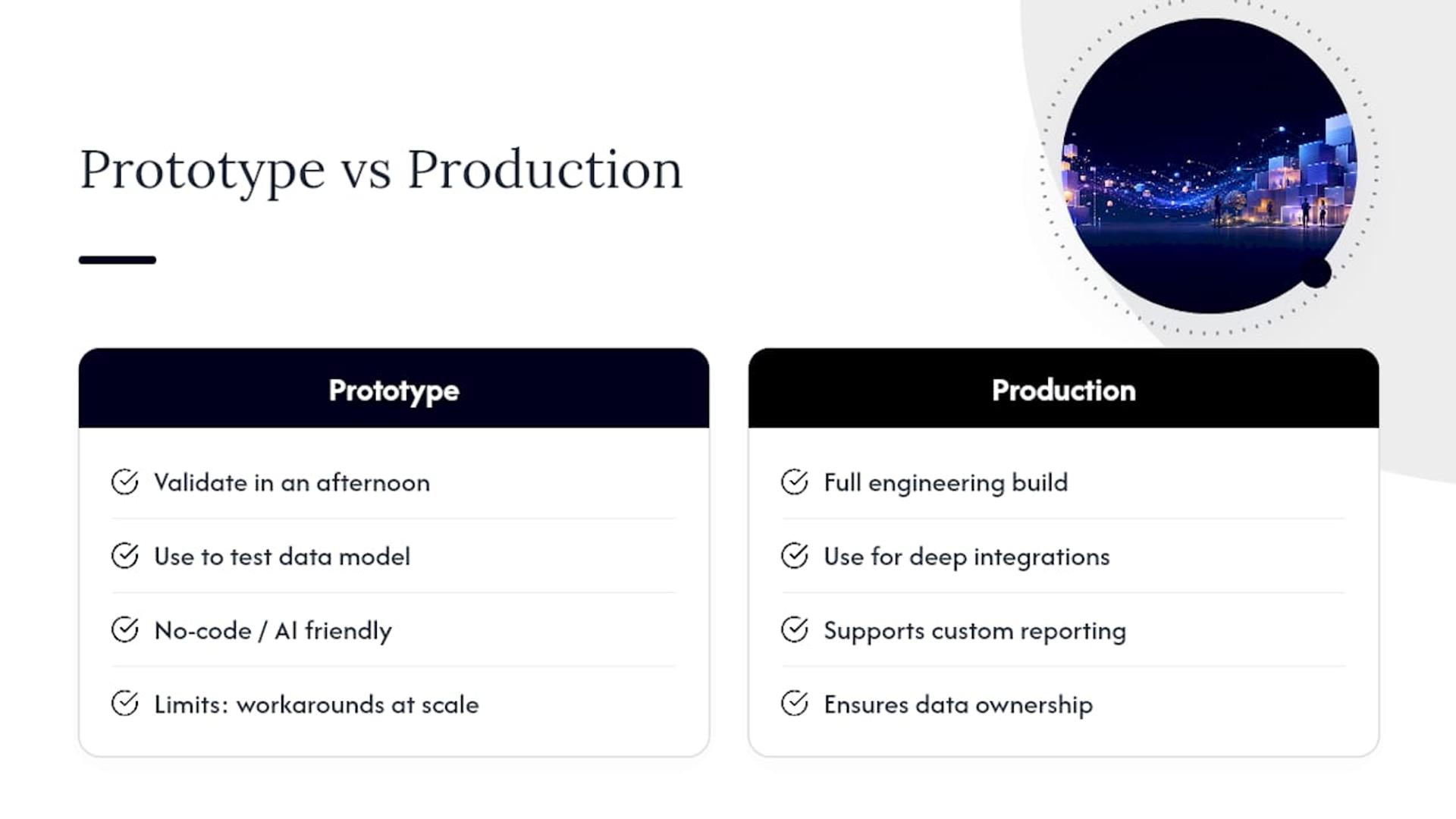
The AI and no-code shift is real, and it deserves more credit than skeptics give it. A prototype built in an afternoon can validate a data model before anyone commits real engineering hours to it. But there’s a ceiling: once you need deep integrations, custom reporting logic, or guaranteed data ownership, the no-code convenience starts costing you in workarounds. Similar patterns have been observed on platforms like Trivbiz, where early prototyping validated the workflow before a full engineering build took it to production scale. The lesson isn’t “choose one path.” It’s knowing which phase you’re in and picking the right tool for that phase.
If you’re still unsure whether your workflow needs custom engineering, run the discovery audit first. That single step will tell you more than any feature comparison ever will.
— Usama
How Bitrupt Helps You Build a CRM That Fits Your Business
Senior engineering teams can provide direct access to the people writing your code, enabling discovery audits and working prototypes to move faster than typical agency queues.
Whether you need a full custom software build, a focused development pod for the MVP phase, or staff augmentation to add senior engineers to your existing team, Bitrupt structures the engagement around what your discovery phase actually surfaces. If you want a cost estimate before committing to a scope, the AI and development cost calculator gives you a starting range based on complexity and timeline. Reach out to scope a discovery engagement, and you’ll have a spec, wireframes, and a backlog in hand before you sign anything larger.
Sources
For deeper technical detail beyond this guide, the sources below cover build timelines, data migration planning, and the build versus buy decision in more depth.
FAQ
How Much Does It Cost to Build a Custom CRM?
Costs range widely by approach: an AI or no-code MVP can cost very little and take days, while a small engineering team typically charges $15,000 to $60,000 for an MVP. A full production system with integrations and migration runs $40,000 or more across 14 to 23 weeks. Bitrupt’s pricing for custom builds is available on request through its services page.
Can I Create My Own CRM With Excel?
Excel can track contacts and deals for a very small team, but it breaks down fast once you need automated reminders, multiple users editing simultaneously, or an audit trail of who contacted whom. It works as a stopgap, not as a system you’ll still trust once your contacts grow beyond a small team.
Can I Build My Own CRM With AI?
Yes. AI app builders can generate a working CRM in minutes to hours, handling much of the underlying code so you can focus on describing your workflow. The trade-off is ownership and depth: confirm the platform supports code export before relying on it long term, and expect to outgrow it once your integration needs get complex.
What Is the Most Customizable CRM?
A custom-built CRM designed around your specific workflow is inherently more customizable than any off-the-shelf product, since every field, pipeline stage, and automation reflects how your team actually sells. Off-the-shelf platforms cap customization at what their configuration settings allow, which is why businesses with unique processes eventually outgrow them.