Prototype in an Afternoon: No Code and When to Hire Engineers
Prototype in an Afternoon: No Code and When to Hire Engineers ! Hands arranging a no-code workflow A no-code platform is software that lets you build apps, workflows, or websites using visual editors, templates, and drag-and-drop components instead of writing programming code.


A no-code platform is software that lets you build apps, workflows, or websites using visual editors, templates, and drag-and-drop components instead of writing programming code. It’s built for citizen developers, meaning business staff, founders, and operations people, not engineers, who need working software without hiring a development team.
TL;DR:
- No-code platforms are suitable for internal apps, dashboards, and MVP prototypes but are not designed for high-volume transactions or complex compliance.
- Most no-code tools excel at simple logic, basic integrations, and short-term projects, but struggle with scalability, performance, and security for growing or regulated apps.
- Before building a large or sensitive project, verify if the platform allows data export, supports necessary security controls, and can handle future scale needs.
- Moving from no-code to custom engineering becomes necessary when app complexity, data sensitivity, or growth surpasses the platform’s limitations.
- Successful use of no-code involves planning an exit strategy, particularly for scalability and compliance, to prevent costly rebuilds later.
Table of Contents
- What Is a No-Code Platform, Exactly?
- How No-Code Platforms Actually Work, Step by Step
- What Features Should You Expect From a No-Code Tool?
- What Can You Actually Build With No-Code?
- Why Teams Keep Adopting No-Code Tools
- The Real Risks: Platform Debt, Security Gaps, and Lock-In
- No-Code vs. Low-Code: Picking the Right Tool for the Job
- When Should You Move From No-Code to Custom Engineering?
- The Honest Verdict on No-Code Platforms
- Sources
What Is a No-Code Platform, Exactly?
Think of a no-code platform the way you’d think of a modular home kit. You’re not pouring concrete or wiring the electrical yourself. You’re arranging pre-fabricated pieces, already tested, already up to code, into a structure that fits your specific plot of land. That’s the entire premise behind no-code development platforms: the heavy engineering work is done once by the vendor, and you assemble the result.
Formally, a no-code development platform lets you create software through a graphical interface and configuration settings rather than programming, using prebuilt templates and visual programming to eliminate the need to write code line by line. That’s the technical definition. In practice, it means you’re clicking, dragging, and filling in forms where a developer would otherwise be typing syntax.
A few core components show up across nearly every no-code tool on the market:
- Visual editors and drag-and-drop components — buttons, forms, tables, and navigation menus you place on a canvas rather than code by hand.
- Prebuilt templates and reusable UI components — starting points for common app types like inventory trackers or booking systems, so you’re editing rather than building from a blank screen.
- Platform-provided hosting, databases, and runtime — the vendor runs the servers, manages the database, and keeps the app live; you never touch infrastructure.
- Built-in connectors — pre-wired links to tools like payment processors, email services, and spreadsheets.
- Natural-language builders — an emerging layer where you describe what you want in plain English and the platform generates the interface or logic for you.
That last point is worth pausing on. A few years ago, “no-code” meant dragging boxes around a canvas. Now some platforms let you type a sentence like “create a form that collects customer feedback and emails it to my team” and get a working result. It’s not full automation of software development, but it’s shrinking the gap between idea and working app faster than most people expect.
How No-Code Platforms Actually Work, Step by Step
The visual surface is what you see. Underneath it, a no-code platform is running through the same basic lifecycle any application does, just with the technical steps abstracted away. Here’s roughly what happens between typing an idea and having something live:
- You design the interface and data model visually. You place screens, fields, and tables on a canvas and define what kind of information each one holds, like text, dates, or file uploads.
- You configure logic and workflows without writing code. Instead of scripting “if this, then that,” you set rules through dropdown menus and condition builders, such as “when a form is submitted, notify the manager.”
- You connect data sources and outside services. Most platforms include a library of app integrations, letting you pull in a spreadsheet, sync with a CRM, or trigger a Slack message.
- The platform deploys and hosts the app automatically, handling scalability concerns as your app grows, as detailed in designing SaaS workflows that actually scale. There’s no server to configure or domain to point manually. You click publish, and the platform handles the rest, including scaling up if traffic grows.
- You maintain the app through live editing and version history. Most tools let you roll back changes or test updates before pushing them live, similar to how a word processor tracks edits.
That fifth step is where the cracks start to show for bigger projects. Platform-managed maintenance is great until your app needs something the platform wasn’t designed to handle, like a custom database query or a security rule specific to your industry. At that point, you’re stuck waiting for the vendor to add the feature, or you’re bolting on workarounds that get messier over time.
Pro Tip: Before you build anything serious on a no-code platform, check whether it lets you export your data and logic. Some platforms make this easy. Others lock your work inside their ecosystem, which turns “quick project” into “expensive migration” the moment you outgrow it.
What Features Should You Expect From a No-Code Tool?
Not every no-code platform is built the same way, but certain features have become table stakes. If a tool is missing more than one or two of these, it’s probably too limited for anything beyond a weekend project.
- Drag-and-drop UI builder with templates — the baseline for constructing screens without design skills.
- Workflow and automation engines — rule-based systems that trigger actions, like sending an approval request when a form is submitted.
- Integrations and API connectors — prebuilt links to common software so your app isn’t operating in isolation.
- User roles and basic access control — settings that determine who can view, edit, or approve within the app, sometimes called role-based access control (RBAC).
- Analytics dashboards and reporting exports — built-in charts or the ability to pull data into spreadsheets for review.
These features exist because no-code platforms are commonly built around workflow builders, dashboards, integrations, and governance controls that let non-technical teams replicate patterns engineers used to build from scratch.
By the numbers: Analyst coverage suggests the low-code and no-code market is on track to approach $50 billion by 2028, driven by enterprises adopting visual development to move faster than traditional engineering cycles allow. That growth isn’t hype. It reflects how many organizations have decided that waiting six months for an IT ticket doesn’t make sense for a simple internal tool.
What Can You Actually Build With No-Code?
This is the question that matters most if you’re deciding whether a no-code platform is worth your time. The honest answer: quite a lot, as long as you’re not trying to run a bank on it.
- Internal apps like inventory trackers, expense approval flows, or HR onboarding checklists that used to live in messy spreadsheets.
- Customer-facing portals such as a simple booking page, a client intake form, or a lightweight web app for scheduling.
- Automations that run on a schedule, like weekly report generation or automatic follow-up emails after a form submission.
- Dashboards and reporting tools that pull data from multiple sources into one visual summary for a team meeting.
- Rapid prototypes and MVPs you can show to investors or early users before committing real engineering budget to a full build.
Vendor case studies and product guides repeatedly point to the same pattern: no-code shows up most often in internal portals, CRUD apps (the kind that just create, read, update, and delete records), approval workflows, and small customer-facing microapps. Notice what’s missing from that list: nothing involving heavy transaction volume, complex compliance rules, or performance under real load. That’s not an oversight. It’s the honest boundary of what these tools are built for.
Why Teams Keep Adopting No-Code Tools
The appeal isn’t complicated once you see it in action. Building even a simple app the traditional way means hiring developers, writing specs, and waiting weeks or months for a working version. No-code compresses that timeline dramatically.
- Faster time-to-value. A working prototype that once took a development sprint can now take an afternoon.
- Lower up-front cost for simple apps. You’re paying a subscription fee instead of a developer’s hourly rate for straightforward projects.
- Independent iteration for domain experts. The person who understands the actual business problem, not a developer translating requirements secondhand, builds and adjusts the tool directly.
- Better cross-team collaboration when governed properly. Business and IT teams can review the same visual workflow instead of one side interpreting written requirements for the other.
This shift has a name in enterprise circles: citizen development. Adoption of no-code is largely driven by organizations shifting toward citizen development as a way to cut IT backlogs and speed up experimentation, rather than routing every small request through a formal engineering queue. That backlog reduction is real, but it only works when someone is still watching what gets built and how.
The Real Risks: Platform Debt, Security Gaps, and Lock-In
No-code platforms solve a speed problem, but they introduce a different set of problems that tend to surface later, usually right when the project starts mattering more.
- Platform debt. As you add more logic and workarounds to fit your growing needs, the app becomes harder to untangle, and migrating it later often costs more than building it properly would have from the start.
- Performance ceilings. No-code platforms are optimized for common patterns, not high-volume transaction processing or complex computation, so they tend to slow down or hit hard limits as usage scales.
- Security and compliance gaps. Without deliberate oversight, teams can spin up apps that store sensitive data without proper access controls, creating what’s often called shadow IT.
- Vendor lock-in. Your app’s logic lives inside someone else’s system, so if the vendor changes pricing, shuts down a feature, or gets acquired, your options narrow fast.
Pro Tip: If your no-code app starts touching anything regulated, healthcare records, financial data, or personal identifiers, stop and check whether the platform actually supports role-based access controls, audit trails, and SOC 2 compliance. Not every no-code tool is built for that kind of scrutiny, and finding out after a data incident is the worst possible time.
Successful larger-scale adoption tends to follow a governance-first pattern: guardrails, security posture, and integration standards get defined before the rollout spreads, not after. Skip that step and you’re not eliminating IT backlog, you’re just relocating the mess.
No-Code vs. Low-Code: Picking the Right Tool for the Job
No-code and low-code often get lumped together, but they serve different people and different levels of ambition.
No-code is built for citizen developers: people with no programming background who need a working result fast. Low-code sits closer to professional developers, offering visual tools alongside the option to write custom code when the visual layer runs out of flexibility. The trade-off is straightforward: no-code gives you speed but limited extensibility, while low-code gives you more control at the cost of needing at least some technical skill.
Here’s a simple way to map the decision:
- Departmental apps with modest data needs — a strong fit for no-code, since the risk of hitting a ceiling is low.
- Apps needing custom integrations or unusual logic — often better suited to low-code, where a developer can step in when needed.
- Enterprise core systems handling sensitive data or heavy transaction volume — generally require custom engineering from the start, not a retrofit later.
- Projects with uncertain long-term scale — worth building a migration plan before you commit, even if you start in no-code.
If your project starts raising questions about compliance audits, thousands of concurrent users, or logic too tangled for a workflow builder to express, that’s your signal to talk to engineers before you build any deeper.
When Should You Move From No-Code to Custom Engineering?
No-code and custom software aren’t rivals. They’re tools for different stages of the same journey, and knowing when to switch lanes is what actually protects a project from becoming a costly rebuild later. Bitrupt sees this pattern constantly: a team builds a smart prototype in a no-code tool, validates the idea, and then hits a wall the platform was never designed to handle.
Run through this checklist before you decide your project has outgrown no-code:
- Complexity — does your logic require conditions, calculations, or data relationships the visual builder can’t express cleanly?
- Compliance — does your app touch healthcare, financial, or personal data that demands documented security controls and audit trails?
- Scale — are you expecting thousands of concurrent users or transaction volume the platform’s infrastructure wasn’t built to absorb?
- Long-term maintainability — will this app still exist in three years, and if so, can you actually export and rebuild it without starting from zero?
| Signal | No-code likely fine | Time to escalate |
|---|---|---|
| Users | Dozens to low hundreds | Thousands+ |
| Data sensitivity | Internal, low-risk | Regulated (health, finance) |
| Logic complexity | Simple rules, forms | Custom calculations, edge cases |
| Growth trajectory | Stable, departmental | Scaling fast, core to the business |
Bitrupt complements no-code rather than competing with it. Prototypes built on visual tools are often the fastest way to prove an idea works, and Bitrupt’s engineers regularly pick up projects at exactly that handoff point, handling the integrations, performance tuning, and compliance work no-code platforms weren’t built for. The UpNext influencer voting app is one example of a platform that needed custom engineering from the ground up rather than a workflow builder. Projects like FitSono and Nani followed a similar arc, starting with a clear idea and requiring engineering depth once real users and real data entered the picture.
If you’re evaluating scope right now, start by mapping your project against the checklist above, and if two or more boxes point toward “escalate,” that’s worth a conversation before you sink more time into a visual builder that may not hold up.
The Honest Verdict on No-Code Platforms
The conventional pitch on no-code oversells the “anyone can build anything” angle, and that framing does readers a disservice. No-code is genuinely excellent at what it’s designed for: internal tools, departmental workflows, and validating an idea before committing real budget. It is not, and was never meant to be, a replacement for engineering on anything that touches regulated data, heavy transaction volume, or logic too tangled for a dropdown menu to express.
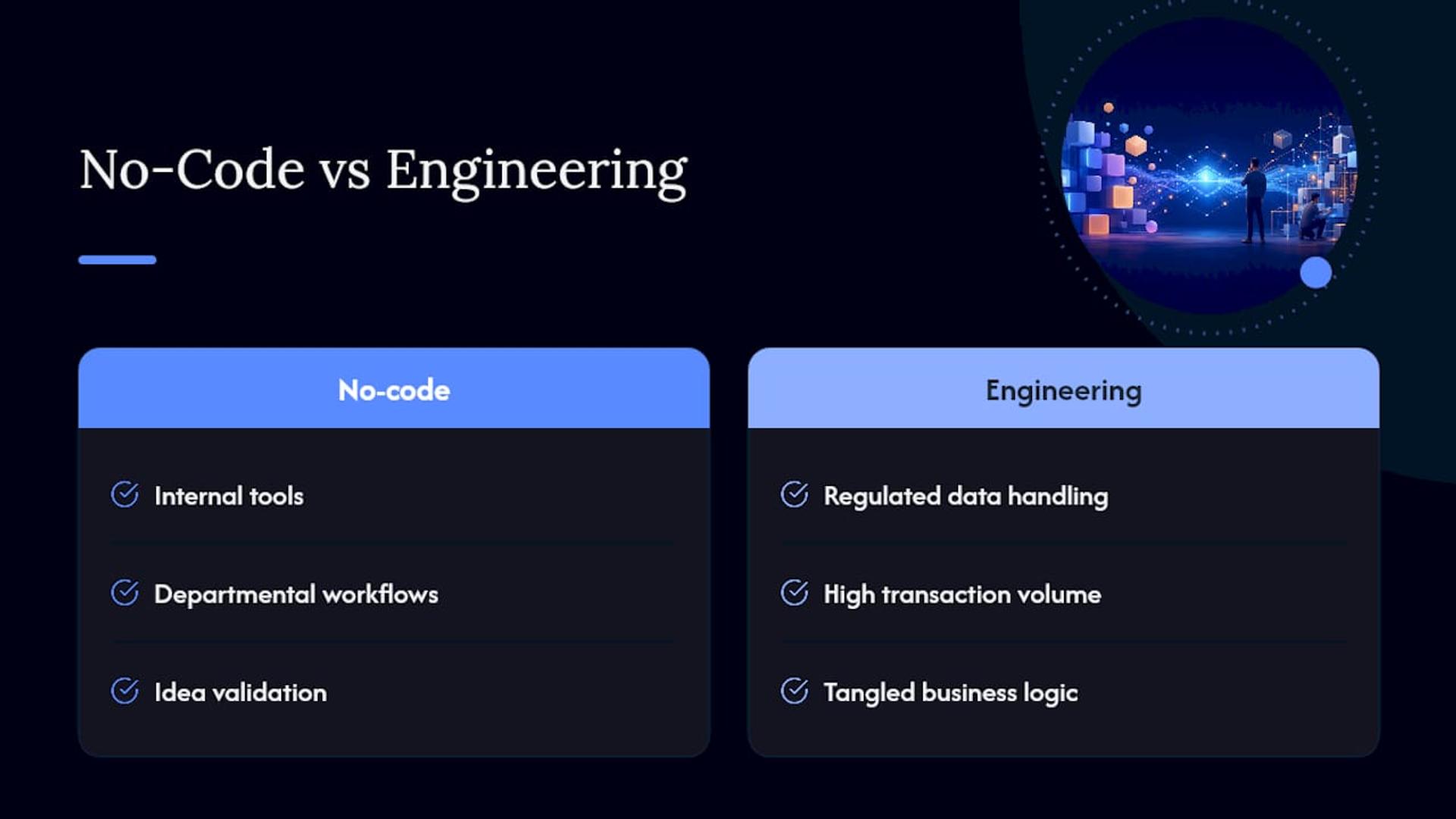
Where most advice falls short is treating the no-code versus custom-engineering decision as binary. It isn’t. The smartest teams use no-code to prove a concept fast, then bring in engineers once the stakes change, not after something breaks. That handoff point, tracked honestly, is the single most useful thing a non-technical builder can plan for from day one.
If you’re building something today, prioritize this: know your exit ramp before you need it. Ask whether your data can be exported, whether your logic could survive a rebuild, and whether the platform you picked was ever meant to carry the weight you’re about to put on it. For projects that need scalable, secure custom systems, that’s the moment worth planning for.
— Usama
Sources
- What Is No Code? | IBM
- EY insights on low-code/no-code and citizen delivery
- No-code development platform — Wikipedia