Avoid Hidden Cloud ERP Costs: Budget the 6 TCO Buckets
Avoid Hidden Cloud ERP Costs: Budget the 6 TCO Buckets ! Finance and IT leaders reviewing ERP cost terms Cloud ERP software is an enterprise resource planning system hosted and maintained by a vendor rather than on a company's own servers, and it delivers faster time to value with a lower upfront infrastructure burden than traditional installations.


Cloud ERP software is an enterprise resource planning system hosted and maintained by a vendor rather than on a company’s own servers, and it delivers faster time to value with a lower upfront infrastructure burden than traditional installations. Growing organizations, distributed teams, and companies that want continuous feature updates without a large IT footprint stand to gain the most. For everyone else, the decision still hinges on cost, control, and how much customization the business truly needs.
TL;DR:
- Choose SaaS when fast deployment and limited IT staffing matter; use private or hybrid hosting for data residency rules or extensive custom code.
- Budget beyond subscriptions for implementation, integration, training, and ongoing operations; negotiate an annual subscription increase cap and confirm whether test environments cost extra.
- Regulated businesses should request written recovery time and data loss commitments, recognized security certifications, and a security maturity score of at least 4.0.
- Vendor scheduled updates can force workflow changes, so track release notes and test critical processes; your team still owns permissions and data quality.
- Train by role, have leaders model system use, and appoint early power users; adoption problems can persist even when technical configuration works.
BitruptPlan ERP Integrations With ConfidenceBitrupt builds custom software and integrations, helping organizations address specific platform needs alongside their cloud ERP rollout.Explore Bitrupt’s engineering services
Table of Contents
- How Cloud ERP Works: Deployment Models and Architecture Basics
- Core Modules and Features to Evaluate
- Key Benefits and Business Outcomes
- Cloud vs. On-Premises ERP: A Deployment Checklist
- Security, Compliance, and Risk Considerations
- Cost and Total Cost of Ownership for Cloud ERP
- Implementation Steps and Vendor Selection Criteria
- Practical Use Cases and Current Trends
- How a Specialist Engineering Studio Supports Cloud ERP Projects
- Disaster Recovery and Business Continuity for Cloud ERP
- Realistic Expectations for Cloud ERP Success
- When Bitrupt Fits Alongside Your ERP Rollout
- FAQ
- Sources
How Cloud ERP Works: Deployment Models and Architecture Basics
Think of cloud ERP the way you’d think of renting a fully furnished office instead of constructing your own building: someone else maintains the plumbing, the electrical, and the structure, while you focus on running the business inside it. That’s the core shift from on-premises software, where your team owns every pipe and wire.
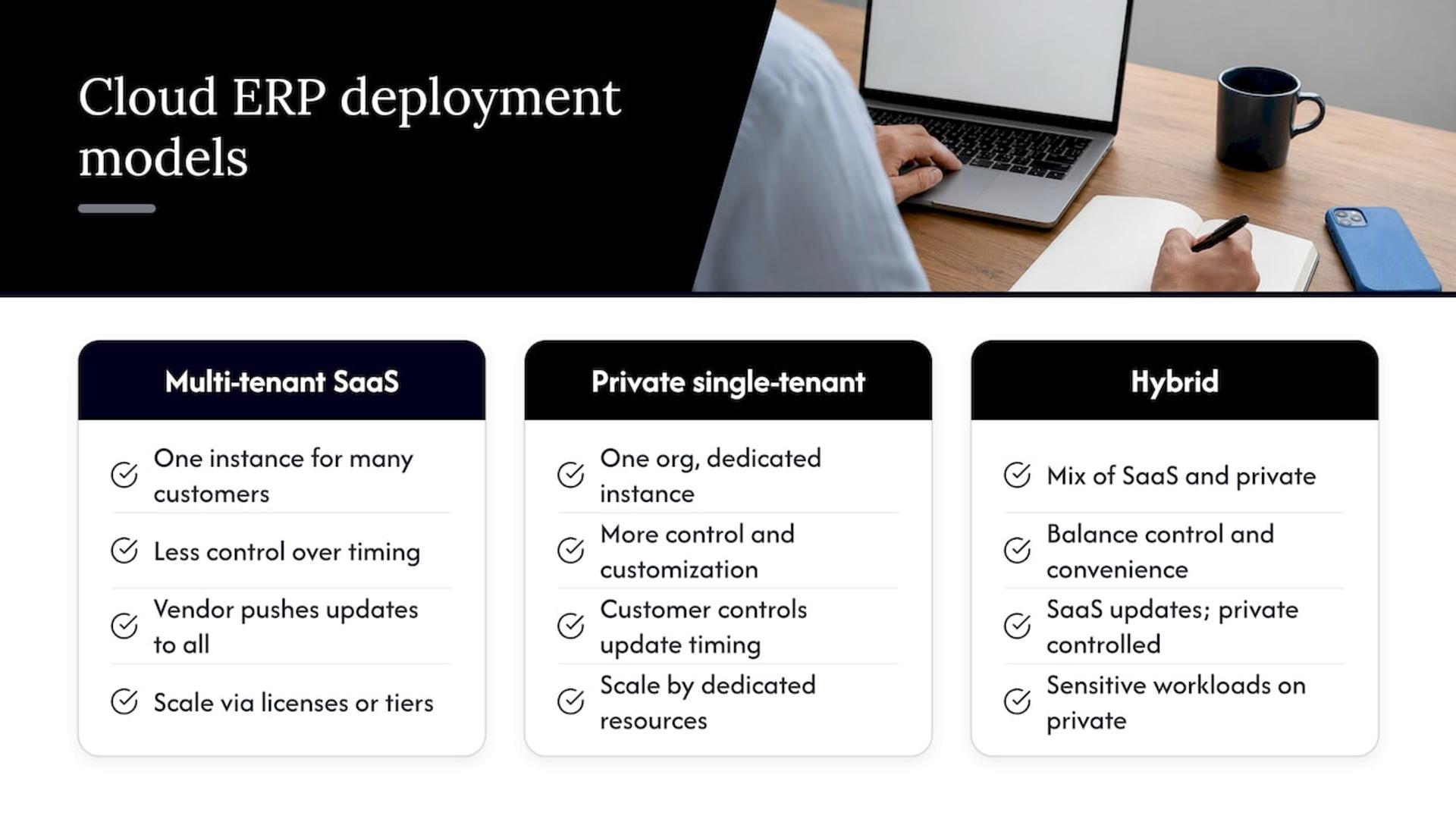
Most cloud ERP platforms run on a multi-tenant SaaS model: one software instance serves many customers, each with logically separated data, and the vendor pushes updates to everyone simultaneously. This keeps costs lower and upgrades frequent, but it also means less control over the timing of changes. Private single-tenant cloud hosting gives one organization its own dedicated instance, often chosen by companies with strict data residency or customization requirements. Hybrid setups mix the two, keeping sensitive workloads on private infrastructure while running standard functions through SaaS.
Scaling in these environments usually means adjusting user licenses or compute tiers rather than buying new servers. Updates arrive on a vendor schedule, sometimes quarterly, which keeps the system current but requires your team to track change logs and test critical workflows before each release.
Integration happens through APIs, middleware platforms, or integration-platform-as-a-service (iPaaS) tools that connect the ERP to e-commerce systems, banking feeds, or specialized software. Our team at Bitrupt’s data engineering services often sees integration complexity, not the ERP license itself, become the real cost driver. Governance still belongs to you: the vendor secures the infrastructure, but you own user permissions, data quality, and configuration decisions.
Core Modules and Features to Evaluate
A cloud ERP platform is really a collection of modules working off one shared database, so the first evaluation question is which modules actually map to your operations.
- Finance and accounting: general ledger, accounts payable and receivable, multicurrency handling, and automated financial close are the backbone most buyers start with.
- Inventory and warehouse management: real-time stock visibility, lot and serial number tracking, and bin-level location control matter most for product-based businesses.
- Supply chain and manufacturing: material requirements planning (MRP), production scheduling, and demand forecasting support companies that build or assemble goods.
- Sales, CRM, and order management: quote-to-cash workflows, pipeline tracking, and order fulfillment keep revenue operations connected to finance.
- HR and payroll: core workforce management typically lives in the ERP, though payroll often routes through region-specific third-party payroll providers due to tax complexity.
- Reporting and embedded analytics: dashboards, role-based reports, and increasingly AI-assisted forecasting turn transaction data into planning input.
- Mobility and extension frameworks: mobile access, low-code customization tools, and prebuilt connectors let you extend the system without custom coding every change.
Not every business needs every module on day one. A services firm might run lean on finance and CRM, while a distributor needs the full inventory and supply chain stack from the start. Mapping modules to actual workflows, rather than buying the broadest package available, keeps both cost and complexity in check.
Key Benefits and Business Outcomes
The benefits of cloud ERP tend to cluster around speed, flexibility, and reduced operational weight, though each comes with a trade-off worth naming honestly.
- Scalability: subscription pricing lets you add users or modules as you grow, rather than over-provisioning hardware years in advance.
- Faster deployment and vendor-managed operations: the vendor handles patching, backups, and uptime, freeing internal IT for higher-value work.
- Accessibility for distributed teams: browser and mobile access support remote staff and multi-location operations without VPN complexity.
- Process automation and a single ledger of record: standardized workflows reduce manual reconciliation across departments.
- Easier integration with analytics and AI platforms: modern connectors make it simpler to feed ERP data into forecasting or business intelligence tools.
The trade-offs are real: vendor lock-in can make switching costly later, mandatory upgrade cadences sometimes force process changes you didn’t plan for, and deep customization is often more limited than with an on-premises build.
Pro Tip: Before signing, ask the vendor exactly how much configuration (not custom code) their platform allows, since that single answer predicts most future frustration.
Cloud vs. On-Premises ERP: A Deployment Checklist
Choosing between cloud and on-premises ERP is less about which is “better” and more about which cost structure and control level fits your situation.
Cloud ERP converts a large capital expense into a predictable operating expense, which helps cash flow planning but reduces your ability to heavily customize the underlying code. On-premises systems demand bigger upfront investment in servers and licenses, plus an internal team to maintain them, but they give you full control over data residency and modification. Hybrid approaches let regulated or data-sensitive functions stay on private infrastructure while everything else runs in the cloud, and many companies use this as a staged path toward full cloud migration rather than an all-at-once leap.
Signals that point toward one model over another:
- Choose SaaS cloud ERP when you want fast deployment, minimal in-house IT staffing, and your industry has no strict data residency mandate.
- Choose private cloud when you need dedicated infrastructure for compliance reasons but still want the vendor managing hardware.
- Choose on-premises or hybrid when you operate in a tightly regulated environment, require heavy custom code, or already have sunk investment in infrastructure you’re not ready to retire.
- Choose a staged hybrid migration when you want to move function by function, starting with lower-risk modules like CRM before touching core financials.
Data residency rules, existing IT headcount, and appetite for custom development usually settle the question faster than price comparisons alone.
Security, Compliance, and Risk Considerations
Security is where cloud ERP claims deserve the most scrutiny, because “the vendor handles it” is not the same as “it’s handled well.”
A useful way to evaluate vendor security is across five domains: authentication and single sign-on, encryption of data at rest and in transit, access control granularity, vulnerability management practices, and incident response readiness. A security maturity assessment framework built on NIST CSF 2.0 and ISO/IEC 27001:2022 maps exactly these five domains and found that enterprise-grade platforms typically score higher on maturity than SME-targeted options, which matters when you’re comparing vendors of different sizes.
Look for concrete certification signals rather than marketing language:
- SOC 2 Type II attestation covering security, availability, and confidentiality controls over time.
- ISO/IEC 27001 certification demonstrating a formal information security management system.
- Industry-specific compliance, such as HIPAA alignment for organizations handling health data.
Zero-Trust principles, verifying every user and system connection rather than trusting anything inside the network perimeter, matter especially for ERP integrations, since each connected API or middleware tool is a potential entry point. Integration-related breaches, like the 2023 MOVEit incident that exposed third-party risk across connected systems, are a reminder that the ERP itself is rarely the weakest link.
For regulated industries, the same security framework recommends a minimum maturity score of 4.0 on its scale, a useful benchmark to request from vendors directly rather than inferring from their website copy. Our SOC 2 compliance checklist walks through the specific evidence to request during vendor evaluation.
Cost and Total Cost of Ownership for Cloud ERP
The subscription price on a cloud ERP quote is rarely the real cost of owning the system, and buyers who budget only for that number are almost always surprised.
A realistic total cost of ownership model covers six buckets: the subscription fee itself, implementation services, integration work, any supporting infrastructure, training and change management, and ongoing operations once the system is live.
- Subscription and licensing: the recurring per-user or per-module fee, usually the most predictable line item.
- Implementation services: configuration, data migration, and consultant time, which often dominate year-one spending.
- Integration: connecting the ERP to existing tools, frequently underestimated during initial scoping.
- Infrastructure: minimal for pure SaaS, higher for private cloud or hybrid setups.
- Training and change management: the human cost of getting staff to actually use the new system correctly.
- Ongoing operations: support contracts, periodic consulting, and the internal time spent administering the platform.
Buyers who focus only on software price routinely underestimate total five-year costs by a wide margin, since implementation and integration are the most variable buckets. Subscription escalation clauses, growing user counts, and custom development needs can flip the early cost advantage cloud ERP usually holds over on-premises systems by year three or four.
To reduce surprises during procurement, negotiate a cap on annual subscription escalation, clarify whether sandbox or test environments carry additional fees, and get a written scope for implementation hours before signing anything.
Implementation Steps and Vendor Selection Criteria
A cloud ERP rollout tends to follow a predictable sequence, and skipping steps to save time usually costs more later.
- Discovery and requirements gathering: map current workflows, pain points, and must-have modules before looking at any vendor demo.
- Vendor shortlisting and RFP: evaluate product fit, published roadmap, integration options, and security posture side by side.
- Contract and scoping: lock implementation hours, data migration responsibilities, and support service level agreements (SLAs) in writing.
- Configuration and data migration: move and cleanse historical data, configure workflows, and build necessary integrations.
- Testing and training: run parallel testing against old processes and train staff well before cutover.
- Go-live and stabilization: launch with a clear rollback plan and a support team on standby for the first weeks.
- Post-go-live optimization: refine reports, automate manual workarounds, and plan the next phase of modules.
Panorama Consulting’s 2026 ERP report found that SaaS deployments often shorten implementation timelines, sometimes significantly, though this depends heavily on scope and data complexity.
When meeting vendors or implementation partners, a compact set of questions cuts through sales language quickly: What does your product roadmap look like for the next two years? What are your standard support response times under the SLA? Which middleware or iPaaS tools do you certify for integration? Can you provide evidence of your SOC 2 or ISO 27001 status? Our vendor evaluation scorecard gives a structured way to score these answers instead of relying on gut feel.
Pro Tip: Budget at least as much time for change management and training as for technical configuration. The software rarely fails; adoption does.
Adoption succeeds when leadership models use of the new system publicly, training is role-specific rather than generic, and a small group of power users is identified early to support colleagues after go-live.
Practical Use Cases and Current Trends
Cloud ERP shows up most visibly in finance close cycles, demand planning, and inventory optimization, where automated workflows replace spreadsheet reconciliation and manual stock counts.
- Embedded AI for forecasting: many platforms now build anomaly detection and demand forecasting directly into reporting modules.
- SaaS-first adoption: Panorama Consulting’s 2026 report notes a strong and growing preference for SaaS deployment over on-premises alternatives.
- Composable, modular ERP: mid-market buyers increasingly mix best-of-breed modules rather than committing to one monolithic suite.
- AI-driven integration orchestration: as more systems connect to the ERP, orchestration strategies that coordinate AI agents across operations are becoming a practical pattern worth watching.
- Inventory-specific tooling: businesses with heavy physical stock needs are also pairing ERP with specialized platforms like cloud inventory software built for contractor and field-service use cases.
How a Specialist Engineering Studio Supports Cloud ERP Projects
Vendor partners handle the core ERP platform well, but custom connectors, data pipelines, and middleware between the ERP and your other systems often fall outside their scope. This is where an engineering studio adds value: building forecasting models, embedding machine learning into existing workflows, or constructing integration layers that the ERP vendor won’t touch.
We work through flexible delivery models, senior-engineer development pods or direct staff augmentation, so you can bring in exactly the capability you’re missing without a full hiring cycle. Bringing in engineering support alongside your ERP vendor makes the most sense when integration complexity or AI ambitions exceed what the platform’s standard toolkit offers.
Disaster Recovery and Business Continuity for Cloud ERP
A cloud ERP vendor’s infrastructure resilience doesn’t automatically mean your business continuity plan is covered. The two are related but distinct responsibilities, and confusing them is a common gap we see in procurement conversations.
Most cloud ERP vendors replicate data across multiple availability zones and maintain documented recovery time objectives (RTO) and recovery point objectives (RPO), the maximum acceptable downtime and data loss window after an incident. Ask any prospective vendor for their specific RTO and RPO commitments in writing, not as a general assurance.
Your own continuity plan still needs to address scenarios the vendor can’t control: what happens if your integration middleware fails independently of the ERP, how staff access critical functions during a prolonged outage, and who owns the decision to failover to a backup process. Regular recovery testing, not just reading the vendor’s disaster recovery documentation, is the only way to know these plans actually work under pressure.
Data backup frequency matters too. Confirm how often the vendor snapshots your data, how long backups are retained, and whether you can export a full copy on demand, independent of the vendor’s own recovery process. For regulated industries, this export capability can matter as much as the certifications discussed earlier, since regulators sometimes require proof that you can access your own data without vendor assistance.
Realistic Expectations for Cloud ERP Success
Cloud ERP rewards patience more than ambition. Set timelines that assume data migration will take longer than planned, and treat governance and vendor roadmap alignment as prerequisites, not afterthoughts. The single highest-leverage investment is building internal change management and integration capability before go-live, not after.
— Usama
When Bitrupt Fits Alongside Your ERP Rollout
When your cloud ERP project needs custom integrations, predictive models, or data pipelines your vendor’s standard toolkit doesn’t cover, we build that layer. Our services span AI and data engineering, enterprise software development, and staff augmentation with senior engineers who plug directly into your timeline.
Reach out through our enterprise software services page when integration complexity or AI extensions start to outpace what your ERP vendor can deliver alone.
FAQ
What is ERP software used for?
ERP software centralizes core business functions, finance, inventory, HR, and sales, into one shared database so departments work from the same data instead of disconnected spreadsheets. It’s used to automate transactions, standardize processes, and give leadership a consistent view of operations.
What are the five main ERP modules?
Most ERP systems are built around finance and accounting, inventory and supply chain management, human resources, customer relationship management (CRM), and reporting or analytics. Specific platforms may bundle or rename these, but these five functions form the common core most businesses evaluate first.
Is Microsoft Azure an ERP?
No, Microsoft Azure is a cloud computing and infrastructure platform, not an ERP system itself. Many ERP vendors run on Azure’s infrastructure, but Azure provides the hosting layer rather than the finance, inventory, or HR functionality an ERP delivers.
How does cloud ERP differ from on-premises ERP?
Cloud ERP is hosted and maintained by the vendor on a subscription basis, while on-premises ERP runs on servers the business owns and maintains internally. Cloud ERP typically means faster deployment and lower upfront cost, while on-premises offers deeper customization at the expense of higher capital investment and internal IT burden.
What should businesses budget for beyond the ERP subscription?
Beyond the subscription fee, businesses should budget for implementation services, integration work, training and change management, and ongoing operational support, since these buckets often account for the bulk of total five-year cost. Implementation services in particular tend to dominate spending during the first year.
Sources
- The 2026 ERP Report — Panorama Consulting Group
- Security evaluation framework for cloud ERP systems using NIST and ISO standards | Scientific Reports
- ERP TCO Calculator — True 5-Year Cost (2026 Guide)