What Is SaaS? A Plain-English Guide With Examples
What is SaaS? Learn how software as a service works, common SaaS examples, benefits, limits, pricing models, and how it differs from PaaS and IaaS.


SaaS, short for software as a service, is software you use over the internet on a subscription instead of buying it and installing it yourself. The provider runs the application on its own servers, keeps it updated, and you open it in a browser or mobile app. If you have ever checked Gmail, joined a video call, or saved a file to an online drive, you have used it. So what is SaaS in practice? It is the reason you can open the same document on a laptop at work and a phone on the train without installing anything.
This guide explains the idea without jargon: how SaaS works, the SaaS applications you already use, the benefits and limits, how pricing works, and how SaaS differs from PaaS and IaaS.
Bitruptbitrupt.coBuild a SaaS Product Around Your NeedsBitrupt builds custom software with end-to-end solutions for scalable, secure platforms, tailored to the needs of your product.Explore Bitrupt
TL;DR
- SaaS is cloud-based software delivered over the internet and paid for by subscription, with the provider handling servers, security patches, and upgrades.
- Everyday SaaS examples include web email, office suites, file storage, CRM, and ERP systems.
- The main SaaS benefits are low upfront cost, fast setup, access from any device, and automatic updates. The main tradeoffs are limited customization, integration work, and dependence on a vendor.
- SaaS is the most hands-off cloud model. IaaS gives you the most control, and PaaS sits in the middle.
- Pricing is usually a recurring fee, often per user or per plan tier, which turns a big one-time purchase into a predictable operating cost.
Table of Contents
- What is SaaS? A simple definition
- How SaaS works behind the scenes
- SaaS examples you probably already use
- Key features of SaaS applications
- SaaS benefits
- Limitations and tradeoffs to plan for
- SaaS pricing models
- SaaS vs. PaaS vs. IaaS
- How to choose a SaaS product
- Our perspective: when to buy SaaS and when to build it
- Build your own SaaS product with Bitrupt
- Putting SaaS to work
- FAQ
- Sources
What is SaaS? A simple definition
The U.S. National Institute of Standards and Technology describes SaaS as the capability to use a provider’s applications running on cloud infrastructure, reached through a thin client such as a web browser or through program interfaces, without the customer managing the underlying infrastructure.
That is the formal version. Here is the everyday one.
Analogy: Think of SaaS like renting an apartment instead of building a house. You get a place that works the day you move in. The landlord handles the plumbing, the roof, and the repairs. You pay monthly, and you can move out when your needs change. The tradeoff is that you cannot knock down a wall whenever you like.
Traditional software worked the opposite way. You bought a license, installed it from a disc or download on each computer, and handled updates yourself. SaaS flips that: the software lives with the provider, and you simply sign in.
Three ideas hold the model together:
- Cloud hosting. The application runs in the provider’s data centers or cloud environment, not on your machine.
- Subscription. You pay a recurring fee for access instead of buying the software outright.
- Internet-based access. You use it through a browser or app from any connected device.
How SaaS works behind the scenes
When you use a SaaS product, your browser or app sends a request over the internet. The provider’s servers process it and send back the result. Your device mostly displays the screen. The Open University describes this as an architectural shift, where significant processing moves from your local computer to the provider’s centralized cloud environment.
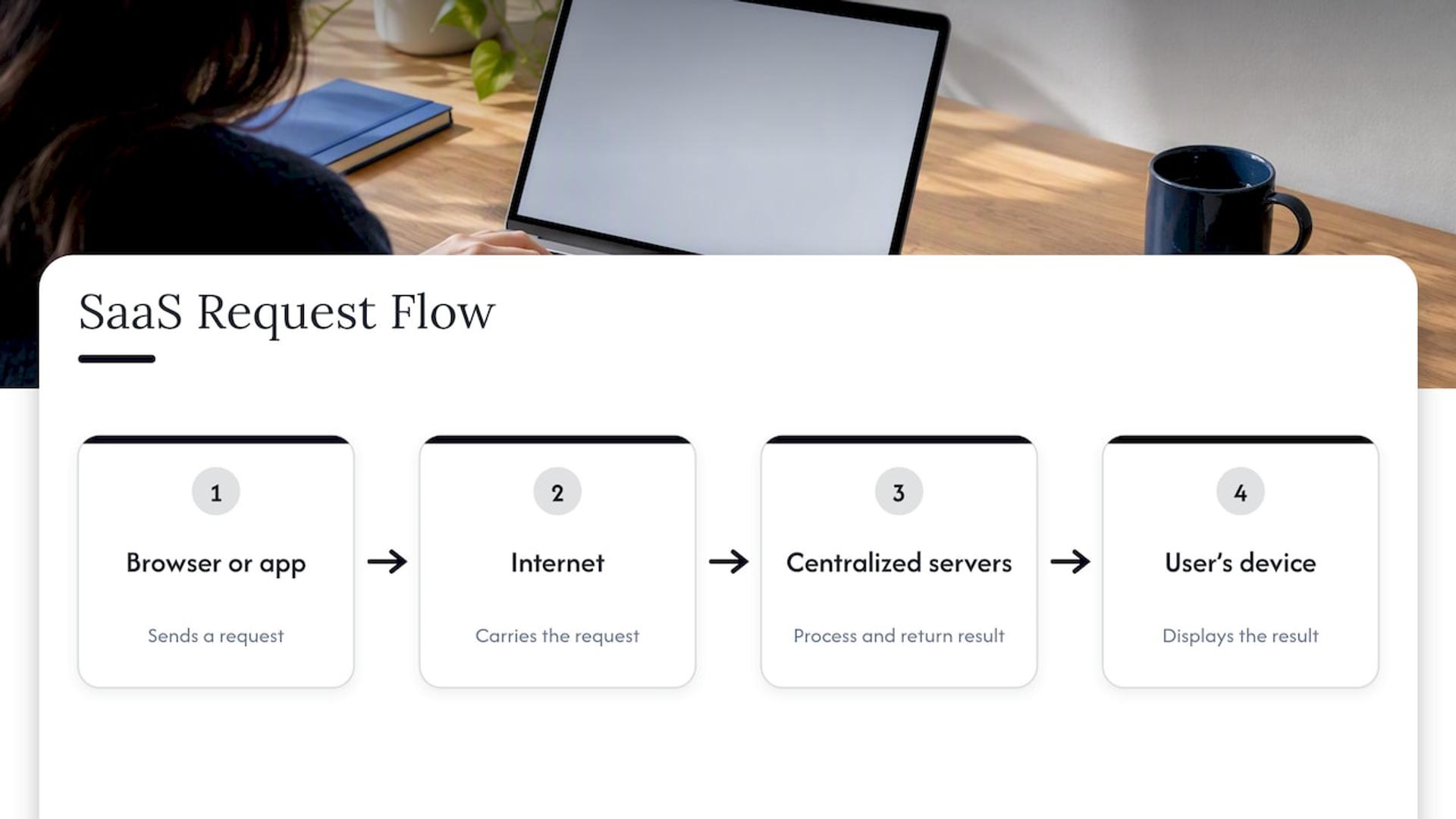
The provider takes on the heavy lifting. According to the U.S. General Services Administration, the vendor hosts the application, infrastructure, and data, and manages the hardware, software, middleware, security patches, and upgrades. You do not buy servers, schedule maintenance windows, or install patches.
Multi-tenancy in one paragraph
Most SaaS products use what is called a multi-tenant model. A single version of the software is hosted on the vendor’s servers and shared by many separate subscribers, while each customer’s data stays separate. Think of an apartment building: everyone shares the structure, but each household has its own locked door.
Why updates feel invisible
Because the provider controls one central version, it can release improvements to everyone at once. IEEE Technology Navigator points to continuous delivery as a key SaaS advantage, since security patches and new features reach all subscribers at the same time instead of following fragmented, customer-managed update schedules. That is why your favorite app can gain a feature overnight without you clicking “install.”
Uptime and contracts
SaaS vendors usually back their service with a Service Level Agreement. These agreements, according to AWS, define expectations for uptime, security, support, and data ownership. If you are choosing a tool for your business, read this document before you sign.
SaaS examples you probably already use
SaaS is not a niche. The GSA lists web-based email such as Gmail, office tools such as Microsoft Office 365, and enterprise applications such as CRM and ERP systems as common examples. The Open University adds consumer subscription services such as Netflix and Dropbox.
Here is how people sort SaaS applications by what they do.
| Category | What it does | Everyday example |
|---|---|---|
| Communication | Email, chat, video meetings | Web email like Gmail |
| Collaboration | Shared documents, spreadsheets, task boards | Online office suites like Microsoft Office 365 |
| Storage | Saves and syncs files across devices | Cloud drives like Dropbox |
| Entertainment | Streams media on demand | Netflix |
| Customer management | Tracks leads, deals, and support requests | CRM systems |
| Business operations | Finance, inventory, HR, supply chain | ERP systems |
How individuals use SaaS
For most people, SaaS means personal convenience. You write a document on your phone and finish it on your laptop. Photos back up automatically. A streaming service remembers where you stopped watching. If your laptop breaks, your work is not lost: the Open University notes that when local hardware fails, data stored in the cloud remains safe and accessible from other devices.
How businesses use SaaS
A ten-person company can run on SaaS end to end. Email and chat handle communication. A shared workspace handles documents and projects. A cloud drive stores files. An accounting tool handles invoices, and a CRM tracks every customer conversation. None of it requires an in-house server room or a full-time IT person to patch machines.
Larger organizations use the same pattern at scale, often with ERP systems that tie finance, inventory, and operations together. Specialized niches have SaaS too: workforce planning tools such as skills mapping and workforce analytics platforms help organizations see which capabilities their teams have and where the gaps are.
If you are weighing a customer-management tool, our overview of custom CRM development shows what tailoring one to your workflow looks like. For a budgeting view of enterprise systems, see how to budget the cost buckets of a cloud ERP.
Key features of SaaS applications
Most cloud-based software that qualifies as SaaS shares a handful of traits:
- Browser or app access. Nothing to install in most cases, or just a lightweight app.
- Subscription billing. Recurring payments, typically monthly or annual.
- Provider-managed maintenance. Hosting, security patches, and upgrades are not your job.
- Multi-tenant architecture. One shared platform serving many customers.
- Scalability. You can add or remove users and features as needs change. AWS notes that the subscription model lets businesses scale their use of software up or down.
- Integrations. Many products connect to other tools through program interfaces, so data can flow between your email, CRM, and billing system.
- Support and SLAs. A defined level of uptime and help from the vendor.
SaaS benefits
The appeal of SaaS comes down to removing work and risk from the buyer.
Lower upfront cost. The GSA lists minimal upfront costs and no need to purchase, install, update, or maintain hardware, middleware, or software among the main advantages. AWS likewise points to lower upfront costs and rapid deployment, because installation and configuration are eliminated.
Quick setup. Many tools go from signup to first use in minutes. There is no procurement cycle for servers.
Access from anywhere. Teams can reach their data and applications from any internet-connected device. The GSA notes this lets organizations mobilize their workforce without specialized mobile security expertise.
Automatic updates. You always use the current version, with fixes and features delivered by the provider.
Flexible scale. Add a seat when you hire. Drop a plan when a project ends.
Better focus. When no one on your team is babysitting servers, they can spend that time on the work that makes your business money. The same logic applies to marketing: tools that automate keyword research and publishing, such as those covered in this look at SaaS SEO growth benefits, let a small team do work that once needed a larger one.
Limitations and tradeoffs to plan for
SaaS is the right choice for many jobs. Good buyers also go in knowing where the model asks for compromise, so they can choose well and set the product up properly.
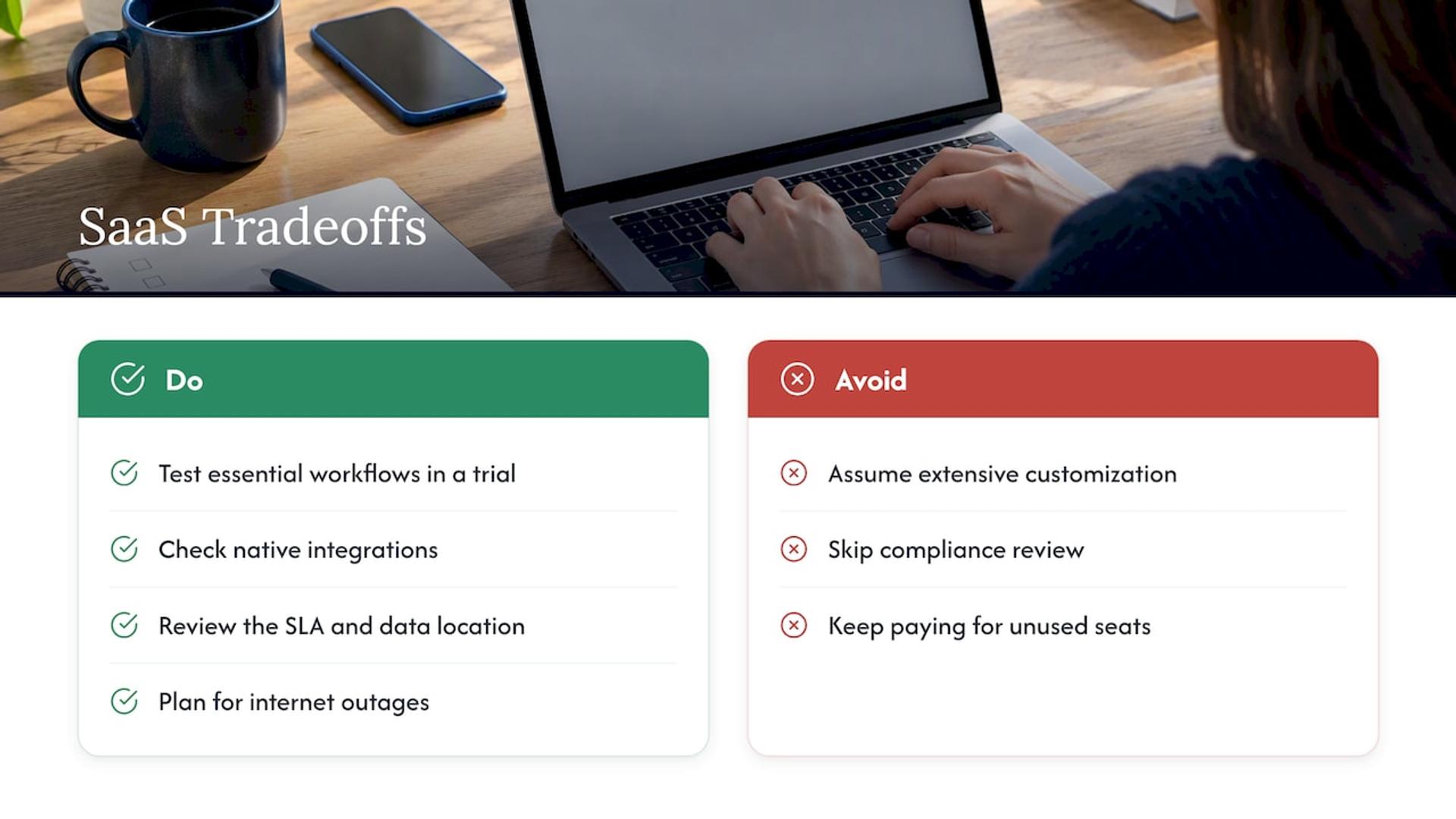
Customization. IEEE Technology Navigator notes that SaaS introduces architectural tradeoffs around customization, integration, and data sovereignty. A shared product is built for many customers, so you configure it more than you reshape it. Before you commit, list the three workflows you cannot live without and test them in a trial.
Integration. Your tools need to talk to each other. Check which connections a product supports natively and which need custom work through its program interfaces.
Data location and ownership. Know where your data is stored and who owns it. The vendor’s SLA is the place to look, since these agreements define expectations for uptime, security, support, and data ownership. If you work in a regulated field such as healthcare or finance, ask your compliance team to review the terms before you sign.
Connectivity. SaaS needs the internet. Plan for what your team does during an outage, and check the uptime commitments in the contract.
Recurring cost. A subscription is cheap to start, and it keeps being billed. Review seat counts a couple of times a year and cancel what nobody uses.
When off-the-shelf tools stop fitting, many companies add a custom layer: a tailored dashboard, a connector between two products, or a purpose-built platform. That is where a development partner earns its keep.
SaaS pricing models
SaaS changes how software shows up on your books. IEEE Technology Navigator explains that it converts software costs from capital expenditure to operational expenditure through recurring subscription fees. Instead of one large purchase, you have a regular expense you can predict.
Vendors package that fee in a few common ways:
- Per-user pricing. You pay for each person who needs an account. Simple to budget, and it grows as your team grows.
- Tiered plans. Basic, standard, and premium plans unlock more features, storage, or support as you move up.
- Usage-based pricing. You pay for what you consume, such as messages sent, records stored, or processing time.
- Flat-rate pricing. One price for the whole product, regardless of how many people use it.
- Freemium. A free entry plan with paid upgrades for advanced features.
Many vendors also discount annual billing compared with monthly billing. Exact prices vary widely by product and change often, so check the vendor’s current pricing page before you decide.
A practical way to compare options: estimate your total cost over a year, including extra seats, add-ons, integrations, and the staff time needed to set it up. The cheapest sticker price is not always the cheapest tool.
SaaS vs. PaaS vs. IaaS
SaaS is one of three main cloud service models. The difference is how much you manage yourself and how much the provider handles.
Microsoft Azure’s explanation frames it this way: IaaS offers the most control, with customers managing operating systems and data while the provider handles hardware. PaaS lets customers manage applications and data while the provider handles the runtime and infrastructure. SaaS is the simplest, with the provider managing everything including the application itself.
| Model | What you get | You manage | Provider manages | Who typically uses it |
|---|---|---|---|---|
| IaaS (infrastructure as a service) | Virtual servers, storage, networking | Operating systems, applications, data | Physical hardware | IT teams building custom environments |
| PaaS (platform as a service) | A ready platform to build and run apps | Your applications and data | Runtime and infrastructure | Developers who want to skip server setup |
| SaaS (software as a service) | A finished application | Your own settings and content | Everything else | Anyone who just needs to use the software |
Analogy: Imagine you want pizza. IaaS is buying the ingredients and renting a kitchen. PaaS is a kitchen with the oven and tools ready, where you bring the recipe. SaaS is ordering the pizza and eating it.
Azure frames the choice as a tradeoff of control: IaaS provides maximum management control, while SaaS prioritizes ease of use and convenience. If you want to use a tool, pick SaaS. If you are building one, you will likely touch PaaS or IaaS underneath.
SaaS vs. “cloud computing”
People often use the terms as if they were the same thing. Cloud computing is the broad idea of using remote computing resources over the internet. SaaS is one way of delivering it, focused on finished applications. Our guide to cloud application development covers the building side of that world.
How to choose a SaaS product
A short checklist keeps the decision grounded:
- Define the job. Write down what the tool must do, and which of those tasks are daily.
- Count the users. Know how many people need access, and at what level.
- Check integrations. Confirm it connects with the tools you already run.
- Read the SLA and data terms. Look at uptime, support, and data ownership.
- Run a trial with real work. Use your own data and your real workflows, not the demo.
- Plan the exit. Ask how you can export your data if you leave.
Our perspective: when to buy SaaS and when to build it
We see SaaS from both sides. Teams come to us as buyers who have outgrown a tool, and as founders who want to launch a SaaS product of their own.
For most everyday needs, buy. Email, chat, storage, and accounting are solved problems, and a subscription is the sensible answer. The moment to look at custom work is when your process is the thing that sets you apart, when a regulated industry demands specific controls, or when you are stitching together so many tools that the glue is becoming a product in itself.
That is also the moment many founders decide to become the SaaS vendor. Building a multi-tenant product with single sign-on and room to scale is a different job from building an internal tool. It rewards senior engineers who have done it before. We work only with senior engineers, and our teams support healthcare, fintech, marketplace, ed-tech, and AI-driven products. If you are exploring that path, our write-up on SaaS application development covers architecture and cost, and our SaaS and B2B software development page shows how we approach it.
Usama
Build your own SaaS product with Bitrupt
If you are past the “which tool should I rent” stage and ready to build a product of your own, we can help. Bitrupt is a global engineering studio. We build web platforms, mobile apps, AI and data products, and enterprise software, and we offer flexible engagements such as development pods and staff augmentation with senior engineers.
Start with our web platform development service if your SaaS product will live in the browser, or talk to us through our main site about the right engagement for your project.
Putting SaaS to work
So, what is SaaS at its core? It is software delivered as a service: hosted by the provider, paid for by subscription, and used through the internet. That one idea explains the whole category, from the email you open each morning to the ERP system that runs a large company’s operations.
For beginners, a simple rule helps. If you only need to use software, SaaS is usually the quickest and most economical route. Check customization limits, integrations, data terms, and total yearly cost before you commit. If your needs are unusual, or you want to sell software yourself, that is when custom development becomes worth a conversation.
FAQ
What does SaaS stand for?
SaaS stands for software as a service. It describes applications that a provider hosts in the cloud and customers use over the internet, usually by subscription, without installing or maintaining the software themselves.
Is SaaS the same as cloud computing?
Not exactly. Cloud computing is the broad practice of using remote servers and services over the internet. SaaS is one model within it, where the service delivered is a complete application. IaaS and PaaS are the other two main models.
What are some common SaaS examples?
Web email such as Gmail, online office suites such as Microsoft Office 365, cloud storage such as Dropbox, and streaming services such as Netflix are all familiar SaaS applications. In business, CRM and ERP systems are the standard examples.
Is SaaS safe for business data?
It can be, but it depends on the vendor and your setup. The provider manages security patches and upgrades, and its SLA defines expectations for security and data ownership. Review those terms, and ask your compliance or security lead to check them if you handle regulated data such as health or financial records.
How is SaaS different from PaaS and IaaS?
With SaaS, the provider manages everything and you use a finished application. With PaaS, you manage your own applications and data on a platform the provider runs. With IaaS, you manage operating systems, applications, and data on infrastructure the provider supplies.
Sources
- Software as a Service (SaaS) - Glossary, NIST CSRC
- Software as a Service (SaaS), GSA Cloud Information Center
- What is SaaS? Software as a Service Explained, AWS
- An introduction to web applications architecture, The Open University
- Software as a service, IEEE Technology Navigator
- What are IaaS, PaaS, and SaaS? Microsoft Azure