What Is Automation Testing? A Practical Guide for Teams
What Is Automation Testing? A Practical Guide for Teams !


Automation testing is the practice of using software to run tests on other software and compare the actual results with the expected ones, with no person clicking through each step. A script opens the app, performs an action, checks the outcome and reports pass or fail. Microsoft’s training material describes it the same way: software executes the code and checks the results against what you expected. Done well, it gives your team fast, repeatable answers every time the code changes.
This guide explains how it works, which tests to automate, which to leave to people, and how to start without building a pile of brittle scripts.
BitruptBuild Software With Quality in MindBitrupt builds custom, scalable software platforms for teams that need reliable applications across healthcare, fintech, marketplaces, AI and ed-tech.Explore Bitrupt
TL;DR
- Automation testing means tools and scripts execute tests and compare actual results with expected results, so checks run the same way every time.
- It shines for repetitive, tedious and error-prone checks such as regression, API and smoke tests. People are still better at judging whether software feels right.
- The real costs are writing and maintaining test code. Flaky, overlong scripts are the usual way projects go wrong.
- Start small: pick a tool, define scope, automate a handful of high-value tests, run them in your CI/CD pipeline, and maintain them as the product changes.
- Plan automation early in the project, not after launch.
Table of Contents
- How automation testing works
- Automation testing versus manual testing
- Benefits you can expect
- Challenges to plan for
- Which tests to automate first
- What should stay manual
- Main types of automation testing
- The automation testing process in five steps
- How automation fits CI/CD and your testing strategy
- Our perspective
- Work with a team that builds the safety net with you
- FAQ
- Sources
How automation testing works
Every automated test follows the same loop. You set up a known state, perform an action, and assert that the result matches what you expect. A test runner executes many of these in sequence or in parallel and produces a report.
Take a signup form. A manual tester fills in the fields, submits and checks that a confirmation appears. An automated test does the same through code: it drives a browser or calls an API, fills the same data, and asserts that the confirmation text or response code is correct. Run it once and you have saved a few minutes. Run it on every code change for a year and you have a safety net.
Two ideas matter here:
- Verification versus validation. TechTarget notes that automated testing excels at verification, meaning checking that logic and calculations are correct, while manual testing is stronger at validation, judging whether the software meets user expectations.
- The tester is separate from the thing being tested. The tools that run the tests are software of their own, which means they also need code review, versioning and upkeep.
Automation testing versus manual testing
The two are partners, not rivals. In manual testing a person follows steps and observes. In automated testing tools and scripts execute the steps. Perforce summarizes the trade-off this way: manual testing handles complex scenarios better, while automation is faster and more efficient.
| Factor | Manual testing | Automation testing |
|---|---|---|
| Who or what runs it | A person | Scripts and tools |
| Best for | Exploring new features, usability, judgment calls | Repetitive checks, regression, data-heavy checks |
| Speed on repeat runs | Slow, grows with scope | Fast, runs unattended |
| Consistency | Varies with attention and fatigue | Same steps every run |
| Upfront effort | Low | Higher: tools, scripts, environments |
| Ongoing effort | Time per run | Maintaining scripts as the product changes |
The Air Force Institute of Technology’s report on automated testing practices lists the main benefits as faster testing, repeatability, consistent verification and better coverage, which lets manual testers spend their time on exploratory testing. That last point is the one teams most often miss. Automation is not there to remove testers. It is there to stop them spending afternoons on the same checkout flow.
Benefits you can expect
Speed and repeatability. A suite that takes a person two days can run in minutes, as often as you like.
Safer change. The U.S. Geological Survey’s software guidance says that writing automated tests throughout a project’s life encourages better software design and lets teams innovate with less risk of breaking existing features. Tests become the reason you can refactor without fear.
Better coverage. Machines happily run thousands of data combinations that no one would check by hand.
Earlier feedback. When tests run on every commit, a bug surfaces minutes after it is written, while the developer still remembers the change.
Realistic expectations on payoff. The AFIT report cites research putting productivity gains from effective automation at roughly 5 to 25 percent of overall development effort. That is meaningful, but it is not magic. Treat any vendor promise of 90 percent savings with suspicion.

Challenges to plan for
Automation is an investment in code, and code needs care. Microsoft’s guidance notes that developers may need to spend more time writing and maintaining test code. Three problems show up again and again:
- Flaky tests. The Selenium project’s documentation warns that browser-based automation can become flaky when too much is demanded of it, especially through race conditions between the browser and the driver. A test that sometimes fails for no reason teaches the team to ignore red builds.
- Long scripts. The same documentation advises breaking long browser workflows into independent, fast tests, because long scripts are slow and sensitive to page-rendering timing.
- Neglected maintenance. Interfaces change. If nobody owns the suite, it decays into noise.
Analogy: an automated suite is like a smoke detector. It only protects you if the batteries are checked. A detector that beeps for no reason gets pulled off the ceiling.
Which tests to automate first
A useful rule from the Project Management Institute’s Disciplined Agile guidance: prioritize tests that are time-consuming, error-prone and tedious. That points to a practical shortlist:
- Smoke tests. A small set that checks the most important functions of the system, run on every build.
- Regression tests. Checks that code changes have not broken existing behavior. These are the classic automation win.
- API tests. Fast, stable and cheap to run, because they skip the browser. If you build services, our guides to contract-first API test automation and API contract testing with CI/CD steps walk through the setup.
- Data-driven checks. Calculations, pricing rules and validations that need many input combinations.
- Critical user journeys. A few end-to-end flows such as sign-in and checkout, kept short and independent.
For a step-by-step first week, see our guide on what to test first in QA automation.
What should stay manual
The web.dev testing guide notes that manual testing remains essential as a precursor to automation and when automated tests would be too unreliable, too broad or too unwieldy to write. In practice, keep people on:
- Exploratory testing of new features, where the goal is to find the unexpected.
- Usability and visual judgment: does this feel right, is this confusing?
- One-off checks that will never repeat.
- Anything whose expected result you cannot yet define.
Acceptance testing can go either way, depending on how stable the criteria are.
Main types of automation testing
The AFIT report covers unit, integration, regression, system and smoke testing. NASA’s software engineering handbook adds acceptance, API and UI testing to the list of commonly automated types.
| Type | What it checks | Typical speed |
|---|---|---|
| Unit | One function or component in isolation | Milliseconds |
| Integration | How modules or services work together | Seconds |
| API | Requests and responses of a service | Seconds |
| Regression | That old behavior still works after a change | Minutes |
| Smoke | The most critical functions after a build | Minutes |
| System / UI end to end | The whole product through its interface | Minutes to hours |
| Acceptance | That requirements are met | Varies |
A healthy suite looks like a pyramid: many fast unit tests, a moderate layer of integration and API tests, and a few end-to-end tests at the top. Inverting it, with hundreds of slow browser tests and almost no unit tests, is the fastest route to a flaky, expensive suite. Mobile products add device and OS variety, which we cover in our mobile app test automation guide.
Testing is not limited to application code either. Teams that publish content-heavy sites also automate checks on structured data, and a practical walkthrough of schema testing automation shows how that kind of validation can run alongside your other checks.
The automation testing process in five steps
TechTarget describes the typical process as selecting a tool, defining scope, planning and developing scripts, executing them, and maintaining them as the software evolves. Here is how we would apply that.
- Choose the tool to fit your stack. Match the tool to your language, your platforms (web, mobile, API) and your team’s skills. A tool your engineers will not touch is worse than a plain one they will.
- Define scope. List the flows that carry the most business risk. Write down what you will not automate yet.
- Plan and build the scripts. Keep each test independent, short and named for the behavior it protects. Use stable selectors and avoid fixed waits.
- Execute in a pipeline. Run tests on every pull request and before every release, not from a laptop on Fridays.
- Maintain. Fix or delete flaky tests quickly, review failures weekly, and update scripts in the same change as the feature.
PMI advises planning test automation at the earliest stages of development, across unit, integration and functional or acceptance levels. Retrofitting automation onto an app that was never designed to be testable is possible, but it costs more.
How automation fits CI/CD and your testing strategy
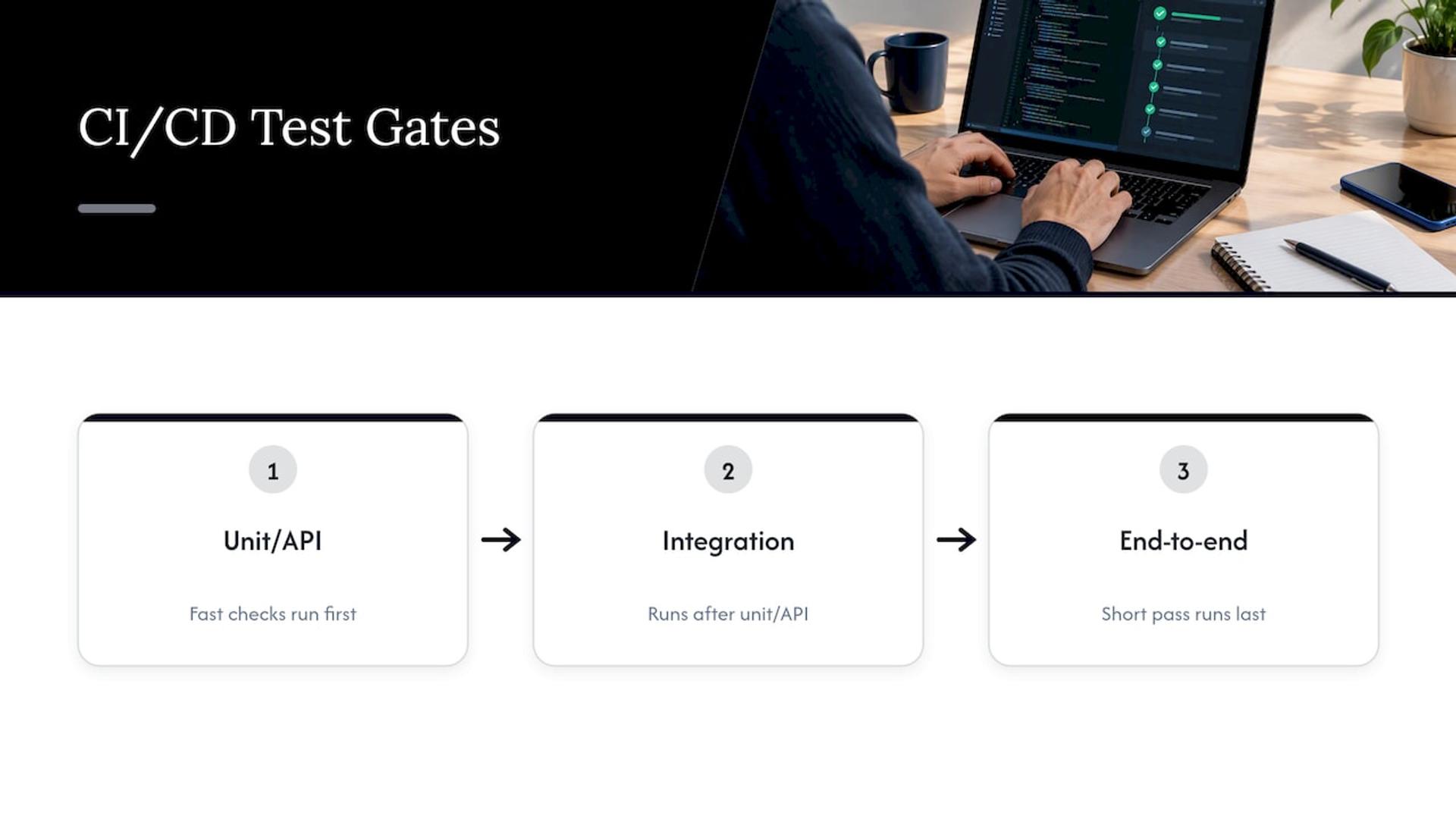
Automated testing is a foundational part of DevOps and Agile, supporting continuous integration and continuous delivery, as the AFIT report puts it. In a CI/CD pipeline, tests act as gates. Fast unit and API checks run first, then integration, then a short end-to-end pass. If any gate fails, the build does not move forward.
For higher-stakes software, independence matters too. NASA’s handbook lists as a best practice for its higher-classification projects formal testing planned and conducted by an independent organization outside the development team. Most commercial products do not carry that bar, but the principle is worth borrowing for payments, health data and anything regulated: people who did not write the code should have a say in how it is checked.
If you want a plan with milestones, our 12-month test automation roadmap shows how to sequence the work and prove return on investment as you go.
Our perspective
Most teams that tell us automation “did not work” skipped the analysis. They bought a tool, recorded a few hundred browser clicks and never decided what the suite was for. It is like buying a Ferrari for a farm: impressive, and wrong for the terrain.
We start from risk. What breaks your business if it breaks? For a healthcare platform that is patient data and scheduling. For a fintech product it is money movement and reconciliation. For a marketplace it is checkout and payouts. We automate those paths first, in layers, and keep humans on exploratory work where judgment beats scripts.
This is why we staff engagements with senior engineers only. Test architecture decisions, such as what to mock, where to draw contracts and how to keep suites fast, are hard to fix later. Getting them right in the first weeks means your release gates stay trusted instead of ignored.
If your team is shipping faster than it can verify, that is the moment to build the net, not after the first painful incident.
Usama
Work with a team that builds the safety net with you
At Bitrupt we offer quality engineering that covers test automation, exploratory testing and accessibility, alongside cloud and DevOps work such as CI/CD. Whether you need a pod to build the suite from scratch or senior engineers to join your team, we scope it around your product and your release process. Learn more on our quality engineering page, or see what QA as a service covers and when it fits.

Ready to talk about your own pipeline? Contact Bitrupt and tell us what you ship and how often.
FAQ
Is automation testing the same as automated testing?
Yes. The terms are used interchangeably, along with test automation. All describe using software tools and scripts to execute tests and compare actual outcomes with expected ones.
Can automation testing replace manual testing?
No. Automation handles repeatable verification well, but people are better at judging usability and exploring new features. The strongest teams use automation to free testers for exploratory work, as the AFIT report describes.
What is the best first test to automate?
Start with a smoke test of your most critical function, then add regression checks for areas that break often. Prefer API-level tests where you can, because they are faster and more stable than browser tests.
Why do automated tests become flaky?
Common causes include timing problems between the browser and the driver, long scripts that depend on page rendering, and tests that share state. Keeping tests short and independent reduces the risk, as the Selenium documentation advises.
Sources
- What is automated testing? (Microsoft Learn)
- Know when to choose automated vs. manual testing (TechTarget)
- Manual Testing vs. Automation Testing (Perforce)
- Automated Software Testing Practices and Pitfalls (AFIT)
- Testing and Automation (U.S. Geological Survey)
- Overview of Test Automation (Selenium)
- Practice: Issues of Quality (PMI Disciplined Agile)
- What testing is (web.dev)
- SWE-066 Perform Testing (NASA Software Engineering Handbook)
- Automated testing (TechTarget)
- Schema Testing Automation: A Practical Guide for SEO Teams