QA Automation: What to Test First and How to Start This Week
QA Automation: What to Test First and How to Start This Week ! QA engineer reviewing an automated test run QA automation runs repeatable tests automatically, using scripts and tools instead of a person clicking through the same steps every release.


QA automation runs repeatable tests automatically, using scripts and tools instead of a person clicking through the same steps every release. The core payoff is speed combined with consistency: teams using qa test automation catch regressions earlier, free up human testers for exploratory work, and release with more confidence. This guide walks through how to start, what to automate first, and which tools fit a beginner team.
TL;DR:
- Automate the five manual test cases your team repeats every release first; defer unstable features, one time migrations, and checks that depend on human judgment.
- Run fast smoke checks on every commit, schedule slower regression suites nightly, and add API tests when backend contracts need coverage without browser overhead.
- Set success measures before scripting, design reusable test structure, and reserve time to repair flaky checks or retire obsolete tests as software changes.
- Choose tools around your team’s existing language, test target, and CI support: Playwright suits fresh cross browser web suites, while Postman handles API checks.
- Favor fast unit tests, add fewer integration checks, and keep end to end tests rare because they run slowly and fail more easily.
BitruptBuild More Reliable SoftwareBitrupt builds custom software and supports ongoing enhancements, helping teams develop scalable, secure platforms tailored to their needs.Explore Bitrupt
Table of Contents
- What is QA automation and why do teams adopt it?
- Manual vs automated testing: when to use each
- What to automate first: regression, smoke, API, and performance tests
- The QA automation process: from tool choice to maintenance
- Popular tools: Selenium, Cypress, Playwright, Postman, and Jenkins
- Benefits and challenges of QA automation
- Best practices and the testing pyramid
- How we support teams building QA automation
- Real-world patterns in QA automation projects
- Three steps to start QA automation this week
- Get started with QA automation support from Bitrupt
- FAQ
- Sources
What is QA automation and why do teams adopt it?
Think of qa automation the way you’d think of a thermostat instead of someone manually checking the room temperature every hour. Once it’s set up correctly, it works in the background, flags problems the moment they appear, and never gets tired of repeating the same check. In software terms, qa automation testing means writing scripts that execute test cases, compare actual results to expected ones, and report failures without a human driving every click.
Teams don’t adopt automation because it sounds impressive. They adopt it because manual regression testing before every release becomes a bottleneck as an application grows. A few common triggers push teams toward automation:
- Release cycles are shortening and manual regression can’t keep pace with weekly or daily deployments.
- The application has grown large enough that testing everything by hand takes days, not hours.
- Bugs keep slipping into production because the same areas get skipped when testers run short on time.
- The team wants automated checks wired into continuous integration testing so failures surface before code merges.
None of this is free. Building a reliable suite takes real engineering time, and a rushed automation effort can produce a pile of brittle tests that break on every minor UI change. The SSTQB/ISTQB Test Automation Strategy syllabus frames automation as an investment that requires planning and ongoing maintenance, not a one-time purchase. That framing matters for beginners: treat the first few weeks as setup, not output.
Manual vs automated testing: when to use each
Manual and automated testing aren’t rivals competing for the same job. They’re better understood as two specialists on the same crew, each suited to different work. Here’s a simple way to decide which one applies:
- Ask if the test is repetitive. If you’ll run the same steps on every release, it’s a strong automation candidate.
- Ask if human judgment matters. Exploratory testing, visual design review, and usability checks depend on a person noticing something “feels off,” which scripts can’t detect.
- Ask how often the underlying feature changes. Features still in active design should stay manual until the UI stabilizes, since automating too early means rewriting scripts constantly.
- Ask about data volume. Testing the same workflow across dozens of input combinations is tedious by hand and trivial for a script.
- Ask about urgency and one-off need. A test you’ll run exactly once, for a feature shipping once, rarely justifies the setup cost of automation.
Manual testing remains the right tool for new feature exploration, accessibility walkthroughs, and anything requiring subjective judgment about user experience. Automation earns its keep on repeatable, well-defined checks like login flows, checkout paths, and data validation rules that don’t change week to week. Most mature QA teams run both in parallel rather than picking one approach exclusively.
What to automate first: regression, smoke, API, and performance tests
Not every test deserves automation on day one. Beginners get the best return by prioritizing test types in a specific order.
- Regression tests come first. They verify that existing features still work after new code ships, and they’re exactly the kind of repetitive check that burns the most manual hours.
- Smoke tests run next as a fast gate early in the pipeline, confirming the build didn’t break core functionality before anyone invests time in deeper testing.
- API tests validate backend contracts and data responses without needing a browser, making them faster and more stable than UI tests. Our guide on contract-first API test automation covers this approach in detail.
- Performance and load tests matter once traffic patterns or scaling concerns become real; automating them lets you simulate thousands of users without hiring thousands of testers.
Hold off on automating tests tied to features still in flux, one-time migrations, or purely visual judgment calls. These change too often or require human eyes to be worth scripting early.
Pro Tip: Start with the five most-repeated manual test cases your team runs every release. That short list usually delivers the fastest visible ROI.
The QA automation process: from tool choice to maintenance
A reliable automation practice follows a sequence, not a scramble. Skipping steps here is the single biggest reason automation efforts stall after a strong start.
- Set goals and success metrics first. Decide what “working” looks like: target code coverage, acceptable test run time, and a flakiness threshold (for example, a test that fails intermittently more than a small percentage of runs gets flagged for review).
- Choose tools based on fit, not popularity. According to TestAutomationPro’s guidance on CI/CD integration, tool choice should prioritize compatibility with your continuous integration testing setup and your team’s existing language skills over whichever tool is trending.
- Design the test automation framework (TAF) before writing scripts. The CT-TAS syllabus recommends building a framework with clear structure, reusable components, and traceability back to requirements, so tests remain maintainable as the suite grows.
- Write scripts with hygiene in mind. Reusable helper functions, consistent naming, and separated test data keep scripts readable for the next engineer who touches them.
- Integrate tests into your pipeline. Wire automated tests into CI/CD so they run on every pull request or merge, acting as a quality gate rather than an afterthought.
- Maintain the suite continuously. Retire obsolete tests, fix flaky ones promptly, and budget ongoing time for this work rather than treating maintenance as optional.
A few practical habits make each step easier:
- Keep environment and test data setup scripted, not manual, so tests run the same way every time.
- Schedule slower suites (like full regression) to run on a timer or nightly, while fast smoke tests run on every commit.
- Parallelize test execution where your CI tool supports it to keep pipeline run times reasonable as the suite grows.
- Document which tests gate a release versus which are informational only.
Our 12-month test automation roadmap walks through this sequencing in more depth, including how to set realistic milestones for a team just getting started. For API-heavy applications, our API contract testing guide covers how to wire contract checks directly into CI/CD steps so backend changes get caught before they reach a UI test at all.
Popular tools: Selenium, Cypress, Playwright, Postman, and Jenkins
Tool choice trips up a lot of beginners because every tool claims to do everything. In practice, each has a sweet spot.
- Selenium has the longest track record for cross-browser web automation and the largest surrounding community, which matters when you hit an obscure bug and need an existing answer. The Selenium project’s own testing practices documentation offers guidance on avoiding fragile tests, a common pitfall for teams new to browser automation.
- Cypress gives developers fast feedback loops and a friendlier debugging experience for modern web apps, though it historically trades off some cross-browser flexibility compared to Selenium.
- Playwright handles modern cross-browser automation with built-in waiting and network interception, making it a strong pick for teams starting fresh without legacy Selenium scripts to maintain.
- Postman covers API testing and automation workflows, letting you build and chain API checks without writing a full test framework from scratch.
- Jenkins orchestrates the pipeline itself, running your test suites on schedule or on every commit and reporting results back to the team.
For a team building mobile-first products, tool choice also depends on platform: our mobile app test automation guide covers the added considerations of testing across iOS and Android.
The right starting combination usually comes down to three questions: what language does your team already know, are you testing primarily web, API, or mobile, and what does your CI system support out of the box? Answering those three narrows the list fast, often to one tool per category rather than five competing options.
Benefits and challenges of QA automation
Automation delivers real advantages, but it also comes with costs that beginners underestimate.
Benefits:
- Faster release cycles, since automated regression suites run in minutes instead of days.
- Earlier defect detection, catching issues before they reach production.
- Consistent, repeatable results that don’t vary based on who ran the test or how tired they were.
- Freed-up time for human testers to focus on exploratory and usability work that scripts can’t replicate.
Challenges:
- Initial setup takes real engineering time, and that cost is easy to underestimate.
- Test suites require ongoing maintenance as the application changes, or they rot into a pile of failing, ignored tests.
- Flaky tests (ones that fail intermittently without a real bug) erode trust in the suite if left unaddressed.
- A green test suite can create false confidence if the tests don’t actually cover the riskiest parts of the application.
The gap between the roles QA analysts hold and the salaries they command underscores how specialized this work has become. As of May 2025, the median annual salary for software quality assurance analysts and testers in the United States is $104,291, with the top 10% earning $167,003.
Mitigating these challenges comes down to treating automation as a strategy, not a tool purchase. The ISTQB CT-TAS syllabus and TestAutomationPro’s summary of that guidance both stress that buying a tool is the easy part; the real work is training the team, integrating tests into CI/CD, and measuring whether automation is actually reducing defect rates over time.
Best practices and the testing pyramid
The testing pyramid gives a simple shape to aim for: lots of fast, cheap unit tests at the base, fewer integration tests in the middle, and a small number of end-to-end tests at the top. This distribution keeps your suite fast and reduces flakiness, since end-to-end tests are the slowest and most fragile layer. A clear explainer on the testing pyramid from CircleCI breaks down why over-investing in end-to-end tests tends to backfire, and the team at Wezard’s testing pyramid guide covers the same concept with practical examples for developers building their first suite.
A few rules keep automation sustainable:
- Select tests for automation based on repeatability and stability, not just how important the feature feels.
- Use stable selectors (data attributes, not CSS classes that change with every redesign) to avoid brittle UI tests.
- Keep test data isolated and reset between runs so tests don’t interfere with each other.
- Modularize scripts into reusable functions so a UI change requires one fix, not fifty.
Shift-left automation, meaning writing and running tests during the sprint rather than after, catches defects while the context is still fresh in the developer’s mind.
Pro Tip: Review your test suite quarterly and delete tests that haven’t failed in over a year for a legitimate reason. Dead tests slow pipelines without adding value.
How we support teams building QA automation
We built our quality engineering practice around the principle this guide follows: automation only pays off when it’s planned, maintained, and integrated into your pipeline from day one. Our engineers work directly with teams across various sectors, where release gates and regression protection carry real weight.
When teams bring us in, here’s what that typically includes:
- Senior-only staffing, so test automation strategy and framework design come from engineers who’ve built these systems before, not junior hires learning on the job.
- Flexible engagement models, including staff augmentation or dedicated development pods, depending on how much of the work you want to own internally.
- Direct access to technical decision makers with fast response times, which matters when a flaky pipeline is blocking a release.
- Quality engineering spanning test automation, exploratory testing, and accessibility, detailed on our quality engineering services page.
Real-world patterns in QA automation projects
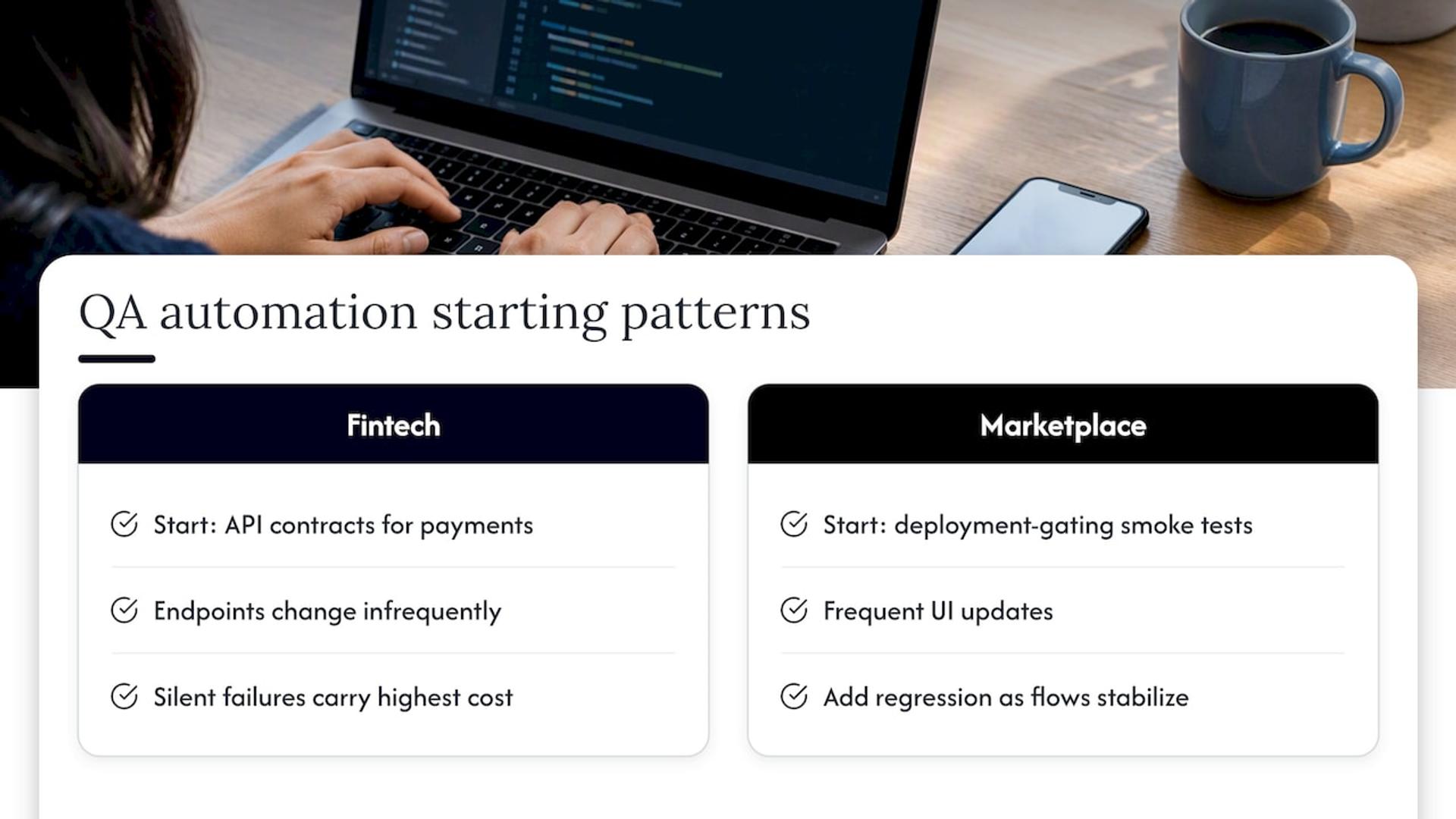
Automation projects tend to follow recognizable patterns once you’ve seen a few. A fintech platform handling regulated transactions, for example, often starts by automating API contract tests around payment flows, since those endpoints change infrequently but carry the highest cost if they break silently. A marketplace app with frequent UI updates usually takes the opposite path, investing first in smoke tests that gate deployments, then layering in regression coverage as the core user flows stabilize.
Healthcare platforms tend to prioritize automated tests around data validation and access control, since compliance requirements make manual spot-checks risky at scale. Ed-tech products, which often ship frequent content and feature updates, lean heavily on regression suites to make sure a new feature doesn’t quietly break an older one that a classroom is actively using.
What these patterns share is sequencing: teams rarely automate everything at once. They pick the highest-risk, most-repeated workflows first, prove the approach works, then expand coverage as confidence and budget allow. That incremental path, rather than a big-bang rewrite of the entire test suite, is consistently what separates automation efforts that stick from ones that get abandoned after a few frustrating months.
Three steps to start QA automation this week
Pick one or two high-value, repeatable tests, your login flow or checkout path usually qualifies, and automate those first rather than trying to cover everything at once. Run a short spike with a single tool like Playwright or Postman, get one test passing, and wire it into your CI pipeline before expanding further. If your application is large or the stakes are high, an outside audit or short-term staff augmentation can shortcut months of trial and error.
— Usama
Get started with QA automation support from Bitrupt
Building a reliable automated test suite takes time most product teams don’t have to spare, especially alongside feature work and release deadlines. We handle quality engineering end to end, from framework design through CI/CD integration, as part of our broader enterprise software and staff augmentation work across web, mobile, and AI-driven products.

If your team is weighing where to start, our quality engineering services page outlines how an engagement typically runs, from an initial audit through ongoing test maintenance. Reach out and we’ll scope what automation makes sense for your current release cycle.
FAQ
Is Selenium good for QA automation?
Yes, Selenium remains a solid choice for cross-browser web testing thanks to its long history and large community support. The Selenium project’s own documentation offers practical guidance for avoiding common pitfalls like fragile, flaky tests.
What are some of the top tools for software testing?
Commonly used tools include Selenium and Playwright for browser automation, Cypress for fast developer feedback on web apps, Postman for API testing, and Jenkins for running tests inside a CI/CD pipeline. The right combination depends on what you’re testing and which language your team already uses.
What does automated quality assurance mean?
Automated quality assurance means using scripts and tools to run test cases, compare results, and flag failures without a person manually repeating each step. It typically covers regression, smoke, API, and performance checks that would otherwise consume significant manual testing time.
Is QA a well-paying career path?
QA can be a strong career path, particularly for analysts and testers with automation skills. As of May 2025, the median annual salary for software QA analysts and testers in the United States was $104,291, with the top 10% earning $167,003.
How do I start implementing QA automation on a small team?
Start by automating your most repeated manual test cases, such as login or checkout flows, rather than trying to cover the entire application at once. Pick one tool suited to your team’s language and test target, get a single test running in your CI pipeline, then expand coverage incrementally.
Sources
- U.S. Bureau of Labor Statistics — Software developers, quality assurance analysts, and testers
- Certified Tester Test Automation Strategy Syllabus (SSTQB/ISTQB)
- TestAutomationPro — Test automation and CI/CD
- Selenium — Test practices