What Does QA Stand For? 3 Terms Beginners Often Confuse
What Does QA Stand For? 3 Terms Beginners Often Confuse !


QA stands for Quality Assurance. In plain terms, it refers to the planned, systematic activities a team runs to build confidence that a product or service will meet its requirements before it ever reaches a customer. You will hear it pronounced letter by letter, “Q-A,” and while the two letters almost always mean Quality Assurance in business and tech, context can shift their meaning elsewhere.
TL;DR:
- QA improves the process that prevents defects; quality control inspects finished work, while testing checks whether a specific build behaves as intended.
- Set acceptance criteria before work begins, assign owners, then review, test, log defects, verify fixes, and feed results into the next cycle.
- Track defect escape rate alongside coverage and defect density, because high test coverage alone cannot show whether important user scenarios are being missed.
- Automate repeatable regression checks in fast release cycles, maintain the suite to limit flaky results, and preserve exploratory testing for unexpected failures.
BitruptBuild Quality Into Your SoftwareBitrupt builds custom software with senior engineers, creating scalable, secure platforms tailored to your product and industry.Explore Bitrupt
Table of Contents
- What Quality Assurance Means in Practice
- How QA Differs From Quality Control and Testing
- A Practical QA Process: From Planning to Improvement
- Key QA Roles and Skills
- How QA Shows Up Across Different Industries
- Common QA Tools and Techniques
- Benefits of QA
- The History Behind Modern QA
- QA Inside Agile and DevOps Workflows
- Types of QA Testing You Should Know
- Measuring QA: KPIs and Metrics That Matter
- Common QA Challenges and How Teams Handle Them
- Why We Build QA Into Every Engineering Project
- Get Quality Engineering Support From Bitrupt
- FAQ
- Sources
What Quality Assurance Means in Practice
Quality Assurance is bigger than a single test or a single checklist. ASQ defines QA as all the planned and systematic activities implemented within a quality system that can be shown to give confidence that a product or service will fulfill its quality requirements. That definition matters because it frames QA as a system, not a task you check off once and forget.
ISO describes QA the same way, as a management system that puts technical and organizational processes in place to monitor and improve quality, catching problems earlier in the chain rather than after the fact. Dictionaries put it even more simply. The Cambridge Dictionary defines QA as the things a company does to make sure its products and services are as good as they should be, which is the version most people actually mean when they use the term in conversation.
In real teams, QA shows up as:
- Written process documentation that spells out how work should be done.
- Regular audits that check whether teams are actually following those processes.
- Peer reviews of code, designs or documents before they move forward.
- Standards and checklists that keep output consistent across projects.
QA as a process works best when it is built into daily work rather than bolted on at the end. A team that treats QA as a last-minute gate before launch tends to catch problems too late and too expensively.
How QA Differs From Quality Control and Testing
This is where most beginners get tangled up, and understandably so. The three terms get used almost interchangeably in casual conversation, but they describe different layers of the same goal.
ASQ and TechTarget both draw the same line: QA focuses on whether the process itself is designed to produce quality, QC focuses on inspecting the finished output, and testing examines one specific version of a product to find defects in it.
Here is the distinction in plain language:
- QA asks, “Is our process built to prevent defects in the first place?”
- QC asks, “Does this specific output meet the spec we agreed on?”
- Testing asks, “Does this particular build, feature or release work as intended right now?”
A short example makes it concrete. Say a mobile app team ships a new checkout flow. QA shows up earlier, in the form of coding standards, design review steps and a documented release checklist that the whole team follows. QC shows up when someone inspects the finished checkout screen against the agreed requirements. Testing shows up when an engineer runs through that exact build, taps every button and confirms the payment goes through.
Testing is part of QA when its results feed back into fixing the process, not just the bug. TechTarget makes this distinction clear: testing finds defects in a version, while QA uses those findings to improve the procedures so similar defects are less likely to show up again. QC activities, on the other hand, tend to happen at fixed inspection points, checking a batch, a build or a deliverable against a spec before it moves on.
A Practical QA Process: From Planning to Improvement
QA as a process follows a fairly consistent rhythm across most teams, whether they build software, manage a factory line or run a customer support desk; you can learn more about optimizing such workflows with Topic Clustering Automation. The steps below reflect how assurance programs are commonly structured in practice.
- Define requirements and quality goals. Agree on what “good” looks like before any work starts.
- Plan standards and responsibilities. Decide who owns which checks and which standards apply.
- Design reviews and tests. Build out test cases, checklists or review criteria tied to the requirements.
- Execute checks. Run the planned tests, reviews or inspections against the actual work.
- Record and prioritize defects. Log what went wrong and rank issues by impact.
- Verify fixes. Confirm that reported problems were actually resolved, not just closed.
- Measure results. Track defect rates, pass rates or rework hours to see how the process performed.
- Improve for the next cycle. Feed lessons back into the standards and the process itself.
In a software team, this might mean automated test suites running in a CI/CD pipeline, structured code reviews before merging, and release gates that block a deployment until checks pass. In manufacturing, it might look like inspection checklists at each production stage. The steps stay the same; the tools change.
Pro Tip: Shift QA left by writing acceptance criteria and running automated checks during requirements and design, not after the build is done. Catching an issue on paper costs far less than catching it in production.
Key QA Roles and Skills
QA as a career path has grown well beyond “the person who tests the app.” Most teams now split responsibilities across a few distinct roles.
- QA engineer: designs test cases, runs manual and automated checks, and reports defects clearly enough for developers to act on them.
- Test automation engineer: builds and maintains automated test scripts that run on every code change, catching regressions fast.
- QA lead or manager: sets testing strategy, allocates coverage across features and reports quality metrics to the wider team.
The skills that matter most tend to include test design (knowing what to check and why), familiarity with automation frameworks, exploratory testing (poking at a product without a fixed script to find the unexpected), accessibility testing, and clear written communication for reporting bugs in a way engineers can actually fix.
How QA Shows Up Across Different Industries
QA is not a software-only idea. It shows up anywhere a process produces something that has to meet a standard.
- Software: CI/CD pipeline gates, automated regression suites and API tests catch issues before a release reaches users.
- Manufacturing: process controls, inspection checklists and ISO-aligned management systems keep output consistent across production runs.
- Healthcare: validation of medical devices and software, process reliability checks and compliance reviews protect patient safety.
- Customer service: monitoring standards, call audits and structured feedback loops keep service quality consistent across agents.
ISO notes that QA activities extend across production, testing, packaging and delivery, with industry-specific practices like safety assessments built in where the stakes call for them.
Common QA Tools and Techniques
Most QA teams lean on a handful of tools rather than reinventing their workflow from scratch.
- Selenium: automates browser interactions, letting teams run the same web tests repeatedly without manual clicking.
- Postman: checks API requests and responses, which is useful for catching backend issues before they surface in the UI.
- Jira: tracks defects and issues, keeping bug reports organized and visible to the whole team.
Beyond tools, teams mix automated testing (fast, repeatable, good for regression) with manual and exploratory testing (slower, better at catching the unexpected), plus accessibility checks to confirm a product works for people using assistive technology. A small team shipping weekly might lean heavily on automation to keep pace, while a team with a slower release cadence can afford more manual exploratory sessions.
Benefits of QA
The payoff for treating QA as a real discipline rather than an afterthought shows up in a few consistent ways.
- Fewer defects reaching production or customers.
- Lower rework costs since problems get caught earlier.
- More predictable, better-quality releases.
- Stronger compliance readiness for regulated industries.
- Higher customer trust built on consistent product quality.
ISO frames QA’s core value as catching and reducing defects earlier in the value chain, which is precisely why upstream process fixes tend to cost less than downstream firefighting.
The History Behind Modern QA
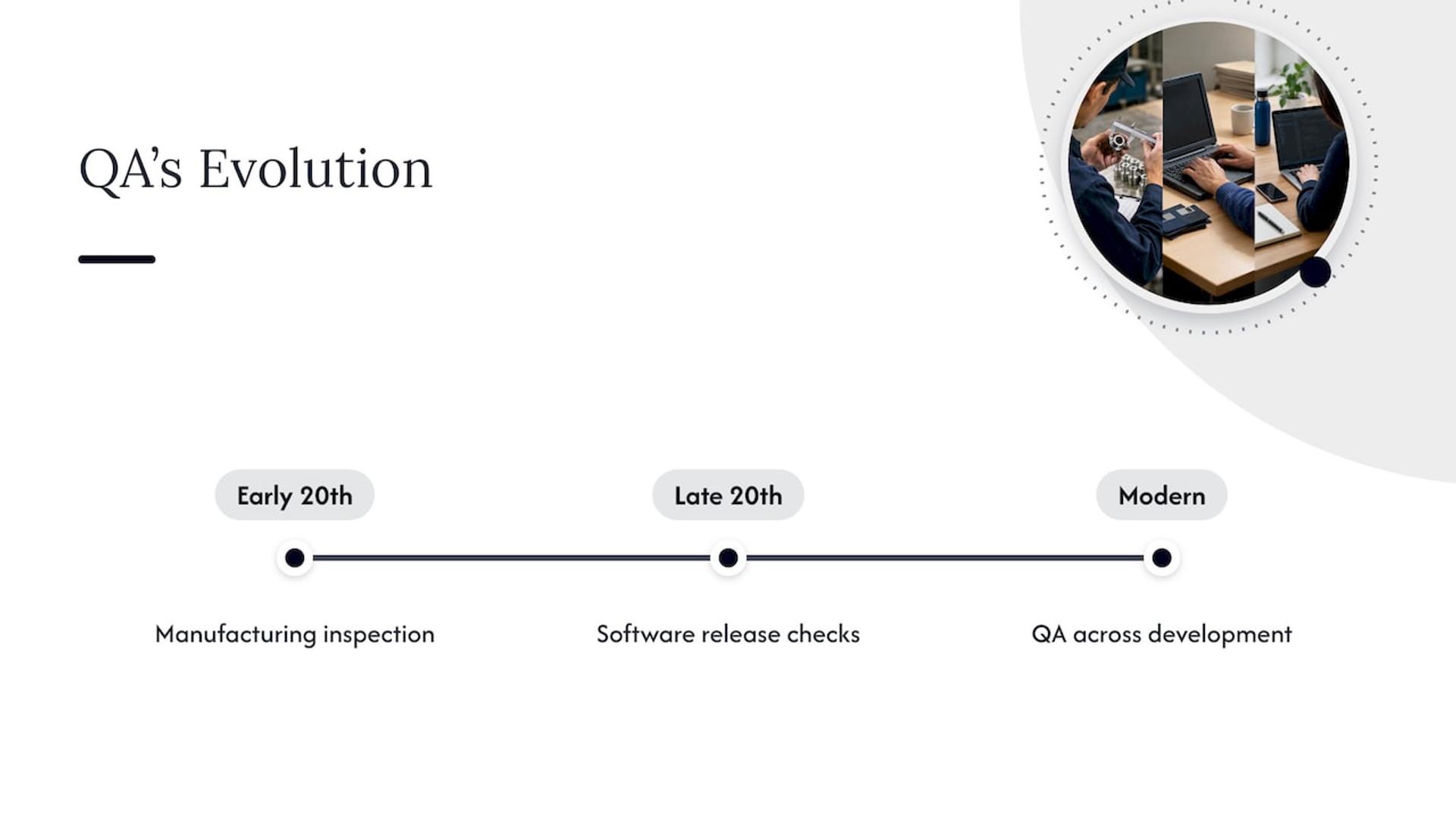
Quality Assurance did not start in software. It grew out of manufacturing, where early 20th-century production lines needed consistent inspection standards to avoid shipping defective goods at scale. Statistical process control and formal quality management systems followed, laying the groundwork for the structured standards that ISO and ASQ document today.
As software development matured through the late 20th century, those same manufacturing principles got adapted for code. Early software QA looked a lot like manufacturing QC: testers checked finished builds against a spec right before release. Over time, as release cycles sped up, QA moved earlier into the development cycle rather than staying a final gate.
That shift matters enormously for how modern teams work. Waiting until the end of a project to check quality means expensive, late-stage fixes and rushed releases. Building QA into every stage, from requirements through design, coding and deployment, means defects get caught when they are cheapest to fix. This is part of why QA as a discipline now sits inside product and engineering teams rather than off to the side as a final checkpoint, and why the roles and tools covered earlier in this guide look so different from the manual, end-of-line inspections QA started with.
QA Inside Agile and DevOps Workflows
Agile and DevOps changed how QA fits into a team’s calendar. Instead of a separate testing phase bolted onto the end of a project, QA activities now run alongside development in short, repeated cycles.
In an Agile sprint, QA engineers write test cases alongside developers writing features, often before the code is even finished. Acceptance criteria get defined up front, and testing happens within the same sprint rather than weeks later. That keeps feedback fast and prevents a backlog of untested work from piling up.
DevOps pushes this further by embedding QA directly into the deployment pipeline. Automated tests run on every code commit, and release gates block a deployment from going live until those tests pass. This is often called continuous testing, and it is why CI/CD pipelines show up repeatedly in software QA conversations. Rather than one large testing phase before a release, small automated checks run constantly, catching regressions within minutes instead of days.
The practical effect is that QA engineers and developers work much closer together than they used to. Test automation engineers often sit inside the same team as the developers whose code they are testing, and quality becomes a shared responsibility rather than a separate department’s job.
Types of QA Testing You Should Know
Not all QA testing checks the same thing. Teams typically run several types, each aimed at a different risk.
- Functional testing confirms that a feature does what it is supposed to do, like verifying a login form actually logs a user in.
- Performance testing checks how a system behaves under load, such as how fast a page loads when thousands of users hit it at once.
- Security testing looks for vulnerabilities that could expose data or let unauthorized access through.
- Usability testing evaluates whether real people can actually use a product without confusion or friction.
Most products need a mix of all four, though the balance shifts by context. A payments platform leans harder on security testing, while a consumer app aimed at first-time users leans harder on usability testing. Skipping one type to save time usually means the risk it was meant to catch simply surfaces later, often in production where it costs more to fix.
Measuring QA: KPIs and Metrics That Matter
QA teams track a handful of metrics to know whether their process is actually working, not just whether it feels thorough.
Defect density, the number of defects found relative to the size of the codebase or feature, shows whether quality is improving or slipping over time. Defect escape rate tracks how many bugs make it past QA into production, which is often the clearest sign of whether a process needs tightening. Test coverage measures how much of the codebase or functionality automated tests actually touch, though high coverage alone does not guarantee quality if the tests are shallow.
Mean time to resolve defects tracks how quickly reported issues get fixed once they are found, and it matters as much as how many defects exist in the first place. Release-to-release regression counts show whether old, previously fixed issues are reappearing, which often points to gaps in the automated test suite rather than new problems.
No single metric tells the whole story. A team with low defect density but a high escape rate might be testing thoroughly but missing the scenarios that matter most to real users. Tracking a small set of these numbers together, rather than chasing one in isolation, gives a far more honest picture of whether QA is doing its job.
Common QA Challenges and How Teams Handle Them
Even well-run QA programs run into the same recurring friction points.
Tight release schedules often squeeze testing time, especially when deadlines move but the QA workload does not shrink to match. Teams that shift testing earlier into the development cycle, rather than treating it as a final step, tend to absorb schedule pressure better because fewer defects pile up at the end.
Flaky or unreliable automated tests are another common headache. Tests that pass or fail inconsistently erode trust in the whole suite, and teams end up ignoring failures that actually matter. Regular maintenance of the test suite, not just writing new tests, keeps this from spiraling.
Incomplete or shifting requirements make it hard to know what “correct” even means, which leaves QA chasing a moving target. Clear acceptance criteria agreed on before work starts reduces this friction considerably.
Finally, communication gaps between QA and development can turn bug reports into back-and-forth guessing games. Clear, reproducible bug reports with specific steps, expected results and actual results cut down on wasted cycles and keep fixes moving.
Why We Build QA Into Every Engineering Project
We treat quality engineering as a core part of how we build software, not a separate phase at the end. Our teams run automated testing, end-to-end checks and release gates on every project, and QA conversations happen directly with the people writing the code rather than through layers of handoff. That proximity tends to catch issues faster and keeps releases moving without the usual back-and-forth delays. When a team is deciding whether to bring in outside help for QA, the clearest signal is a growing gap between release speed and confidence in what is being shipped.
— Usama
Get Quality Engineering Support From Bitrupt
If QA gaps are slowing your releases or you are launching a product where defects carry real cost, we offer quality engineering as a direct, hands-on service rather than a bolt-on afterthought. Our engagement models let you bring in QA and automation engineers exactly where you need them, with direct access to the engineers doing the work and fast response times.
We build automated test suites, end-to-end checks and release gates into the engineering work itself, which means quality conversations happen inside the same team building the product, not in a separate silo. If your current process is missing automated coverage, struggling with flaky tests or simply moving too slowly to catch defects before release, our quality engineering services are built to close that gap. Reach out through our services overview to start a conversation about where QA support would help your team most.
FAQ
What does QA stand for in work?
QA stands for Quality Assurance in nearly every professional context, referring to the planned activities a team runs to make sure its products or services meet agreed requirements. The exact scope varies by industry, but the core idea, building confidence in quality before delivery, stays consistent.
What is the role of QA?
The role of QA is to build and maintain processes that prevent defects, rather than simply catching them after the fact. This includes defining standards, designing test plans, reviewing work, reporting issues clearly and feeding results back into improving the process for next time.
What does QA stand for in healthcare?
In healthcare, QA still stands for Quality Assurance and covers activities like validating medical devices and software, running compliance checks and maintaining process reliability to protect patient safety. ISO’s quality management framework extends into healthcare settings with these same preventive principles.
What does QA mean in quality?
Within quality management, QA means the systematic, process-level activities designed to prevent defects, distinct from quality control, which inspects finished outputs, and testing, which checks a specific build or version. ASQ’s comparison lays out this distinction clearly for anyone new to the terms.
Is QA the same as testing?
No, testing is one activity within a broader QA process. Testing checks whether a specific product or build works as intended, while QA uses the results of that testing, along with reviews, audits and standards, to improve the process itself over time.
Sources
- Quality Assurance vs Quality Control: QA vs QC | ASQ
- Quality assurance | ISO
- What is Quality Assurance (QA)? | TechTarget
- QA | Cambridge Dictionary