Native App Development: A Beginner's Guide for 2026
Native App Development: A Beginner's Guide for 2026 ! Developer tests native apps on two phones Native app development means building a mobile app for one operating system, using the languages and tools that operating system's maker supports.


Native app development means building a mobile app for one operating system, using the languages and tools that operating system’s maker supports. For iPhones, that means Swift or Objective-C in Xcode. For Android, it means Kotlin or Java in Android Studio. You get the fastest, most polished experience the device can deliver, and the price is a separate codebase for each platform. This guide explains how it works, what it costs in effort, and when it is the right call.
BitruptBuild a Mobile App Around Your NeedsBitrupt builds custom software with senior engineers, helping teams create scalable, secure platforms tailored to their product requirements.Explore Bitrupt’s software development
TL;DR
- A native app is built specifically for one platform: Swift or Objective-C for iOS, Kotlin or Java for Android.
- Native is the strongest fit when performance, hardware access, offline use, or a platform-perfect interface is central to the product.
- The trade-off is two codebases, which raises development and maintenance effort.
- Cross-platform and hybrid approaches share more code. They suit products where speed to market and budget matter more than squeezing out every frame.
- Pick based on what your users do with the app, not on which approach is fashionable.
Table of Contents
- What native app development is
- How native iOS and Android development works
- Key benefits of native mobile apps
- The native development lifecycle
- Essential tools for native development
- Testing a native app
- What native development costs
- Common challenges and how to handle them
- Native vs. cross-platform vs. hybrid
- When to choose native
- Our perspective
- Build your native app with Bitrupt
- FAQ
- Sources
What native app development is
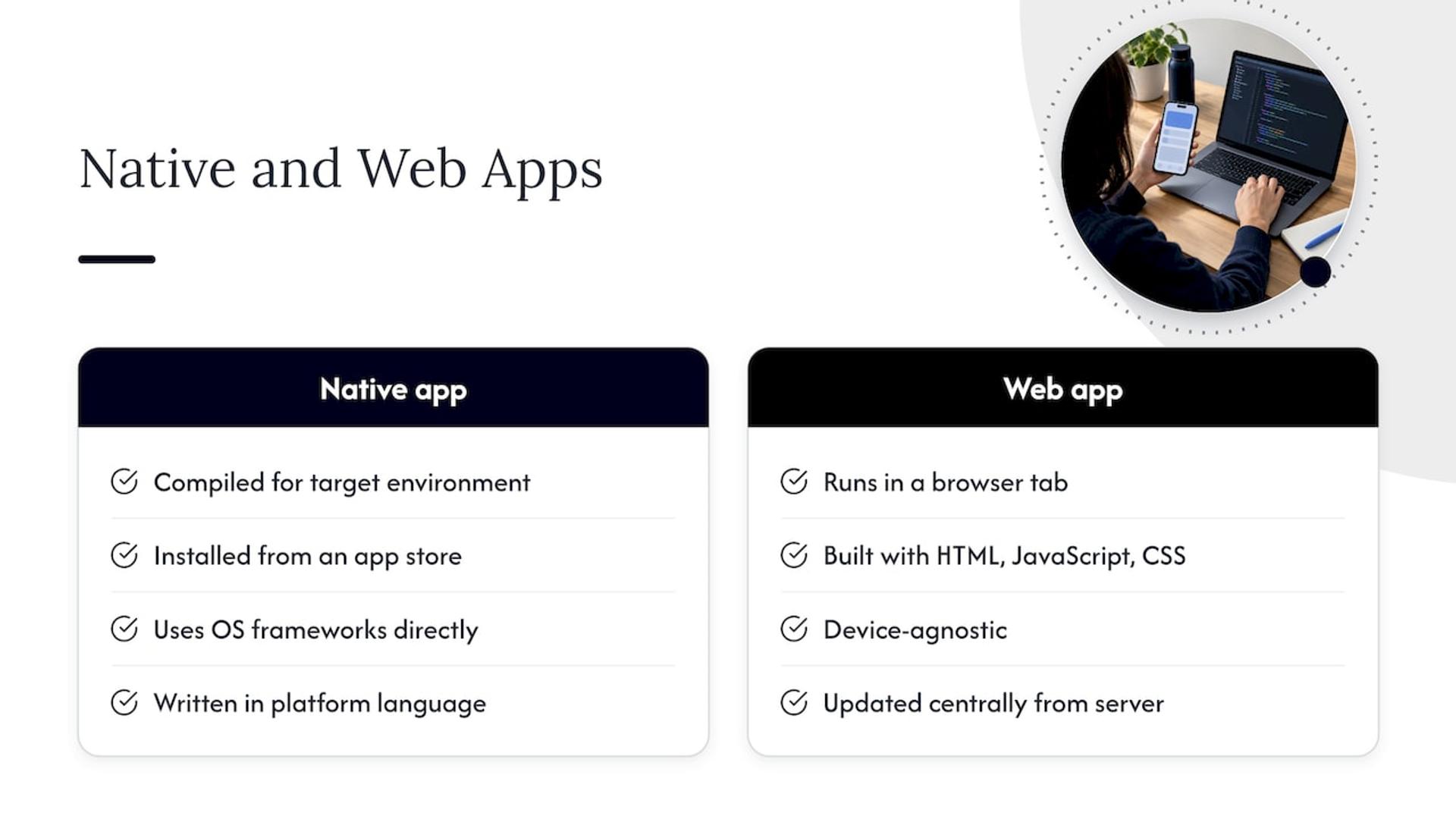
A native app is compiled to run on the hardware and software environment it targets. MDN’s glossary gives the plain version: an Android app written in Java with the Android toolchain is native, while a web app running in a browser is not.
That gives you a simple mental test. If the app is installed from an app store, talks directly to the operating system’s frameworks, and was written in the platform’s own language, it is a native mobile app. If it lives in a browser tab, it is a web app. Salesforce’s mobile documentation describes those HTML apps as browser-delivered, built with HTML, JavaScript and CSS, device-agnostic, easier to start, and updated centrally from a server. Examples include a bank’s online dashboard or a web-based email client opened in Safari or Chrome.
Analogy: a native app is a tailored suit. A web app is a one-size jacket that fits many people acceptably. Both keep you warm, but only one was cut for your exact measurements.
How native iOS and Android development works
Apple and Google each ship their own software development kit (SDK), their own design guidelines, and their own preferred languages. Native development means working inside that ecosystem.
iOS app development
iOS apps use Swift or Objective-C. Modern interfaces are commonly built with SwiftUI alongside Apple’s SDKs, according to TechTarget’s 2026 comparison. Xcode is the main development environment, and it runs only on macOS, so every iOS team needs Apple hardware.
Swift is the language most new projects start with. Objective-C is older, and you will meet it mostly in long-running codebases that still need maintenance. If you are curious about the first steps, our walkthrough on iOS app development for beginners covers the basics.
Android app development
Android apps use Kotlin or Java with Android Studio and the Android SDK. Kotlin is Google’s preferred language for new Android work. Java remains common in older apps, and the two languages can live side by side in the same project.
Quick comparison of the two stacks
| iOS | Android | |
|---|---|---|
| Languages | Swift, Objective-C | Kotlin, Java |
| Main IDE | Xcode (macOS only) | Android Studio |
| UI toolkit | SwiftUI and Apple’s SDKs | Android SDK |
| Distribution | Apple’s App Store | Google Play |
Because the two stacks do not share code, a team building both writes the same features twice, once per platform. That is the core economic fact of native development, and the rest of this guide keeps coming back to it.
Key benefits of native mobile apps
Salesforce lists the native strengths as fast graphics, fluid animation, camera, contacts, geolocation, encrypted storage, and familiar platform behavior. Here is what that means in practice.
Performance
Native code talks to the operating system without a translation layer. Kotlin’s documentation says native is especially suitable for performance-intensive apps such as games, AR/VR and complex graphics. If your product renders heavy 3D, processes video in real time, or runs on-device machine learning, this is where native earns its keep.
User experience
IOS and Android users expect different navigation patterns, gestures and controls. Native apps use each platform’s own components, so they feel familiar from the first tap. Kotlin’s documentation points to close alignment with platform guidelines as a reason to go native.
Offline functionality
Native apps can store data on the device and keep working without a connection. Kotlin lists offline capabilities among the cases where native is worth considering. Field-service tools, clinical apps used in hospital dead zones, and travel apps all benefit.
Security
Native apps get direct access to platform security features such as encrypted storage, which Salesforce names among native strengths. For apps handling health or financial data, building on the operating system’s own security facilities is a sensible foundation, though you still need secure coding, access control and proper review.
Device hardware access
Camera, GPS, biometrics, Bluetooth, sensors: native apps reach them through official APIs, usually the day a new capability ships. Kotlin describes native as providing full hardware access. If your product connects to external accessories, such as security keys, this guide on device hardware integration in mobile apps shows how that kind of integration is approached.
Platform integration
Notifications, widgets, wallets, voice assistants, health data stores: native apps plug into them directly. That integration is often the difference between an app people open daily and one they forget.
The native development lifecycle
The stages are the same for most software, and a native project follows them closely. One industry guide lays out concept and planning, requirement analysis, design, development, testing, deployment, and maintenance and support.
- Concept and planning. Define the problem, the users, the outcomes, feature priorities, budget, timeline and team capacity before any code is written. Strong concept development and project planning before coding saves rework later.
- Requirements and design. Turn the plan into user flows, wireframes and a UI design that respects each platform’s conventions. A native app is often designed twice in small ways, because iOS and Android users expect different patterns.
- Development. Build the iOS app in Swift, the Android app in Kotlin, and the backend and APIs that both share. A shared backend is the one part you do not duplicate.
- Testing. Verify on real devices, covered in the next section.
- Deployment. Submit to the App Store and Google Play, each with its own review process and policies.
- Maintenance and support. After launch, teams monitor performance, errors and user behavior, fix issues, and improve the app using feedback and analytics.
For a broader view that is not specific to native, see our beginner’s guide to developing a mobile app.
Essential tools for native development
- Xcode for iOS: editor, simulator, debugger and the path to App Store submission.
- Android Studio for Android: the main environment, with the Android SDK and emulator.
- Version control such as Git, so two platform teams can work in parallel without collisions.
- CI/CD pipelines to build, test and ship each platform automatically on every change.
- Crash and performance monitoring to catch problems real users hit. Our engineering piece on cutting cold starts and crashes goes deeper.
- Real test devices across screen sizes and OS versions, since emulators miss real-world behavior.
Testing a native app
Native testing happens at several layers. Unit tests check individual functions. UI tests simulate taps and swipes. Exploratory testing, where a person hunts for odd behavior, catches what scripts do not expect. Accessibility testing confirms that screen readers and larger text sizes work, which matters for users and often for compliance.
Test on both platforms separately. A feature that works on a recent iPhone can fail on an older Android phone with a different screen ratio and less memory. Because each platform has its own codebase, each also needs its own regression suite every release.
What native development costs
The structural driver is simple. Kotlin’s documentation notes that separate codebases for each platform increase development and maintenance costs. Salesforce also notes that native demands greater experience than other development scenarios, which is why team seniority matters more than headcount.
What moves the total:
- Number of platforms. One platform first, or both at once.
- Feature complexity. Payments, real-time features, AI and hardware integrations take longer than a content app.
- Backend and integrations. APIs, authentication, third-party services.
- Design depth. Custom animation and platform-specific polish.
- Ongoing support. OS updates arrive every year, so budget for maintenance, not only the launch.
We do not publish fixed prices because every engagement is scoped to the project. For realistic ranges and an estimator, read our app cost guide for founders, and see how app type shapes cost and timeline.
Common challenges and how to handle them
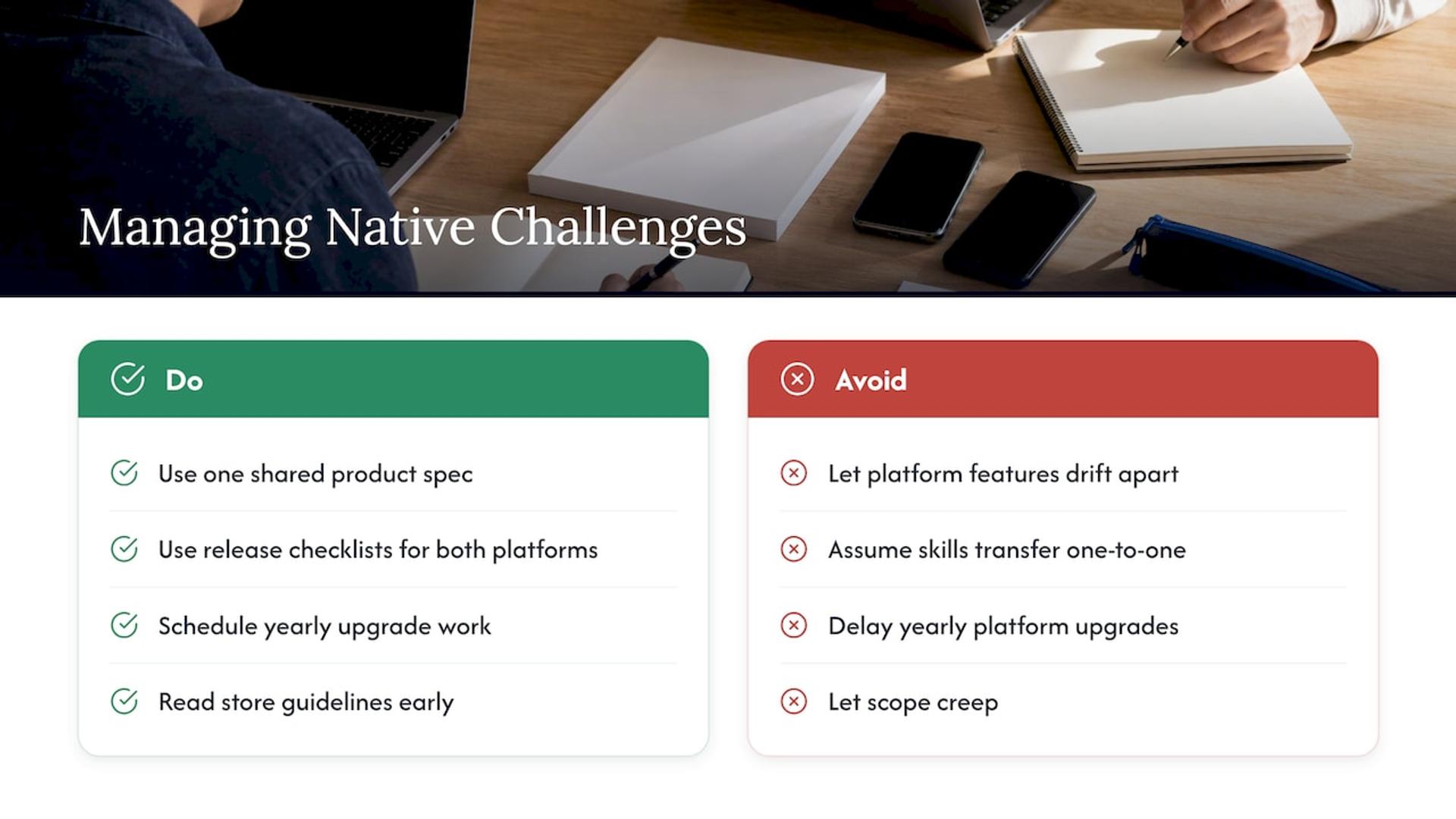
Two codebases drifting apart. Features land on iOS and arrive late on Android. Fix it with one shared product spec, one backlog, and release checklists that cover both platforms.
Hiring. You need Swift and Kotlin specialists, and their skills do not transfer one-to-one. Flexible models such as a dedicated development pod or staff augmentation fill the gap without a long hiring cycle.
Keeping up with the platforms. Apple and Google change SDKs, permissions and store rules regularly. Schedule yearly upgrade work.
Store review. Rejections cost days. Read the guidelines early and design around them, especially for health, finance and payments features.
Scope creep. Native work is expensive to redo. Lock priorities in planning and ship a focused first release.
Native vs. cross-platform vs. hybrid
Cross-platform development shares code or business logic across platforms, reducing development and maintenance effort and speeding delivery. Hybrid apps wrap web technology inside an app shell. Each has a place.
| Native | Cross-platform | Hybrid | |
|---|---|---|---|
| Codebase | One per platform | Largely shared | Shared, web-based |
| Performance | Highest, full hardware access | Strong, varies by workload | Depends on the web layer |
| Platform look and feel | Exact | Close, sometimes needs platform code | Generic unless tuned |
| Speed to first release | Slower | Faster | Fast |
| Best for | Games, AR/VR, heavy graphics, deep OS integration | Business apps, marketplaces, MVPs | Simple content or internal tools |
Is React Native truly cross-platform?
Yes, with a nuance. Kotlin lists React Native as a cross-platform framework, with performance varying by workload. Salesforce explains that React Native uses JavaScript to assemble native UI building blocks and gives direct access to native resources, and separates it from the hybrid category. So the screen you see is made of real native components, even though the code is shared.
On speed, an academic evaluation found similar graphical animation performance, but React Native did worse than native Android on computational tasks. The lesson: blanket claims in either direction mislead. Smooth animation can be comparable, while heavy computation can favor native by a wide margin.
If cross-platform looks right for your first release, our guide to an MVP in 6 to 12 weeks with cross-platform development explains the path. We build with React Native as well as native, so the recommendation follows your product.
When to choose native
Kotlin’s guidance is to consider native when performance, hardware integration, platform-specific features, complex graphics, offline capabilities, or a polished platform-specific UI is central. Turn that into a checklist:
- Your product is its performance. Games, video tools, AR, real-time visualization, on-device AI.
- Hardware is the feature. Sensors, Bluetooth devices, camera pipelines, biometrics.
- Users must work offline. Clinical, field and logistics apps.
- Platform polish drives retention. Consumer apps competing on feel.
- You are committing to one platform first. Native on iOS or Android alone avoids the duplication cost.
- Budget supports two specialist teams or a phased rollout.
If most of these are “no”, a cross-platform build probably gets you to market sooner. If several are “yes”, native is usually the sturdier foundation.
Our perspective
We see the same mistake often: a team picks a technology first and a product second. Native, cross-platform and hybrid are all legitimate. The right one depends on what your users do in the first thirty seconds and what your roadmap demands in year two.
Native rewards seniority. Two platforms, two toolchains and yearly OS changes leave little room for guesswork, which is why we staff projects only with senior engineers. You get direct access to technical decision makers and fast responses, so a platform question gets answered in hours, not sprints.
Our approach is to analyze before building. Analysis is insurance: a few days of scoping costs far less than rebuilding the wrong app. Then we match the engagement to your need, whether that is a development pod that owns delivery or senior engineers added to your team.
Usama
Build your native app with Bitrupt
If you are weighing native against other approaches, we can help you decide and then build it. Our mobile app development team works across iOS, Android and React Native, with senior engineers on every project, flexible engagement models, and a response time we aim to keep within 24 hours. For regulated products, see our work for fintech and the other industries we serve.
Tell us what you are building and who it is for, and we will recommend the approach that fits, native or otherwise.
FAQ
What is a native app?
A native app is built for one operating system using that platform’s own languages and tools, such as Swift for iOS or Kotlin for Android. It is installed from an app store and uses the device’s features directly. A browser-based web app is not native.
Is Swift or Objective-C better for iOS?
For new projects, Swift is the usual starting point, often paired with SwiftUI. Objective-C is mainly found in older codebases that still need updates. Both are supported for native iOS development, and they can coexist in one app.
Should I use Kotlin or Java for Android?
Kotlin is Google’s preferred language for new Android work, so it is the default for new apps. Java is still supported and widespread in existing apps. Many teams run both in the same project during a gradual move.
Is React Native native?
React Native is classed as cross-platform. It uses JavaScript to assemble native UI components, so the interface is built from real native elements. It shares code across iOS and Android, unlike a fully native build with a separate codebase per platform.
Is native development worth the cost?
It is worth it when performance, hardware access, offline use or platform polish is central to your product. Separate codebases raise effort, but you get the most direct access to each platform. A scoping conversation will show which approach suits your goals.
Sources
- Native - Glossary | MDN
- Cross-platform and native app development | Kotlin Multiplatform documentation
- About Native, HTML, and Hybrid Development | Salesforce Developers
- Android vs. iOS app development: Key differences to know | TechTarget
- How to Develop an App: Everything You Need to Know | OutSystems
- An evaluation of Mobile Cross-platform Development using React Native | DiVA