Mobile App Development Platforms: How to Choose in 2026
Mobile App Development Platforms: How to Choose in 2026 ! Engineers compare mobile app development options The best mobile app development platform is the one that matches your team's skills, your product's device needs and your plan for the next three years.


The best mobile app development platform is the one that matches your team’s skills, your product’s device needs and your plan for the next three years. For most US startups that means React Native or Flutter. For apps that lean hard on new OS features, it means Xcode and Android Studio. For Microsoft-centric enterprises, it often means .NET MAUI. Below we compare all five, then give you the criteria we use to decide.
BitruptBuild for Your App’s Next Three YearsBitrupt builds custom software for fintech, healthcare, marketplaces, and other sectors, with senior engineers and flexible engagement models.Explore Bitrupt’s engineering services
TL;DR
- Mobile app development platforms are the tools, frameworks and services you use to design, build, test and ship iOS and Android apps.
- React Native and Flutter are the usual picks for startups and fast prototypes. Native tools (Xcode, Android Studio) win when you need the deepest device access.
- .NET MAUI suits teams that already work in C# and the Microsoft ecosystem.
- Choose by security, integrations, device needs, team skills and long-term maintenance first. Price comes last.
- Low-code and no-code builders are good for prototypes and internal tools, but they trade away control.
Table of Contents
- What mobile app development platforms are
- The five platforms compared
- Performance, code reuse and device access
- Which platform fits which project
- How to choose: seven criteria
- Our perspective
- Build with a senior team
- FAQ
- Sources
What mobile app development platforms are
A mobile app development platform is a bundled set of tools and services that lets a team design, build, test, deploy and maintain apps for multiple devices. You will also see the same idea sold as mobile app development software or app development tools. The labels overlap, but the choice underneath is always the same: how much of the app do you write once, and how much do you write per platform?
Platforms fall into four broad classes:
- Native IDEs (Android Studio, Xcode): maximum control and platform-specific fidelity.
- Cross-platform frameworks (Flutter, React Native): one codebase that runs on iOS and Android.
- Code-sharing frameworks (.NET MAUI, Kotlin Multiplatform): shared business logic, with native UI where you want it.
- Low-code and no-code builders: visual tools that reduce hand-written code.
That split comes from a 2026 roundup of mobile development software. It is a useful map, because each class trades control for speed in a different way.
Analogy: think of building a house. Native is hiring a separate crew for each house on the street. Cross-platform is one crew and one blueprint for both. Low-code is a prefab kit: fast to assemble, hard to move the walls.
The five platforms compared
Flutter
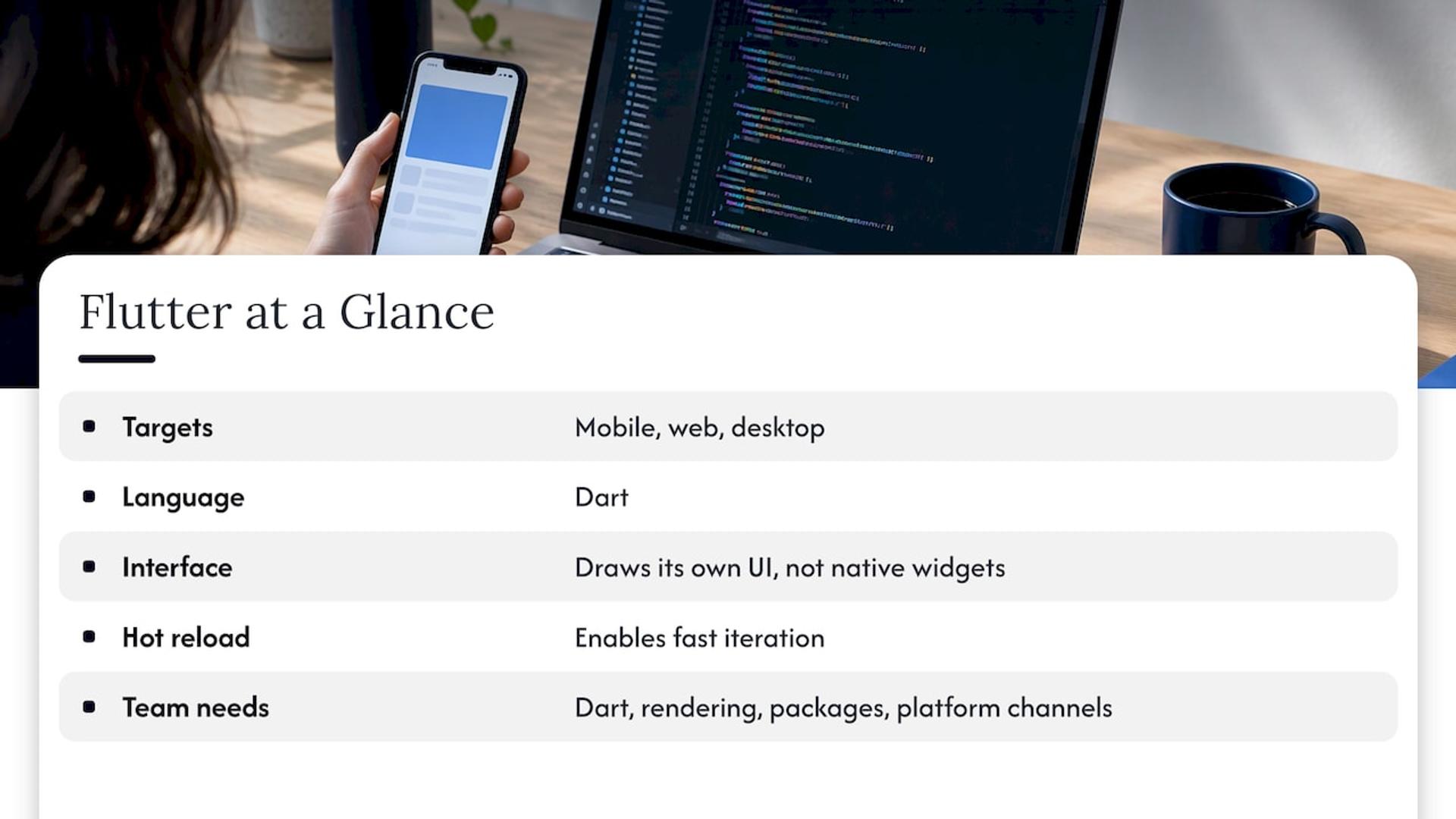
Flutter is Google’s open-source framework for building natively compiled apps for mobile, web and desktop from a single codebase. You write in Dart, and Flutter draws its own interface rather than wrapping native widgets. That gives you very consistent visuals on both platforms and fast iteration with hot reload. We cover the trade-offs in our guide to Flutter and hot reload.
The catch: your team needs Dart, plus a working understanding of Flutter’s rendering model, packages and platform channels for native features.
React Native
React Native lets teams use JavaScript or TypeScript and React to build mobile apps. If your web team already ships React, the ramp-up is short, and you can share some logic and developer habits across web and mobile. According to The Pragmatic Engineer, Flutter and React Native lead cross-platform development, and React Native is more popular in the US and UK.
The catch: you will still deal with native dependencies and platform builds, so someone on the team needs native build knowledge.
.NET MAUI
.NET MAUI is Microsoft’s framework for building native mobile and desktop apps with C# and XAML. One shared codebase can target Android, iOS, macOS and Windows. It fits companies with a deep .NET bench, existing C# back ends and Microsoft tooling.
The catch: the community and package ecosystem are smaller than those around React Native and Flutter, so plan on more custom work for niche integrations.
Android Studio
Android Studio is the official environment for Android, built around Kotlin (Java is also supported). Native tools build for one operating-system family and give the earliest access to platform APIs. Publishing runs through Google Play.
Xcode
Xcode is Apple’s environment for iOS and other Apple platforms, built around Swift (or Objective-C). It requires a Mac, and publishing needs an annual Apple Developer Program membership. As the same roundup notes, you cannot build or submit iOS apps without Apple hardware. Native languages differ per platform: Java or Kotlin for Android, Objective-C or Swift for iOS.
Side-by-side table
| Criterion | Flutter | React Native | .NET MAUI | Android Studio | Xcode |
|---|---|---|---|---|---|
| Main language | Dart | JavaScript / TypeScript | C# and XAML | Kotlin (or Java) | Swift (or Objective-C) |
| Targets | iOS, Android, web, desktop | iOS, Android | iOS, Android, macOS, Windows | Android | Apple platforms |
| Cross-platform | Yes, single codebase | Yes, single codebase | Yes, single codebase | No | No |
| Customization | High, own rendering layer | High, native modules | Good, native controls | Full | Full |
| New OS features | Via plugins or channels | Via native modules | Via platform code | First access | First access |
| Development speed | Fast, hot reload | Fast, large JS talent pool | Fast for .NET teams | Slower, two codebases | Slower, two codebases |
| Typical fit | Brand-heavy UI, MVPs | Startups with web teams | Microsoft-centric enterprises | Android-first or hardware-heavy | iOS-first or Apple-feature-heavy |
| Main limitation | Dart skills, bigger app size | Native build knowledge | Smaller ecosystem | Android only | Mac required, iOS only |
Performance, code reuse and device access
Native still has the performance edge on paper, but the gap is narrower than many assume. A 2026 empirical study on arXiv found native lowest on both operating systems, with Kotlin Multiplatform the closest cross-platform option, at 6.1% above native on iOS and 11.4% above native on Android. React Native and Flutter showed larger differences in that study. An earlier Springer study is often cited for the opposite point, that some frameworks can match or beat native on certain metrics, so test your own critical screens rather than trusting a single benchmark.
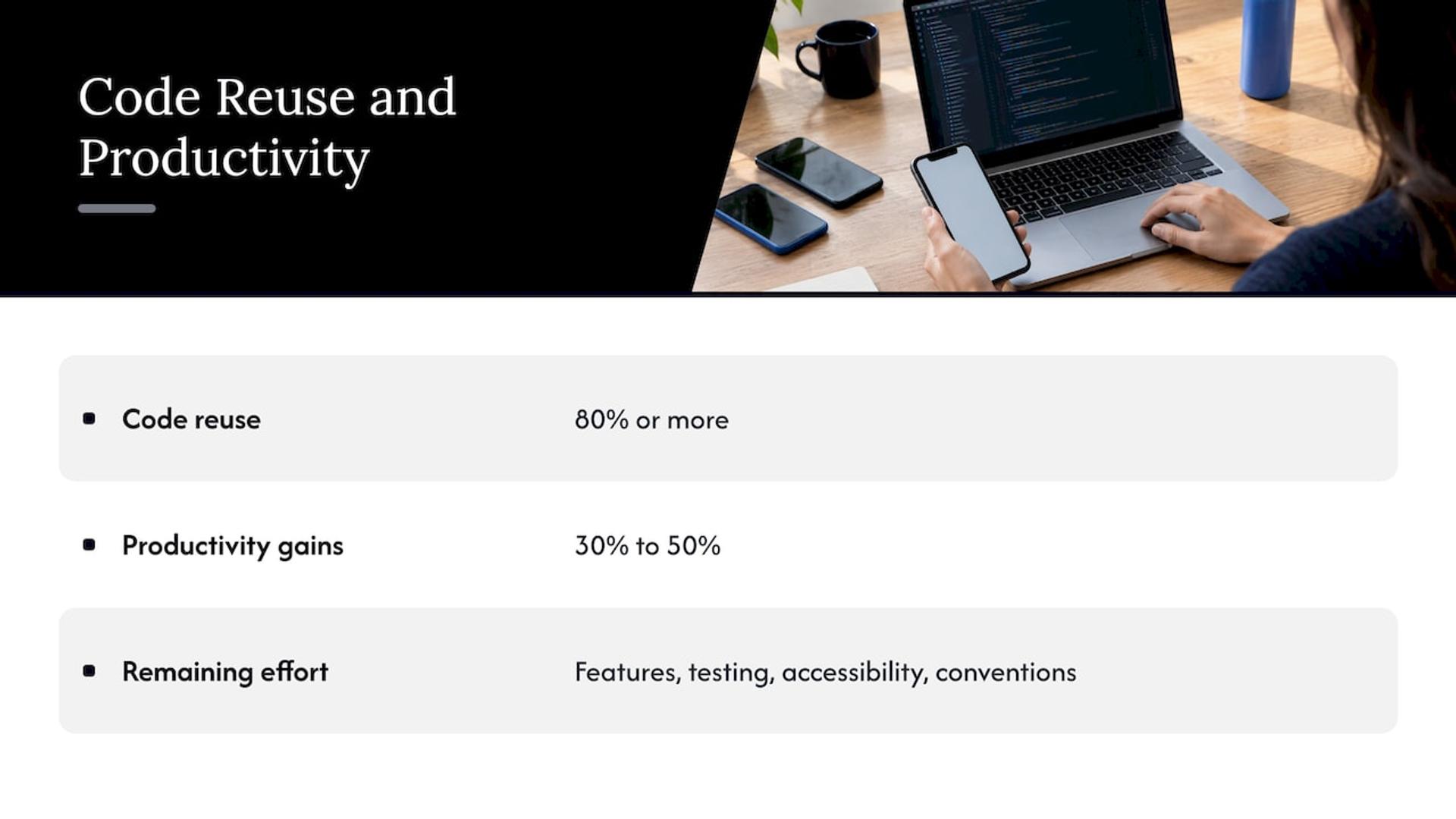
Code reuse is where cross-platform pays off. A Linux Foundation report from August 2025 states that frameworks such as Flutter, Kotlin Multiplatform and React Native let developers reuse 80% or more of their code, and that adopting teams report productivity gains of 30% to 50%. Expect the rest of your effort to go into platform-specific features, device testing, accessibility checks and platform conventions.
Which platform fits which project
Startups and rapid prototyping
Pick React Native or Flutter. One team, one codebase and quick iteration let you test an idea in weeks. If you want to see how a lean build is scoped, read our walkthrough of an MVP in 6 to 12 weeks with cross-platform mobile development. For throwaway prototypes, a visual builder can work as well: we explain when no-code is enough and when to hire engineers.
Enterprise applications
Enterprises care about security, governance, integrations and long-term support. Native or a mature cross-platform framework both work. If your engineers live in C# and your back end runs on Microsoft services, .NET MAUI reduces retraining. If your product has to show up on every device and integrate with many systems, React Native or Flutter with a strong engineering team is common. Our enterprise software work covers this kind of build.
Native development
Choose Xcode and Android Studio when your product depends on new OS features, demanding graphics, platform-specific interaction patterns or complex device services such as Bluetooth peripherals and background processing. Native is the safest default in those cases, and it is the right call for apps where one platform is your whole market.
Low-code and no-code
Visual builders suit internal tools, forms, approvals and early validation. The trade-offs are real: an arXiv review of zero-code LLM-based development lists limited customizability, scalability and performance overheads, and vendor lock-in among the limits. For business-critical workflows it still recommends involving at least one technical expert. AI app builders add speed, but anything they generate needs a security and code review before launch.
How to choose: seven criteria
Work through these in order. Eliminating options early saves more time than comparing features late.
- Security and governance. Write each must-have as a testable statement. OWASP MASVS is a good starting list for mobile security areas such as storage and authentication. Note that a framework choice does not prove those controls exist; your app and your build vendor each need an owner for security.
- Required integrations. List the payment, identity, health-record, analytics or ERP systems the app must talk to. Check that each has a maintained SDK or API for your framework.
- Device and offline needs. Camera, biometrics, sensors, background tasks and offline sync push you toward native or toward a framework with strong native bridges.
- Code ownership. Ask whether you get the full source and can host it anywhere. Visual builders that keep your app on their infrastructure with no export create lock-in.
- Team skills. Flutter needs Dart. React Native needs JavaScript or TypeScript and React. MAUI needs C#. Native needs Swift and Kotlin. Hiring in your market matters as much as the framework’s merits.
- Budget. Count build cost and the cost of two codebases versus one. Our 2026 app cost guide breaks down the ranges and includes an AI calculator.
- Scalability and long-term maintenance. Apps need regular OS updates, dependency upgrades and store-policy changes after launch. Pick a framework with an active release cadence, and budget for ongoing support from day one.
If you are earlier in the journey, our beginner’s guide to developing a mobile app and our overview of mobile app types and what they do to cost and timeline help you scope before choosing a stack.
A quick decision shortcut
| If this describes you | Start with |
|---|---|
| Web team that ships React, needs iOS and Android fast | React Native |
| Design-led product, identical look on both platforms | Flutter |
| Established .NET shop, enterprise back end | .NET MAUI |
| Heavy hardware use, newest OS features on day one | Xcode and Android Studio |
| Validating an idea before hiring | A visual builder, then rebuild with engineers |
Once your app is live, give it a findable home. Adding SoftwareApplication schema markup to your app’s landing page helps search engines read its name, category and platforms.
Our perspective
Most platform debates are really staffing debates. A framework is only as good as the people who ship with it, and that is why every Bitrupt engagement runs on senior engineers only.
We rarely tell a client “use X” before we know their roadmap. A healthcare app that handles patient data, a fintech app with strict security reviews and a marketplace that needs fast iteration each point to different stacks. We scope the integrations, the device needs and the maintenance plan first, then pick the platform.
Our approach is to keep the choice reversible where we can: clean architecture, tested code and documented decisions, delivered through development pods or staff augmentation, whichever fits your team. You get direct access to technical decision makers and a response within 24 hours.
Usama
Build with a senior team
If you have shortlisted a platform and want it built well, our team designs, builds and supports iOS and Android apps with React Native, Flutter and native stacks, from MVP to enterprise scale. We can also take over maintenance and feature work for an existing app.
See our mobile app development services or get in touch through Bitrupt to talk through your project.
FAQ
What is the best platform to build a mobile app?
There is no single best one. React Native and Flutter are the most common choices for cross-platform apps, while Swift with Xcode and Kotlin with Android Studio are the standard for native. Choose based on your team’s skills, device requirements and budget.
Which is better for startups, Flutter or React Native?
Both are strong. React Native suits teams with existing JavaScript or React skills, and it is more popular in the US and UK. Flutter suits design-led products and teams comfortable learning Dart. Decide by who you can hire and how custom your interface is.
Do I need a Mac to build an iPhone app?
Yes. Building and submitting iOS apps requires Apple hardware and an Apple Developer Program membership, even if you write the app in a cross-platform framework. Android development runs on Windows, macOS or Linux.
Can I build a mobile app without coding?
Yes, for simpler apps and prototypes. Visual builders reduce hand-written code, but they can limit customization and scalability. For apps handling sensitive data or complex logic, bring in an experienced engineer.
Sources
- Mobile app development platform overview
- 8 best mobile app development software for 2026
- Flutter
- Cross-platform mobile development, The Pragmatic Engineer
- What is .NET MAUI?, Microsoft Learn
- Application development platform guide
- Native vs. cross-platform app development, Microsoft
- Cross-platform vs native mobile development: an empirical study, arXiv
- Expanding the Vision for the Mobile Industry, Linux Foundation
- Review of tools for zero-code LLM-based application development, arXiv
- OWASP MASVS