Cloud Data Migration: Key Insights for Modern Data Leaders
Cloud Data Migration: Key Insights for Modern Data Leaders ! Engineer checking source storage during cloud migration Data migration to cloud succeeds or fails long before the first byte moves.


Data migration to cloud succeeds or fails long before the first byte moves. The outcome is set by how well you classify your data, choose a strategy per dataset, design security into the transfer, and define what “done” means before cutover. This guide gives CIOs, CDOs and data engineers a vendor-neutral working plan, with a checklist and a validation framework you can adapt to your own estate.
Bitruptbitrupt.coBuild a More Resilient Cloud PlatformBitrupt’s senior engineers build custom, scalable software and can support cloud migration planning for complex data environments.Visit
TL;DR
- Data migration to cloud is a sequence of per-dataset decisions (rehost, replatform or refactor), not one big lift.
- Governance, cataloging and lineage work belongs before the move. Your organization stays accountable for data even when the provider secures the infrastructure.
- The three recurring risks are data quality, downtime and cost overruns. Each one has a design-time countermeasure.
- Validate with checksums and reconciled business measures, and keep the source available until the new environment has proven stable.
- Senior engineering judgment matters most at assessment and cutover, the two points where mistakes are expensive.
Table of Contents
- What cloud data migration actually means
- Why enterprises migrate: scalability, cost, analytics and AI readiness
- Choosing a strategy: rehost, replatform or refactor
- Data governance, cataloging and lineage before the move
- Security and compliance during data migration to cloud
- Common risks: data quality, downtime and cost overruns
- A step-by-step checklist for data migration to cloud
- Post-migration validation: prove it before you retire the source
- Where Bitrupt fits
- Our perspective
- A practical plan for data migration to cloud
- FAQ
- Sources
What cloud data migration actually means
Cloud data migration is the transfer of data or applications from a private, on-premises datacenter to the cloud, or from one cloud environment to another. Microsoft’s definition adds that a migration may move everything or only a select few workloads to meet a strategic purpose.
That last point is useful for leaders. Broader cloud migration also covers applications, networking and security infrastructure. Google Cloud notes that a full datacenter exit can take more than a year of planning, testing and execution. Data migration is often the critical path inside that effort, because data has gravity: applications can be rebuilt quickly, but terabytes of history cannot be moved casually.
Why enterprises migrate: scalability, cost, analytics and AI readiness
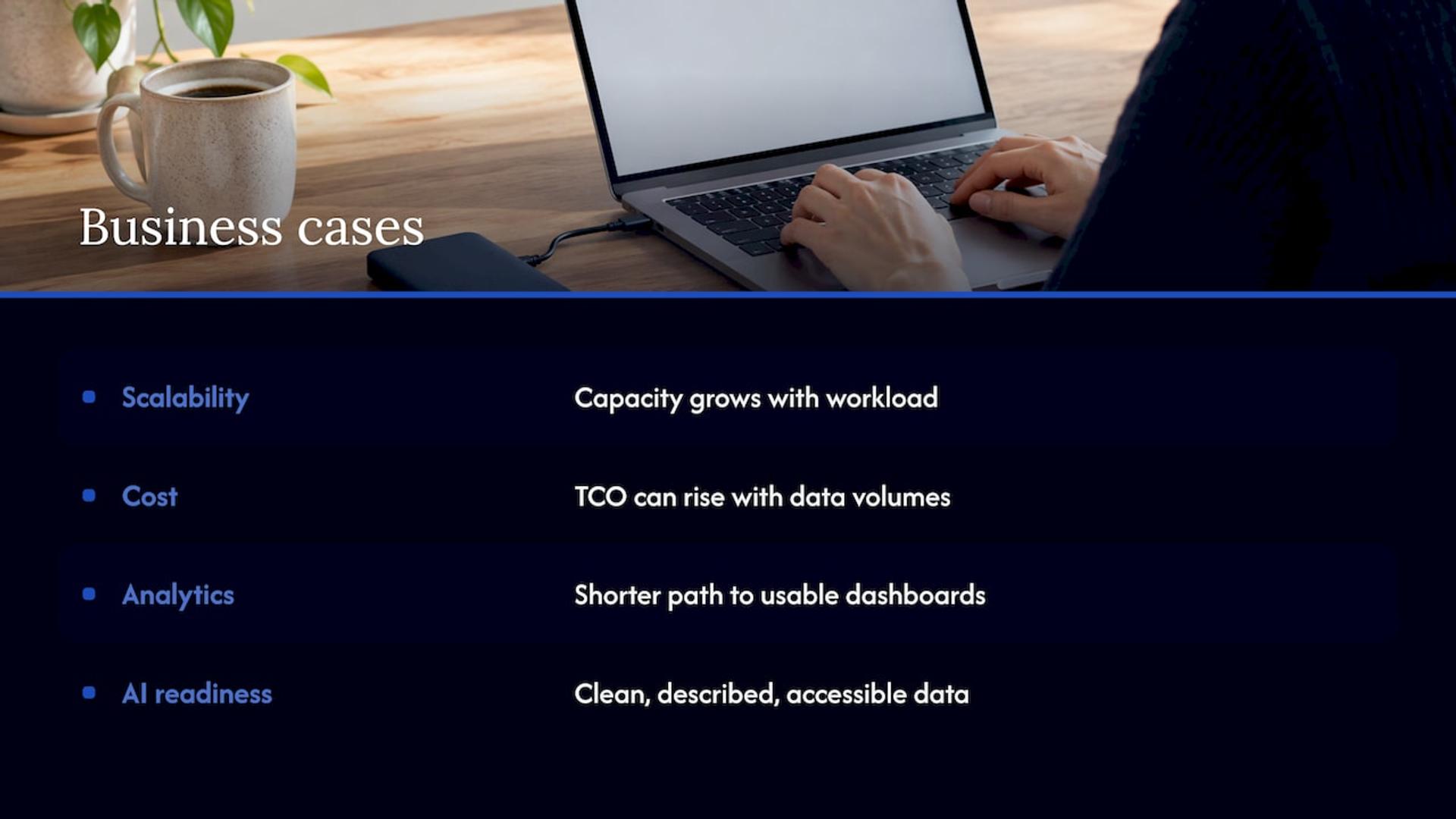
The business cases usually fall into four groups.
Scalability. Capacity becomes a configuration choice rather than a procurement cycle. Storage and compute can grow with workload instead of being sized for a peak you may never reach.
Cost. Google Cloud lists the shift from capital to operational expenditure among the benefits. Be precise here, though. McKinsey’s analysis found that the total cost of ownership of a server instance in the public cloud can be substantially lower than on-premises, but that it can rise significantly as data volumes grow, and that data transfer fees can raise it sharply for data-intensive workloads. Model your own access patterns before you promise savings to the board. Our on-prem to cloud migration cost guide walks through what to budget.
Analytics. Consolidating fragmented sources into one governed platform shortens the path from raw data to a usable dashboard. The platform choice matters; our comparison of Snowflake and BigQuery covers the trade-offs.
AI readiness. Models need clean, well-described, accessible data. Most AI projects stall on data access and quality, not on algorithms, so a migration that fixes lineage and quality is also the first phase of an AI program.
If your reason for data migration to cloud is only “everyone is doing it,” stop and write down the measurable outcome first. Every later decision depends on it.
Choosing a strategy: rehost, replatform or refactor
Strategy is chosen per dataset and per workload, not once for the enterprise.
Rehost (lift and shift)
You move the data and its database engine as they are, to equivalent cloud infrastructure. It is the fastest route and the lowest immediate risk to application behavior. It is a good fit for stable systems with a fixed retirement date, or when a datacenter contract is ending. The cost is that you inherit existing inefficiencies, including oversized tables and duplicated stores.
Replatform
You keep the data model but change the underlying service, for example moving a self-managed database to a managed one. You gain patching, backup and scaling automation without rewriting application logic. For most core operational databases this is the best balance of effort and benefit.
Refactor
You redesign the data architecture for cloud-native services: decoupled storage and compute, event streaming, a lakehouse or warehouse. It carries the highest effort and the highest payoff, and it is where AI and analytics gains come from. Reserve it for data that drives competitive advantage.
A simple rule: rehost what you will retire, replatform what you must keep running, refactor what differentiates you. For the wider menu of options, see our overview of the 7 Rs and how to choose.
Pick the transfer pattern too
Strategy describes the destination; the transfer pattern describes the journey. AWS describes three design options: live replication, which copies objects asynchronously until the data is in sync; snapshot migration, which delivers a full system state and then updates it with smaller transfers; and phased migration, which moves smaller datasets one at a time. Google’s architecture guidance suggests basing the approach on four questions: data volume, change frequency, downtime tolerance and the current consistency model.
Data governance, cataloging and lineage before the move
Governance is the part of data migration to cloud that leaders most often postpone and most often regret postponing.
Google Cloud states that even though providers offer robust security tools, the organization remains responsible for data governance and compliance policies. The Cloud Standards Customer Council’s roadmap lists the data considerations to settle during assessment: governance, confidentiality, integrity and quality preservation, statutory compliance, sensitivity and privacy, and legal or regulatory requirements about physical location. The same roadmap says the assessment should end in go or no-go decisions and a priority order.
Build the catalog first
A catalog is your inventory of what exists, who owns it and how sensitive it is. Before moving anything, record for each dataset:
- Business owner and technical steward
- Classification (public, internal, confidential, regulated)
- Source system, refresh frequency and volume
- Downstream consumers: reports, models, APIs, partners
- Retention requirement and legal hold status
This inventory also exposes dead data. Data nobody owns and nobody reads should be archived or deleted rather than migrated, which cuts both transfer time and storage cost.
Capture lineage while you can still see the source
Lineage records where data came from and what transformed it. During a migration it answers the question every stakeholder will ask afterward: “why does this number differ?” Document pipelines and transformations in the legacy environment while the people who built them are still reachable. Rebuilding lineage after the source is decommissioned is guesswork.
AWS DataSync’s requirements guidance recommends naming a single-threaded leader for the project and deciding who owns and classifies the data. Do both before the first transfer job runs.
Security and compliance during data migration to cloud
The security question has changed. McKinsey observes that security leaders have moved on from asking whether the cloud is secure to asking how to adopt it securely, since many existing practices and architectures may be less effective there. Plan for that gap.
Secure the transfer, not just the destination
- Encrypt in transit and at rest, and decide who holds the keys before data lands.
- Apply least privilege to the migration identity. A migration account that can read, write, delete and reconfigure everything turns a script error into an incident. Scope it narrowly, and remove it when the migration ends.
- Preserve permissions and metadata. AWS notes that a successful migration keeps permissions, access controls and other metadata intact, and keeps data consistent through network outages.
- Log everything. Audit events from the transfer are evidence for compliance reviews later.
Map regulation to location
If you handle health records, payment data or personal data of residents in regulated jurisdictions, confirm where the data may physically reside and who may access it before you pick a region. Involve your compliance officer or counsel during assessment, not at sign-off. Regulated data, such as protected health information, may need specific contractual and technical controls that your legal team must confirm.
Common risks: data quality, downtime and cost overruns
Data quality
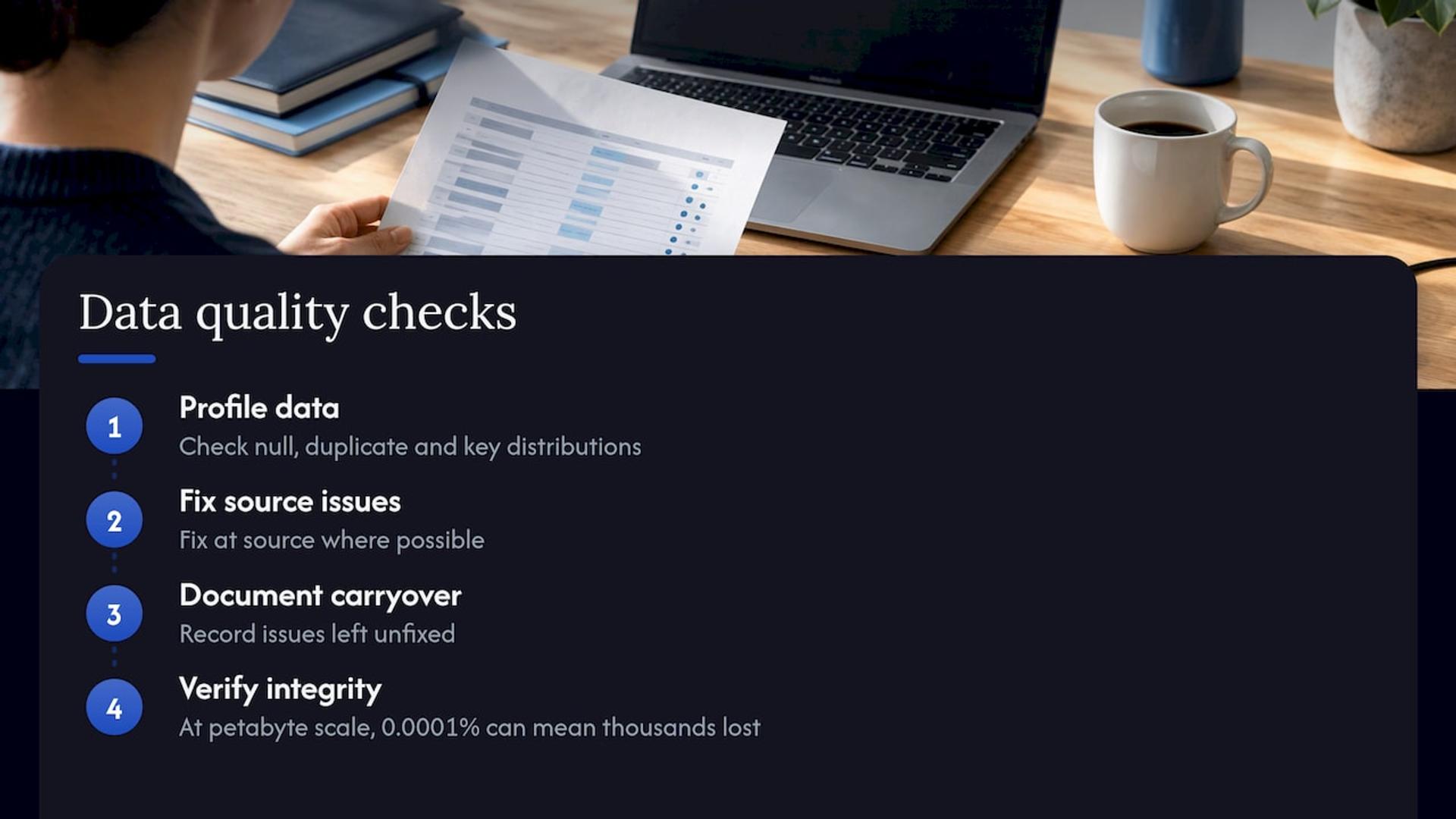
Migration moves problems faithfully. Duplicates, orphaned keys and inconsistent formats arrive in the cloud intact, then break the analytics you migrated for. Profile data during assessment: null rates, duplicate rates, key distributions. Fix at the source where possible, and document anything you choose to carry over unfixed.
Scale also matters. Google’s guidance points out that at petabyte scale with billions of files, even a latent error rate of 0.0001% in the source storage can mean thousands of lost files. Integrity checking is not optional for large estates.
Downtime
A near-zero downtime pattern, described in Microsoft’s Cloud Adoption Framework, works like this: establish database replication, monitor replication lag, migrate unstructured data while replication is stable, pause writes for a final synchronization, validate integrity, redirect traffic, and keep validating and monitoring afterward. The only outage is the brief write freeze. Our zero downtime deployment runbook covers the application side of the same cutover.
Cost overruns
Google Cloud notes that organizations sometimes overprovision resources during the initial migration and overspend. Add the transfer and storage growth effects McKinsey describes, and dual running costs while two environments coexist. Set budgets and alerts from day one, right-size after the first month of real usage, and see our three-phase approach to AWS cost optimization for a worked method.
A step-by-step checklist for data migration to cloud
Use this as a skeleton and adapt it to your estate.
- Define outcomes and owners. Write the measurable goal, name a single accountable leader, and name an owner for each dataset.
- Inventory and classify. Build the catalog described above, including sensitivity and residency requirements.
- Assess readiness. Decide what can move, what must change first and what should be retired. Produce go or no-go decisions.
- Choose strategy and pattern per dataset. Rehost, replatform or refactor; live replication, snapshot or phased.
- Design the landing zone. Accounts, networking, identity, encryption, logging and cost guardrails exist before data arrives.
- Plan the schedule with buffers. Microsoft recommends start and end dates for each migration with buffer time for testing and fixes, and advises avoiding critical business periods such as financial close, product launches or holiday seasons.
- Write the rollback plan. AWS guidance includes one in its requirements step. Define the trigger conditions and who decides.
- Rehearse on a representative subset. Google recommends testing the transfer plan before running it in production, and enabling versioning and backup on the destination.
- Run parallel tests. Comparing old and new outputs side by side catches silent differences that row counts miss. The approach is well illustrated in this checklist on running parallel tests for a payroll system move.
- Execute the cutover. Replicate, freeze writes, synchronize, validate, redirect traffic.
- Validate and monitor (next section), and keep the source until the exit criteria are met.
- Optimize and decommission. Right-size, tune, then retire the legacy environment formally.
For a provider-specific version of this sequence, our AWS migration checklist breaks the work into seven phases, and the cloud migration tools roundup helps with tool selection.
Evaluating migration tooling
Each major cloud provider offers native services for database replication, bulk transfer and hybrid storage. AWS’s decision guide lists AWS Database Migration Service for databases, DataSync for high-speed transfers, Transfer Family for SFTP and FTPS workloads, and Storage Gateway for hybrid storage. Compare tools on source and target fit, downtime, schema handling, pricing unit, effort to first cutover and security. AWS also cautions that specialized tools can become sunk costs after the transition, so favor tooling you will reuse.
Post-migration validation: prove it before you retire the source
Validation is where data leaders earn trust. Build it into the plan as a framework with objective gates, not a final glance at a dashboard.
Technical integrity
- Counts are the floor, not the ceiling. Microsoft’s guidance says that for deeper validation, checksums and hash functions are preferred over row counts, and that for file systems MD5 hashes can validate file counts, sizes and timestamps.
- Profile again. Compare null rates, duplicate rates and key distributions between source and target.
- Reconcile aggregates. Totals that finance and operations already trust, such as revenue by month or active accounts, must match.
Behavior and performance
- Run representative queries and reports, and compare output and latency.
- Test peak concurrency and load windows against what production will see.
- Confirm transformation logic produces identical results.
Security and operations
- Verify permissions, masking and audit events.
- Test backup restoration, not just backup creation.
- Confirm alerting reaches the right on-call owner.
Set exit criteria
Decide in advance how long dual running continues, which thresholds mean go, and what triggers rollback. Google’s guidance is to validate data before removing source data. Keep the source available until reconciliation, stability and compliance requirements are all satisfied, then decommission with a recorded sign-off.
Where Bitrupt fits
If your team lacks the bandwidth or the specialist depth for assessment, replication design and cutover, we can take that work on. Bitrupt staffs engagements only with senior engineers and responds within 24 hours, and we work through development pods or staff augmentation, so you can embed engineers in your own team or hand us a defined scope. Our cloud and DevOps work covers AWS and GCP, and our data engineers handle integration and pipelines.
Explore our cloud migration services or our data engineering services, then talk to us about your migration scope.
Our perspective
We approach every data migration as an engineering problem first and a logistics problem second. The costly mistakes happen in assessment and cutover: a dataset classified wrongly, a dependency nobody mapped, a rollback plan that existed only on a slide.
That is why we put senior engineers on every project. The people who scope the work are the people who can judge a replication design, read a lineage gap and make the go or no-go call, and you get direct access to those technical decision makers with fast responses.
Analogy: a migration without assessment is like moving house without checking which furniture fits through the door. You find out at the worst moment, with the truck already running.
Flexible engagement lets you match our involvement to your needs, whether that is a full pod that owns the migration or senior engineers added to your existing data team.
Usama
A practical plan for data migration to cloud
To summarize: treat data migration to cloud as a portfolio of decisions. Inventory and classify first, match strategy to each dataset, design security into the transfer, plan around business calendars, and validate with checksums and reconciled measures before retiring anything. Do that, and the move becomes a controlled program rather than a gamble. If you want senior engineers beside you for it, contact Bitrupt.
FAQ
How long does data migration to cloud take?
It depends on volume, complexity and how much preparation is needed. Google notes that a full datacenter exit can take more than a year, and that preparing a large dataset for transfer can take as long as the transfer itself. Scope a pilot first to calibrate your own timeline.
What is the difference between rehost, replatform and refactor?
Rehost moves data and systems as they are. Replatform keeps the data model but adopts managed cloud services. Refactor redesigns the architecture for cloud-native capabilities. Most enterprises use all three across different datasets.
How do I minimize downtime during migration?
Use continuous replication so the target stays close to the source, then pause writes briefly for a final synchronization and validate before redirecting traffic. Rehearse the cutover and keep a rollback plan ready.
Who is responsible for data security in the cloud?
The provider secures its infrastructure and offers security tooling, but your organization remains responsible for data governance and compliance policies. Define ownership, classification and access rules before migrating.
How do I know the migration worked?
Compare checksums, null and duplicate rates, key distributions and reconciled business totals between source and target. Test query performance, permissions and recovery, and keep the source until your exit criteria are met.
Sources
- What is Data Migration? | Microsoft Azure
- What is cloud migration? | Google Cloud
- Making a secure transition to the public cloud | McKinsey
- What is a Data Migration Framework? | AWS
- Migrate to Google Cloud: Transfer your large datasets | Google Cloud
- Migrating Applications to Public Cloud Services: Roadmap for Success | Cloud Standards Customer Council
- Gathering requirements for your migration | AWS DataSync
- Execute migration | Microsoft Cloud Adoption Framework
- Plan your migration | Microsoft Cloud Adoption Framework
- Choosing AWS migration services and tools | AWS Decision Guides
- Payroll Migration Checklist